Choosing a system
Kiosks, table tablets or guests' phones? Hardware cost and fit for dine-in
Kiosks suit counter service, table tablets suit venues ready to maintain a device per table, and QR on guests' phones needs no hardware. Costs worked out.

WaiterPilot Operations
Updated , 8 min read
The short answer
For table service, guests' own phones are the cheapest place to start: there are no devices to buy, charge or fix. Table tablets put the same screen on every table and work for guests without a smartphone, but you pay for and maintain one per table. Kiosks suit counter service. Few vendors publish hardware prices; Square lists its Kiosk at $99 a month per device.
Key points
- Kiosks fit counter service; table tablets and QR codes on guests' phones fit table service.
- In the NRA's 2024 survey, 60% of full-service diners would order on a tablet at the table and 48% with a QR code on their phone.
- Square publishes $99 a month per Kiosk device; we found no published price for table-ordering tablets, so get quotes and do the per-table arithmetic.
- The best study of table tablets found about 1% more per check and about 10% shorter meals; nobody has published the same for guests' phones.
- QR ordering on phones depends on the guest's phone, battery and signal, so keep servers and printed menus for those it doesn't suit.
On this page
For a table-service restaurant, guests’ own phones are the cheapest place to start: there are no devices to buy, charge or fix, only a QR card on each table. Table tablets give every table the same screen and work for guests who don’t want to use their own phone, but you pay for and look after one device per table. Kiosks suit counter service, where guests order before they sit or take food away, and fit table service poorly. Few vendors publish hardware prices. Square is one that does: $99 a month per Kiosk device.
This guide compares the three on fit, guest preference and cost, with a per-table worksheet you can fill in with your own quotes.
What is the difference between the three?
Short answer: where the screen lives and who owns it.
| Self-order kiosk | Table tablet | QR code, guest’s phone | |
|---|---|---|---|
| Where the guest orders | A standing screen near the entrance or counter | A device fixed to or left on the table | Their own phone, after scanning a code on the table |
| Service style it fits | Counter service: order, then sit or take away | Table service | Table service |
| Who owns the device | You | You (bought or rented) | The guest |
| How many devices | A few per location | One per table, plus spares | None; one QR card per table |
| Who charges and cleans it | Your staff | Your staff, every night | The guest |
| Works for guests without a smartphone | Yes | Yes | No |
| Payment | Usually on the device | Often on the device | Depends on the tool; WaiterPilot takes none |
The categories blur. A kiosk can sit in a casual-dining lobby, and some tablets live with servers instead of on tables. But the question to start with is simple: do guests order before they sit, or after?
What do guests prefer?
Short answer: in the US, tablets at the table did slightly better than QR codes in the latest survey we could verify. Neither is a clear winner.
The National Restaurant Association’s Restaurant Technology Landscape Report 2024 asked US full-service diners what they would use:
| At a full-service restaurant, would… | Tablet at the table | QR code on own phone |
|---|---|---|
| Place an order | 60% | 48% |
| Pay the check | 65% | 46% |
The same survey found 63% would “place an order using a smartphone app”, and that ordering by QR code varied hugely by age, from 69% of millennials to 21% of baby boomers. A quarter of operators (25%) planned to put resources into self-order or self-pay systems in 2024: 20% of full-service operators and 30% of limited-service ones.
Two cautions. These questions were asked separately, so the gap isn’t a head-to-head vote. And a 2016 Cornell report on tabletop devices in one chain found “about one-quarter of all guests do not like to use the technology” at all (Susskind and Curry, Cornell, 2016). Whatever you choose, keep a server and a printed menu for those guests. We pull all the survey data together in do customers like QR code menus?
What does the hardware cost?
Short answer: published prices are rare, so get quotes and do the per-table arithmetic yourself.
Here’s every hardware-related price we could find on a vendor’s own page on 15 October 2026:
| Vendor | Product | Published price | Notes |
|---|---|---|---|
| Square | Square Kiosk | $99 a month per device | On top of a Square for Restaurants plan |
| Square | Square KDS (kitchen display app) | $30 a month per device on Plus, $20 on Premium | A kitchen screen, not a guest device |
| GRUBBRR | Self-ordering kiosks | Not public | Lists “93+ POS systems” |
| T-order (Korea) | Table tablets | Not public | Byline Network reported (Jan 2026) it passed 320,000 installed tablets |
| WaiterPilot | QR on guests’ phones | No hardware; QR table cards printed free | $200 per location per month for the software |
Korea shows how normal table tablets can become: T-order’s 320,000 installed tablets is a vendor figure, as reported by Byline Network. It also shows the QR alternative: Toss Place offered QR table ordering with no tablets, for stores on its own POS, “free for life” as a 2024 launch offer (Toss Place, 2024).
How do the costs compare for one restaurant? A worksheet
Casa Olivo is a fictional restaurant we use for examples. The table count and spares are assumptions. The only device price used is Square’s published Kiosk price; for tablets we show the arithmetic, not a market price, because we found none published.
Casa Olivo has 20 tables and full table service. The owner wants to compare the three options on hardware alone, before any POS plan or software fee:
| Line | Kiosks | Table tablets | QR on guests’ phones |
|---|---|---|---|
| Devices needed | 2 kiosks (assumed) | 20 tables + 2 spares = 22 | 0 (20 QR cards) |
| Price per device per month | $99 (Square, as published) | Your quote: T | $0 |
| Hardware per month | 2 × $99 = $198 | 22 × T | $0 |
| At T = $10 a device a month | 22 × $10 = $220 | ||
| At T = $20 a device a month | 22 × $20 = $440 | ||
| Devices to charge each night | 0 (plugged in) | 22 | 0 |
| Fit with table service | Poor: guests walk to the kiosk | Good | Good |
The $10 and $20 rows are arithmetic to show the scale, not prices we found. Put your own quotes in. What the worksheet shows:
- Tablets scale with tables. Every table you add is another device to pay for, charge and replace. Kiosks scale with queue length, and phones don’t scale at all.
- For Casa Olivo, kiosks are cheap but wrong. Two kiosks cost $198 a month on Square’s published price, but in a full-service room guests would have to get up to order.
- Phones move the cost from hardware to software. With WaiterPilot, Casa Olivo pays $200 a month for the software, with no devices, and staff use the phones or tablets they already have.
What costs don’t show on a price list?
Short answer: the work of keeping devices alive. Before you sign for tablets or kiosks, ask about each line:
- Charging. Who plugs in 22 tablets at closing, and where?
- Breakage and loss. Drops, spills, theft. Is replacement included?
- Spares. How many do you need so a dead tablet doesn’t leave a table without one?
- Cleaning. Shared screens need wiping between parties.
- Wi-Fi. Every device needs a reliable connection across the whole room.
- Updates and support. Who fixes a frozen device at 20:30 on a Friday?
- Integration. Does the device send orders to your POS and kitchen, and at what extra cost?
- Contract length. If you rent devices, ask how long you are committed for.
QR on guests’ phones has hidden costs too. Some guests have a flat battery, no data or no wish to use their phone. QR cards wear out and need reprinting. And the guest’s phone screen is one you don’t control, so the ordering page has to work on any phone in any browser.
Does the research favor one of them?
Short answer: the strongest evidence is about tablets, and it shows speed, not bigger checks.
A peer-reviewed study of tabletop devices in a 66-restaurant US casual-dining chain found sales per check rose about 1% while meal duration fell about 10% (Tan and Netessine, Management Science, as reported by Restaurant Technology News, 2019). In the Cornell report, guests who paid on the tabletop device turned their tables in about 45 minutes against about 54 for those who didn’t, though guests chose whether to use it.
We found no peer-reviewed study of the same kind for ordering on guests’ own phones, or for kiosks in table service. Phones may do better or worse than tablets; nobody has published the answer. Be wary of any vendor promising bigger checks from any of the three. We trace that claim in does tabletop ordering increase check size?
Which one fits which venue?
Short answer: match the device to how guests sit and who they are.
| Venue | Best fit | Why |
|---|---|---|
| Quick service, order at the counter | Kiosks | Guests order before they sit; kiosks shorten the queue |
| Food hall or counter café | Kiosks, or QR at the counter | Ordering happens before seating |
| Small table-service restaurant | QR on guests’ phones | No devices to manage; servers stay on the floor |
| Casual-dining chain with high volume and an IT team | Table tablets, or QR | Tablets suit chains that can maintain them; QR avoids the hardware |
| Tourist restaurant with many languages | QR with chat in the guest’s language | Guests read and ask in their own language on their own phone |
| Older regulars, or guests who prefer service | Servers and printed menus, maybe tablets | Many in these groups won’t use their own phone to order |
| Fine dining | Servers | Devices on the table rarely fit the room; see fine dining and AI ordering |
Where does WaiterPilot fit?
Short answer: in the third column, for table service, with no hardware.
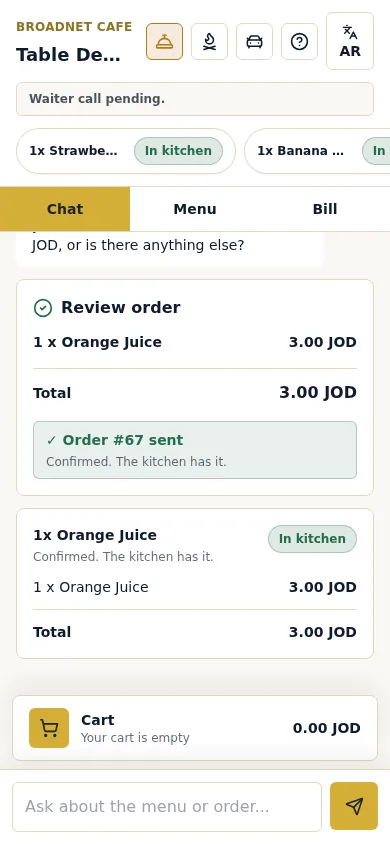
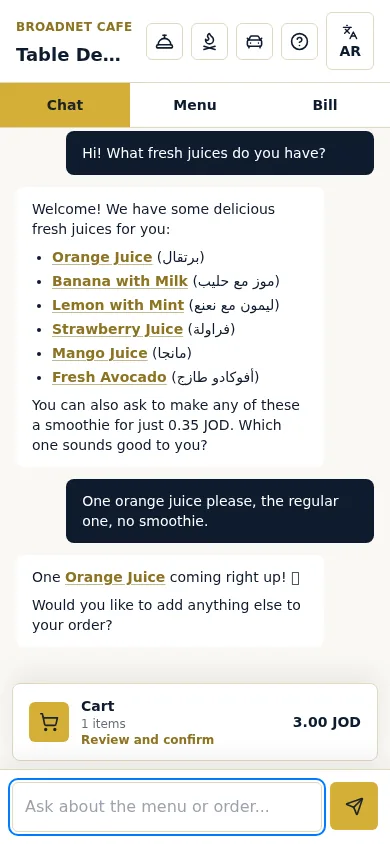
Guests scan the QR code on their table and the menu opens in their phone’s browser, with no app and no sign-up. They order by chat in their own words, in their own language (tested in English, Arabic and Spanish; the screen buttons are in English or Arabic). Orders go to a staff board and a kitchen screen that run on phones or tablets you already have; the first order at each table waits for staff to confirm it. Guests can call a waiter or ask for the check from their phone. Each table gets its own QR code, which you can print from the owner page in three sizes, and we print your first QR cards and train your staff for free.
What it doesn’t do: it doesn’t run kiosks, it has no POS or printer link, and it takes no payment. If you need a kiosk for counter service, or a payment device on every table, it’s the wrong tool. The price is $200 per location per month after 30 days free, with 0% commission and no contract.
What to do next
Count your tables, decide whether guests order before or after they sit, and fill in the worksheet with real quotes. If guests’ phones come out ahead, read how QR table ordering works with WaiterPilot, or try a sample order to see the guest side. For the other options side by side, see AI waiter vs QR menu vs POS ordering.
Questions readers ask
Is a kiosk or QR code ordering better for a restaurant?
It depends on the service style. Kiosks suit counter service, where guests order before they sit or take food away. For table service, QR codes on the table let guests order from their seat without any hardware to buy.
How much does a self-order kiosk cost?
Few vendors publish a price. Square lists its Kiosk at $99 a month per device on its US restaurant pricing page (checked 15 October 2026), on top of its POS plan. GRUBBRR and others ask you to contact sales.
Are table tablets better than QR codes?
Guests said they were slightly more willing to use them: 60% would order on a tablet at the table against 48% with a QR code, in the NRA's 2024 survey. But tablets mean one device per table to buy or rent, charge, clean and repair.
Do I need any hardware for WaiterPilot?
No. Guests use their own phones, and staff use phones or tablets you already have. We print your QR table cards for free. On iPhone, lock-screen alerts need the staff board added to the home screen.
What about guests without a smartphone?
Phone-based ordering doesn't serve them, so keep servers and a printed menu. If many of your guests don't carry a smartphone, or would rather not use it, tablets or plain table service may suit you better.
Sources
- Restaurant Technology Landscape Report 2024, National Restaurant Association, 2024 (checked 2026-10-15)
- Square for Restaurants pricing, Square, 2026 (checked 2026-10-15)
- 티오더, 태블릿 누적 설치 32만대 돌파 (T-order passes 320,000 installed tablets), Byline Network, 2026-01-14 (checked 2026-10-15)
- Toss QR table order launch offer (토스 QR 테이블주문), Toss Place, 2024-03-18 (checked 2026-10-15)
- GRUBBRR home page, GRUBBRR, 2026 (checked 2026-10-15)
- Research: tabletop technology improves sales 1% per check, reducing meal duration 10%, Restaurant Technology News (reporting Tan and Netessine, Management Science), 2019-07 (checked 2026-10-15)
- The Influence of Table Top Technology in Full-service Restaurants (Cornell Hospitality Report 16(22)), Susskind and Curry, Cornell Center for Hospitality Research, 2016-10-06 (checked 2026-10-15)