Can you use WaiterPilot without replacing your POS?
Yes. WaiterPilot works alongside your POS, not inside it. It has no POS connection and no printer connection: orders land on WaiterPilot's own staff board and kitchen screen, and your team rings each sale into your till, either as they confirm the order or when the table asks for the check. You keep your till, your card terminal and your reports. If you need every sale in one system with no re-entry, a POS-native tool fits better.
Updated
What does "alongside, not inside" mean?
WaiterPilot and your till don't talk to each other. Nothing flows into the POS and nothing prints.
Guests scan the QR code on their table and the menu opens in the phone's browser, with no app and no sign-up. They ask questions and order by chat, then tap Confirm. The order appears on the WaiterPilot staff board as Awaiting staff; a staff member confirms it and it moves to In kitchen, then to Served when the food reaches the table.
Staff work from three screens: the main board with every ticket by status, the kitchen screen with dishes, quantities, options and notes but no prices, and the floor screen with waiter calls and check requests. They run on phones or tablets you already have. There is no hardware to buy.
Your till keeps doing what it does today: it records the sale, takes payment and runs your reports. The one step WaiterPilot adds is entering the sale in the till by hand.
Where does each step happen: WaiterPilot or your till?
WaiterPilot runs the order. Your till runs the money. The handoff between them is a person entering the sale.
| Moment | In WaiterPilot | In your till |
|---|---|---|
| Guest orders | The guest orders by chat on their phone, checks the order card and taps Confirm. | Nothing yet. |
| First order at a table | The ticket shows as Awaiting staff. A staff member confirms it and it moves to In kitchen. | If you ring in as you confirm: enter the items now. |
| Cooking | The kitchen screen shows dishes, quantities, options and notes, without prices. | Nothing prints. The kitchen works from the screen. |
| Later orders | Later orders from the same table can go straight to the kitchen. | If you ring in as you confirm: add them. |
| A dish runs out | The owner or manager marks a dish sold out from their phone and WaiterPilot stops offering it right away. A dish already in the kitchen can be marked Out of stock, which takes it off the guest's bill. | Void it if it was already rung in. |
| Check request | The guest asks for the check from their phone and the floor screen shows it, with whether they'll pay by cash or card. The guest sees the live bill with tax and any service charge you set and can split it evenly or see just their own share. | If you ring in at the check: enter everything from the live bill now. |
| Payment | Not handled. WaiterPilot takes no payment. | Your card terminal or till takes payment and closes the sale. |
| Records and reports | Not a replacement for your till's records. | Sales reports, tax records and stock counts stay in your till, as today. |
The till lane is an outline. The exact steps depend on your POS; we work them out with you in the demo.
What does staff ring into the till from?
From the staff board while they confirm, or from the guest's live bill at the check. Both show each dish and its price; the bill also shows the tax and service charge the restaurant set.
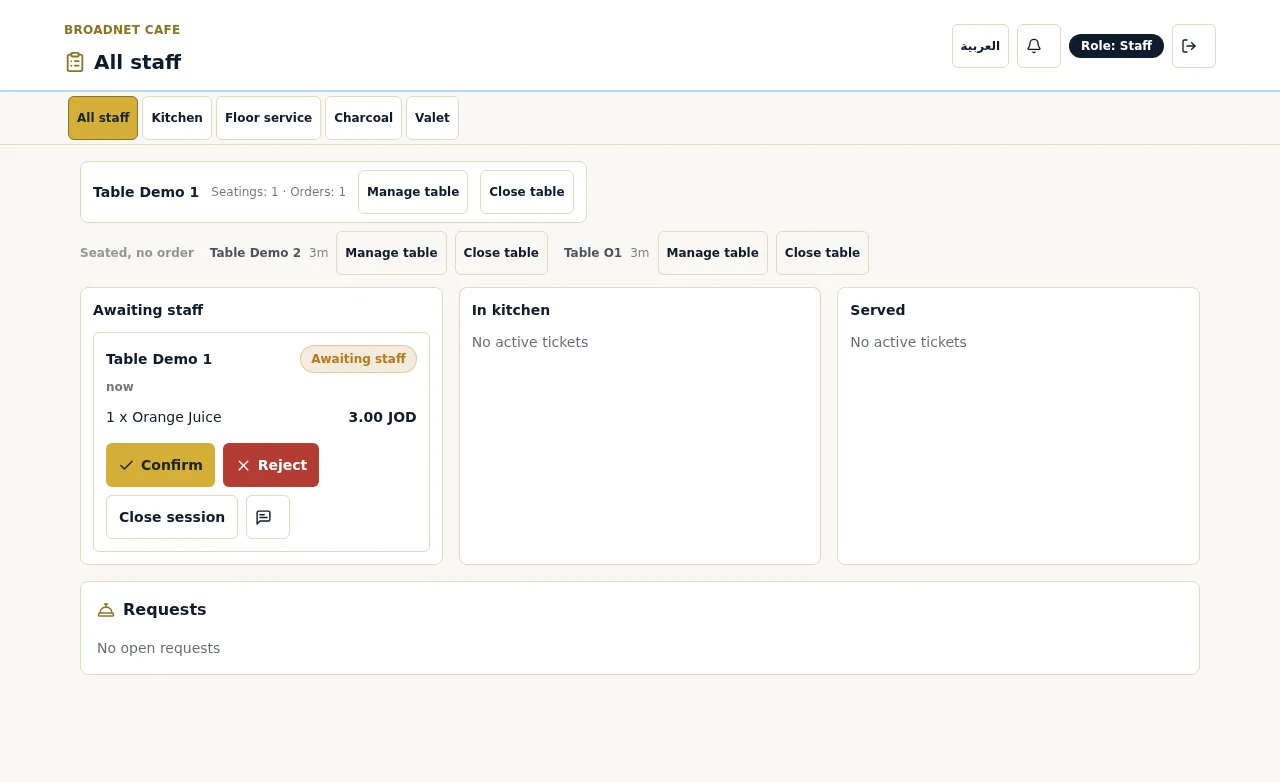
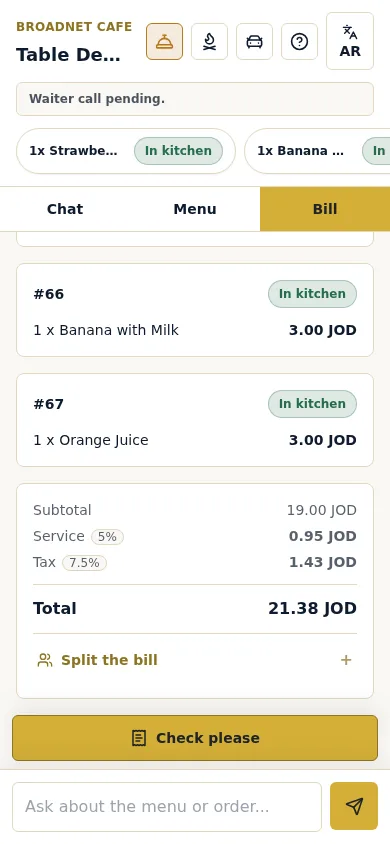
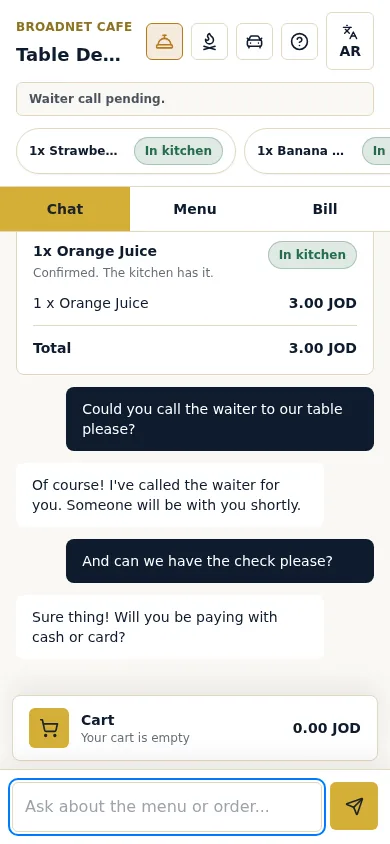
Real screenshots, 15 October 2026, at Broadnet Cafe, BroadNet.AI's demo restaurant (prices in Jordanian dinars).
When do staff ring the sale into the till?
Pick one of two moments and train everyone on it. The guide to QR ordering without a POS integration walks through a full evening and a worksheet for the staff time it takes.
- As they confirm the order. The till stays current all evening, so sales and stock counts are right at any moment. It takes more touches per table.
- When the table asks for the check. Fewer touches: staff enter everything from the live bill at once. The till runs behind until each table pays, and staff must leave out anything marked out of stock.
- Not both. Mixing the two on the same night is how items get missed or rung in twice.
WaiterPilot fits if…
You want to keep your till and can live with one manual step.
- You like your POS and don't want to switch to get table ordering.
- Your POS has no table ordering of its own, or you don't want to add it.
- You have no POS at all. A cash register or a card terminal is enough, because the staff board and the live bill run on phones and tablets you already have.
- Many guests don't read your menu's language. They can ask and order by chat in their own language.
- You want guests to ask about dishes before they order, not only tap items into a cart.
- You want a flat price: $200 per location per month after 30 days free, 0% commission and no contract. See pricing.
Choose a POS-native tool instead if…
Some restaurants are better served by ordering built into their POS. We'd rather say so here than after setup. Vendor facts below were checked on 15 Oct 2026.
- Guests should pay at the table. WaiterPilot takes no payment. Toast Mobile Order & Pay, Square's self-serve ordering, sunday and Qlub all let guests pay from their phone.
- Your kitchen runs on printed tickets. WaiterPilot has no printer connection. Square says self-serve orders "go to your POS and kitchen printers" (Square).
- Every sale must be in one system with no re-entry. For example, when stock, receipts or tax records must update from each order on their own. Ordering built into your POS does that; WaiterPilot doesn't.
- You run Toast, Square or Clover and are happy with it. Their own QR ordering is the natural fit. Toast asks restaurants to set a Toast device to fire Mobile Order & Pay tickets (Toast support), and Clover Scan to Order runs on a Clover POS device connected to a printer (Clover).
- You want pay-at-table that plugs into your POS. sunday shows POS partners including Toast, Clover, Lightspeed and NCR VOYIX, and Qlub says its SoftPOS is "fully integrated with your POS system".
What should you check in your own till first?
Four questions to your own POS provider tell you how much the manual step will cost you, and whether you already pay for an alternative.
- How fast can staff ring in an item? Quick keys or a favourites screen make ringing in from the board a few taps per table. If every item takes a search, ring in at the check instead.
- Does your POS already include QR ordering? Some POS plans do. If yours does and you're happy with tap-to-order in one language, it may be the simpler choice.
- What do your reports and stock counts need? If stock or tax records must update from each order as it's placed, you need ordering inside the POS.
- Who closes the till at night? That person checks WaiterPilot's orders against the till for the first nights. The onboarding checklist includes it.
Does WaiterPilot work with Toast, Square, Clover or Lightspeed?
It works next to any of them, but it doesn't connect to any of them.
WaiterPilot has no integration with Toast, Square, Clover, Lightspeed, Foodics or any other POS, and no connection to kitchen printers. Because it doesn't need one, it runs next to whichever till you use: orders appear on WaiterPilot's screens, staff enter the sale in your till, and guests pay on the card terminal you already have.
If that ever changes, this page will say so, with the date.
Questions about WaiterPilot and your POS
Does WaiterPilot integrate with Toast, Square, Clover or Lightspeed?
No. It has no integration with any POS. It runs next to whichever till you use: orders appear on WaiterPilot's screens and staff enter the sale in your till. If that changes, this page will say so, with the date.
Does WaiterPilot connect to my POS or kitchen printer?
No. It has no POS connection and no printer connection. Orders appear on the WaiterPilot staff board and kitchen screen, and staff enter the sale in your own till.
Can I use WaiterPilot with no POS at all?
Yes. The staff board, kitchen screen and live bill run on phones or tablets you already have. You take payment however you do today.
Does WaiterPilot take payment?
No. Guests see a live bill with tax and any service charge or gratuity you set, and can split it evenly or see just their own share, then pay on your own terminal or till.
Do orders print in the kitchen?
No. The kitchen works from the kitchen screen, which shows dishes, quantities, options and notes, without prices.
What happens in the till when a dish sells out?
In WaiterPilot, a dish already in the kitchen can be marked Out of stock, which takes it off the guest's bill. If staff already rang it into the till, they void it there too.
Who checks an order before the kitchen starts it?
Your staff. The first order at each table waits as Awaiting staff until someone confirms it. Later orders from that table can go straight to the kitchen.
How much staff time does the manual step take?
It depends on your till and how many tables order through WaiterPilot. Time it on your own test night: ring in a few tables both ways and keep the one your team finds faster. The guide to QR ordering without a POS integration has a worksheet.
Related pages
- How it worksThe full order flow, step by step, with real screens.
- Waiter call and billThe live bill and the check request staff ring in from.
- QR ordering without a POS integrationA worked evening and a staff-time worksheet.
- Compare table ordering toolsWhen Toast, Square or another tool fits better, with dated sources.
- Toast QR code ordering vs WaiterPilotPOS-native order-and-pay next to chat ordering.
- Square QR code ordering vs WaiterPilotThe same question for Square restaurants.
- Buyer's checklistTwelve questions to ask any vendor, POS first.
- GlossaryPOS, KDS, order-and-pay and other terms.
- Pricing$200 per location per month after 30 days free.