What happens from scan to served?
The guest scans the table's QR code, asks about the menu in the chat, and taps Confirm. The order appears on your staff board as Awaiting staff. Someone on your team taps Confirm, it moves to In kitchen, and staff mark it Served when it reaches the table. The first order at a table always needs that staff confirmation; later orders from the same table can go straight to the kitchen. Every screenshot below is real, taken on 15 October 2026.
Updated
Where do these screenshots come from?
From the live product, at Broadnet Cafe, BroadNet.AI's own demo restaurant, on 15 October 2026. Nothing is mocked up.
Broadnet Cafe has a real menu of 147 dishes priced in Jordanian dinars (JOD), a few demo tables and the same staff board your team would use. We ordered drinks from one table in a phone-sized browser window and watched the staff board on a second screen. We cropped out a phone-alert notice and one test table's name; nothing else in the product screens was changed.
How we tested, and how you can repeat it, is in our ordering test method.
What does the guest see after scanning?
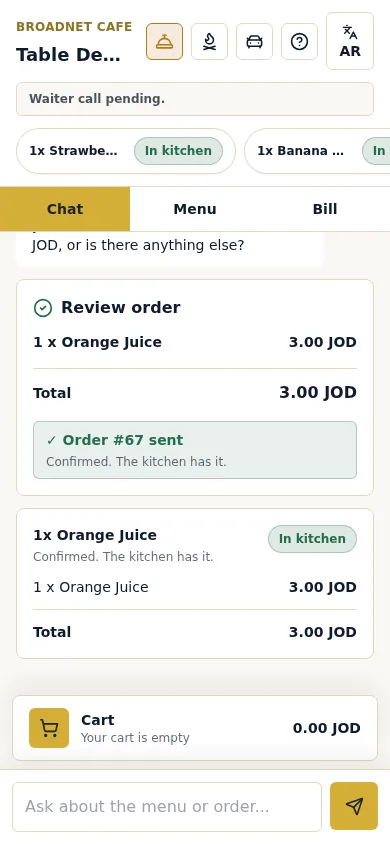
The chat opens in the phone's browser, with no app and no sign-up. The guest asks in their own words and gets answers from your menu.
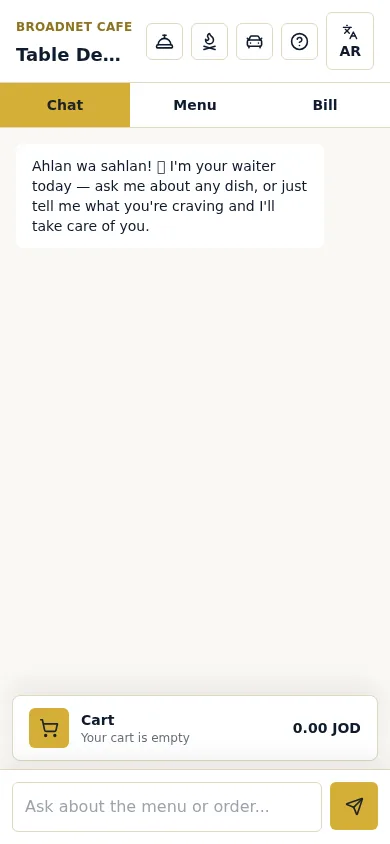
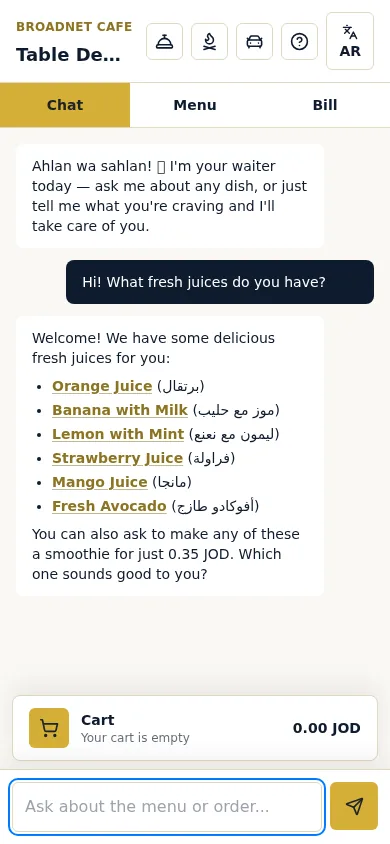
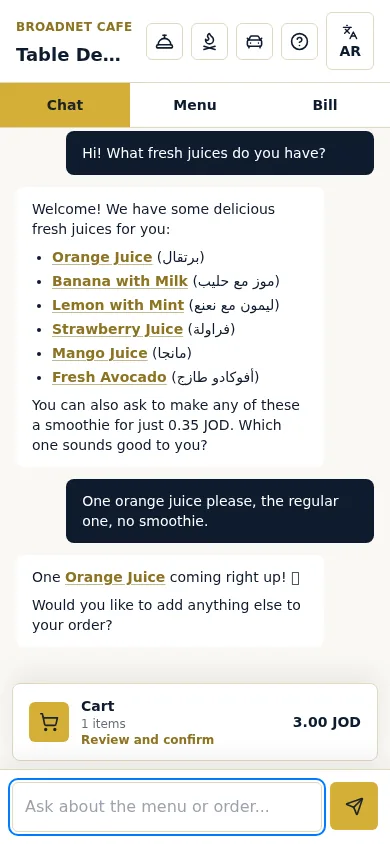
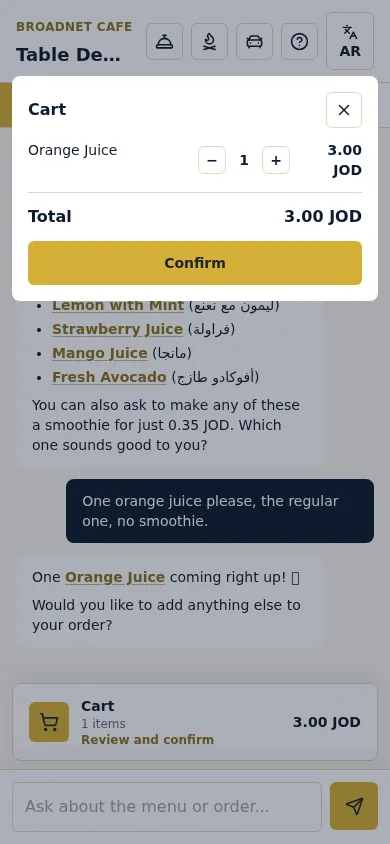
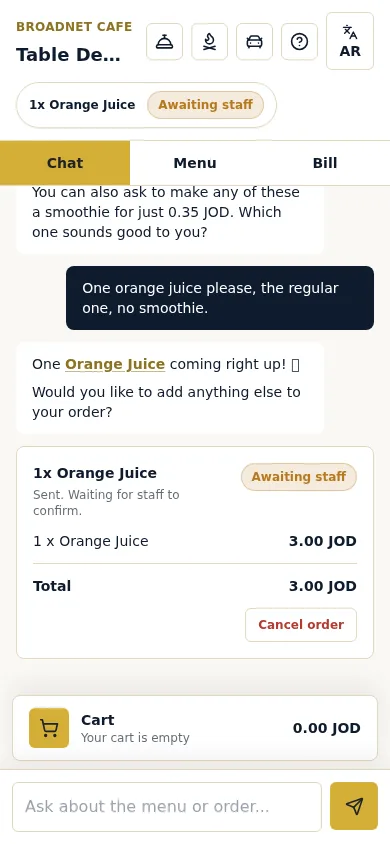
Real screenshots, Broadnet Cafe (BroadNet.AI demo restaurant), 15 October 2026. Prices in JOD because that restaurant's menu is in JOD.
What does your team see?
The order lands on the staff board under Awaiting staff. Staff tap Confirm or Reject; confirmed orders move to In kitchen, then to Served.
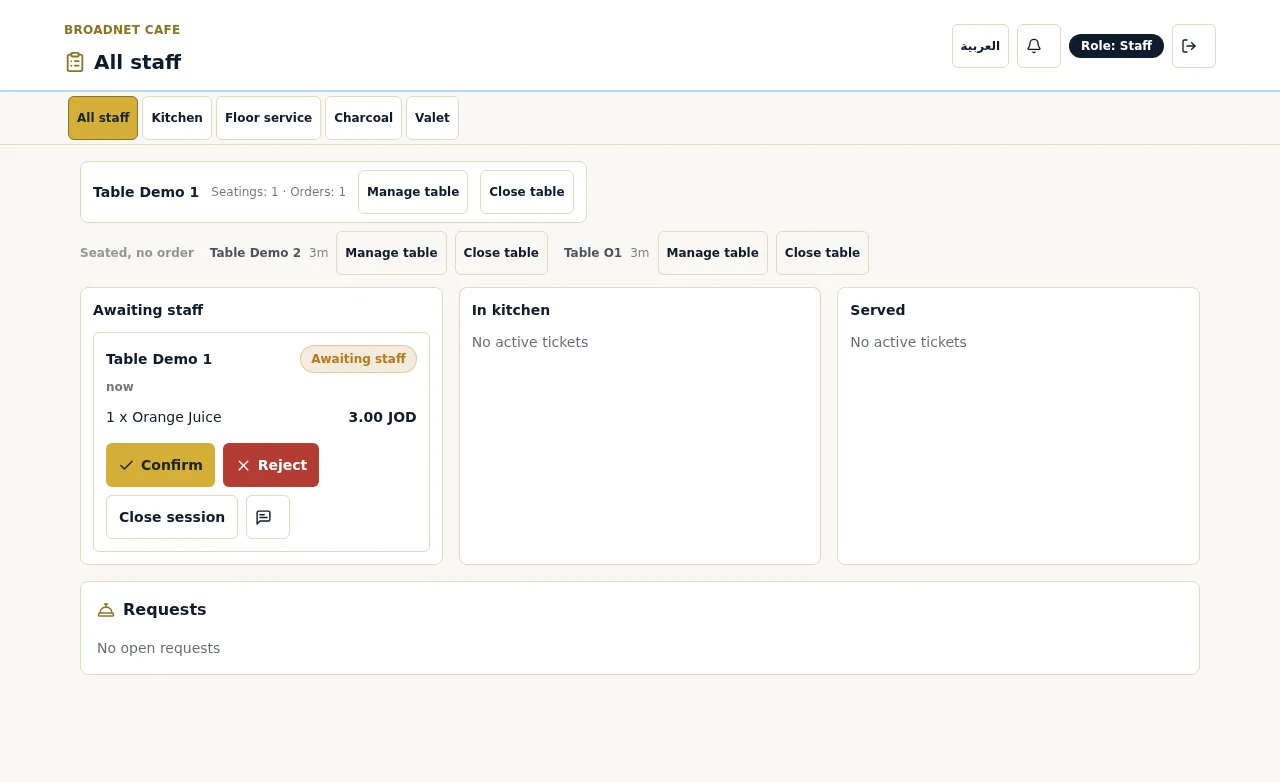
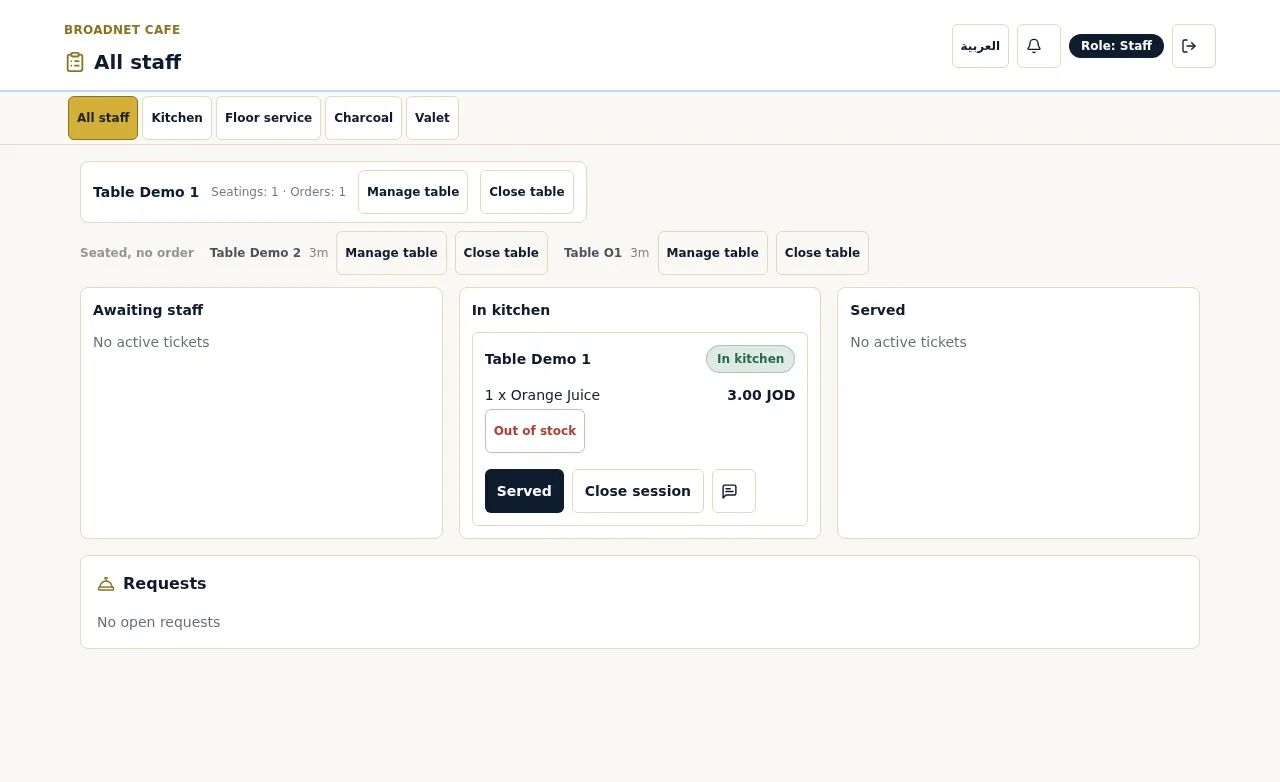
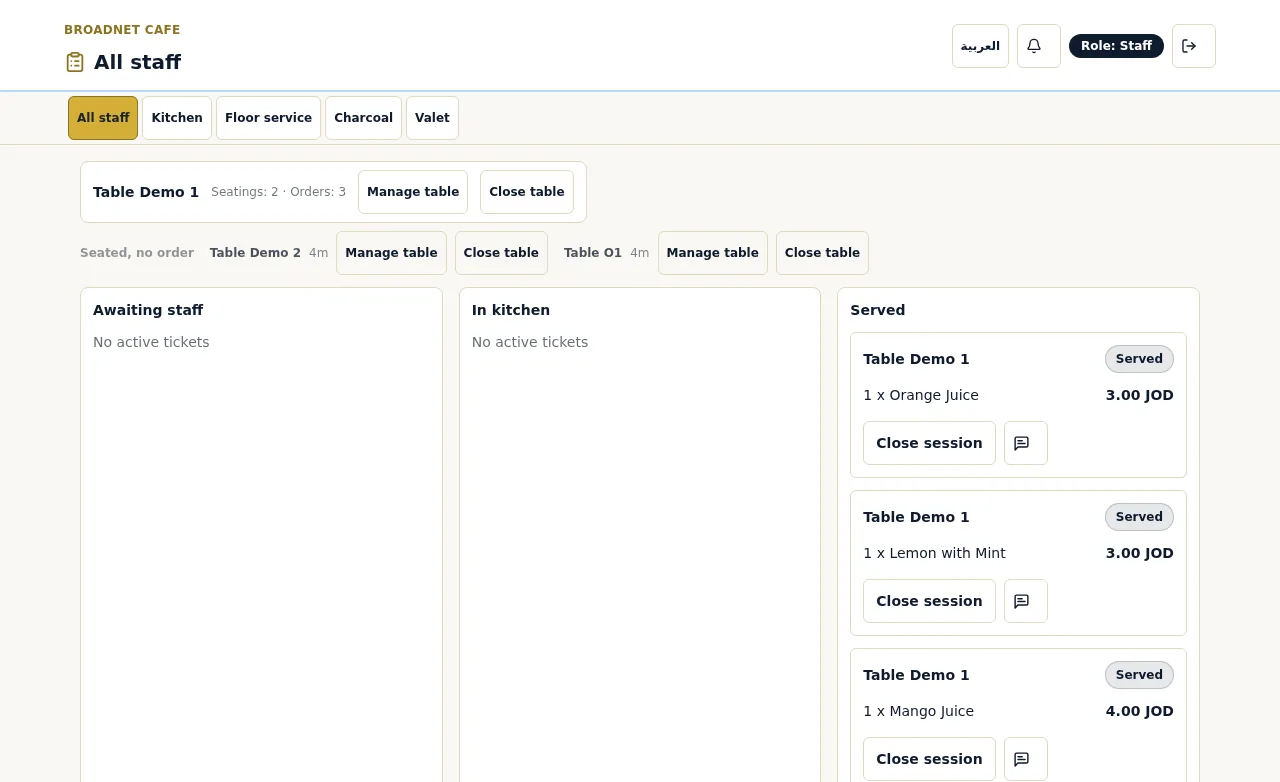
How does the guest know the kitchen has it?
The order card on the guest's phone changes from Awaiting staff to In kitchen, with the order number.
How fast does a confirmed order reach the staff board?
Within seconds. In our test on 15 October 2026, four orders reached the staff board in 0.81, 2.74, 1.49 and 1.28 seconds after the guest tapped Confirm.
That is four samples from one table at a quiet demo restaurant, so read it as "within a few seconds", not as a guarantee for a full Saturday night. The time a person takes to tap Confirm comes on top. Our test method explains how we timed it and how to time it in your own restaurant.
Why does the first order at a table need a person?
So a person sees every new table's order before the kitchen starts cooking. After that, the table's later orders can go straight to the kitchen.
That first check is where staff catch what software shouldn't judge alone: an order that doesn't match who is sitting there, a duplicate, a note in a language that needs a word at the table, a request that sounds like an allergy. It replaces the walk to the table to take the order with a glance and a tap.
Once a table has a confirmed order, a second round of drinks or a dessert doesn't need to wait for anyone. Staff still see every ticket on the main board.
What happens when something goes wrong?
Here is what WaiterPilot does in each case, and what stays with your staff. Staff can reject a waiting order, take a dish off an order already in the kitchen, and mark dishes sold out; guests can cancel while an order waits, and call a person at any time.
| Situation | What WaiterPilot does | What your staff do |
|---|---|---|
| A dish runs out before anyone orders it | The owner or manager marks it sold out from their phone (owner or manager PIN), and WaiterPilot stops offering it right away | Mark tonight's sold-out dishes before doors open |
| A dish runs out after it was ordered | On the ticket in In kitchen, staff tap Out of stock. The dish comes off the bill and the guest sees a note | A server tells the guest and offers something else |
| An order shouldn't be cooked (a duplicate, the wrong table, a prank) | While it is Awaiting staff, staff tap Reject | A server goes to the table and explains |
| The guest changes their mind before confirming | Nothing has been sent. They change the quantity in the cart before tapping Confirm | Nothing |
| The guest changes their mind after confirming | While the order is Awaiting staff, the guest can tap Cancel order. Once it is In kitchen, only staff can change it | Use Out of stock or a word at the table, as you would today |
| The guest writes in another language | The chat answers in the language the guest writes in. Screen buttons switch between English and Arabic with the EN/AR button | If a guest is still stuck, they tap the waiter button; it works in any language |
| A note in a language nobody on shift reads | Notes go on the ticket as the request was taken, not translated | A server checks it at the table, ideally before confirming the first order |
| An allergy question | The chat gives what your menu says and asks the guest to confirm with staff. It doesn't alert staff by itself | Staff decide. Agree that any allergy mention means a person goes to the table |
| A party moves, or orders a dish from a server | Staff move the party to another table, add a dish for the table, or close the table from the staff screen | Close the table when the guests leave |
| The connection drops | WaiterPilot runs in the browser, so guest phones and staff screens both need a connection | Fall back to the printed menu and a notepad until it's back |
What do the staff screens show?
A main board for the whole order flow, a kitchen screen for cooking and a floor screen for guests who need someone. They run on phones or tablets you already have.
| Screen | What it shows | Usually watched by | What staff do there |
|---|---|---|---|
| Main board (All staff) | Every ticket by status: Awaiting staff, In kitchen, Served, plus tables and requests | A manager, host or lead server | Confirm or reject waiting orders; waiting orders and calls change colour at 1, 5 and 10 minutes |
| Kitchen screen | Quantities, dishes, options and notes, without prices | The cooks at the pass | Read what to cook; notes appear as the request was taken, not translated |
| Floor screen | Waiter calls, check requests and tables | Servers on the floor | Tap Ack to show a request is being handled, then go to the table |
What do you see as the owner?
A results page for your restaurant: how tonight compares, what sells, what guests ask for and how fast your team responds, plus your menu and tables.
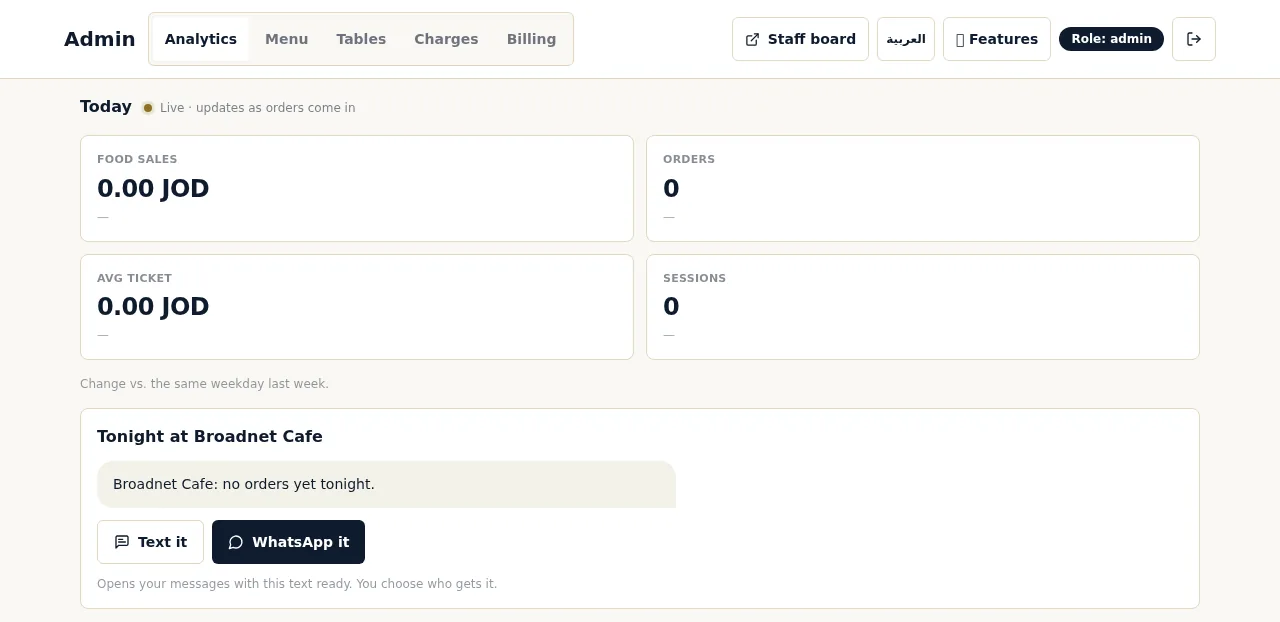
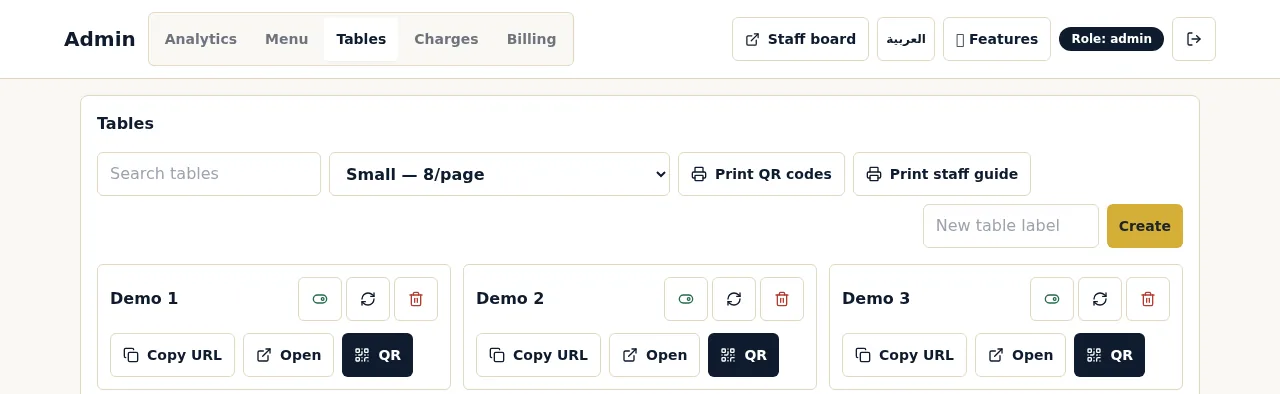
The owner page also shows busy hours, top dishes, what guests asked for that isn't on your menu, questions the chat couldn't answer, how many guests scanned, chatted and ordered, and how long staff take to confirm orders and answer calls.
How does setup work, and how long does it take?
Most restaurants are live within two weeks of the first call. Setup, menu loading, QR cards and staff training are free, and there's no hardware to buy.
- A first call. Twenty minutes on your tables, your menu and how orders reach your kitchen and till today.
- Your menu, loaded for you. Send us your current menu as a PDF or photos and we load it, with dishes, options and descriptions. You check it before going live, because the chat answers from it.
- QR cards for every table. We print them as part of setup.
- Staff training. Your team learns the screens and the order states, from confirming a first order to tapping Ack on a waiter call.
- Your own devices. Staff use phones or tablets you already have. Guests use their own phones. On an iPhone, lock-screen alerts need the staff board added to the Home Screen.
- Thirty days free. Then $200 per location per month, with 0% commission and no contract. See pricing.
What should you check before the first night?
Test every table, agree who watches each screen, and decide how notes, allergies and sales into your till will be handled.
- Scan the QR card on every table and check that it opens the chat for that table.
- Place a test order and walk it through Awaiting staff, In kitchen and Served, as in the screenshots above.
- Put the main board where the person confirming orders sees it, and the kitchen screen where the cooks can read it.
- Name who confirms first orders, who watches the floor screen and taps Ack, and who covers breaks.
- Agree how sales get into your till: who rings up WaiterPilot orders, and when.
- Mark tonight's sold-out dishes before the doors open.
- Agree the allergy rule: any allergy question or note means a person goes to the table.
- Decide who reads notes in other languages, and put a translation app on one staff phone.
- Check Wi-Fi or mobile signal at the farthest table and in the kitchen, and charge the staff devices.
- Keep printed menus on hand for guests who'd rather order with a server.
Questions about the order flow
How do orders reach the kitchen?
Through WaiterPilot's own screens. A confirmed order appears in In kitchen on the staff board and the kitchen screen; there is no printer or POS connection.
Who confirms an order?
Someone on your team, from the main board. The first order at each table always needs that confirmation; later orders from the same table can go straight to the kitchen.
How long does an order take to reach the board?
Within seconds. In our 15 October 2026 test, four confirmed orders reached the board in 0.81 to 2.74 seconds. Four samples is a small test; see the method.
Can a guest cancel an order?
Yes, while it is still Awaiting staff. After staff confirm it, changes go through your staff.
Does the kitchen see prices?
No. The kitchen screen shows quantities, dishes, options and notes, without prices.
What if a dish sells out during service?
The owner or manager marks it sold out from their phone and WaiterPilot stops offering it right away. If it was already ordered, staff tap Out of stock on the ticket, which takes it off the bill, and tell the guest.
Does WaiterPilot take payment?
No. Guests see a live bill with tax and any service charge you set and can split it; they pay the way they pay today.
Are these real screenshots?
Yes. They were taken in the live product at Broadnet Cafe, BroadNet.AI's own demo restaurant, on 15 October 2026. We only cropped out an alert notice and a test table's name.
What should you read next?
- Waiter call and the billCalls, the check request, the live bill and the split, in real screenshots.
- Multilingual ordering testThe same menu asked in English, Spanish and Gulf Arabic.
- Our ordering test methodHow we timed orders to the board, and how to repeat it.
- Works with your POSGetting WaiterPilot orders into your till.
- How QR table ordering worksThe guest's side of the same flow.
- PricingFree setup, 30 days free, then $200 per location per month.