Choosing a system
Pay at table vs order at table: what's the difference, and do you need both?
Order at table lets guests send their order from the phone; pay at table lets them settle the bill there. They cut different waits. Which one do you need?

WaiterPilot Operations
Updated , 8 min read
The short answer
Order at table moves the order from the server's notepad to the guest's phone. Pay at table moves the payment. They remove different waits: the wait to order and the wait to pay. Some tools do both. WaiterPilot does only the ordering side, plus a live bill and a check request; guests still pay on your own card terminal.
Key points
- Order at table shortens the wait to order and reorder; pay at table shortens the wait for the check and the card machine.
- In a 2016 Cornell study of one chain, guests who paid on a tabletop device turned tables in about 45 minutes, against about 54 for those who didn't (observational).
- Pay-at-table tools such as sunday and Qlub say they integrate with POS systems, so in most set-ups the order needs to be in the POS before a guest can pay it.
- WaiterPilot takes no payment: guests see a live bill, split it, and tap Check please with cash or card, and a server brings the terminal.
- If the check is your slowest moment, a pay-at-table tool is the better buy; if ordering and questions are, start with order at table.
On this page
Order at table and pay at table solve two different waits. Order at table moves the order from the server’s notepad to the guest’s phone, so nobody waits to be seen before they can order or reorder. Pay at table moves the payment to the phone, so nobody waits for the check or the card machine. Some tools do both. WaiterPilot does only the ordering side, plus a live bill and a check request; guests still pay your staff on your own terminal.
So the real question isn’t which is better. It’s which wait costs your restaurant more, and whether you want to fix one or both.
What exactly is the difference?
Short answer: what moves to the guest’s phone. Order at table moves the order; pay at table moves the money.
| Order at table | Pay at table | Order and pay | |
|---|---|---|---|
| What the guest does on the phone | Orders, adds notes, reorders | Opens the bill, splits it, tips, pays | All of it |
| Which wait it removes | Waiting to order and to reorder | Waiting for the check and the card machine | Both |
| Where the money goes | Through your terminal, as today | Through the vendor’s payment service | Through the vendor’s payment service |
| Usually needs your POS? | Depends on the tool | Yes: it reads the bill from the POS | Usually the vendor’s own POS |
| Examples (vendor pages, 15 Oct 2026) | WaiterPilot | Qlub Pay-at-Table, sunday Pay | Toast Mobile Order & Pay, Square self-serve ordering, Qlub Order-and-Pay, sunday Ordering |
The categories overlap more each year. Qlub and sunday sell both sides. Toast’s Mobile Order & Pay lets guests order and pay from their own device, and Square’s self-serve ordering takes Apple Pay, Google Pay and Square Pay. Ask any vendor which column it really sits in for the plan you’d buy.
Which wait costs you more?
Short answer: the best evidence points to the end of the meal. Paying is where tabletop devices showed the clearest time savings.
Here is what the research shows, with its limits:
- Paying. In a 2016 Cornell report on one US full-service chain, guests who paid on a tabletop device had a table-turn time of 45 minutes 21 seconds, against 53 minutes 45 seconds for guests who didn’t, a “15.5-percent reduction” (Susskind and Curry, Cornell, 2016, p. 7). Guests chose whether to use the device, so this is an association, not proof.
- Server time. In one restaurant from the same report, server time per table fell 36% when guests paid by device and 65% when they ordered and paid by device (p. 6). That was 63, 33 and 7 tables, so treat it as a hint.
- Both, in a stronger study. A peer-reviewed study of a 66-restaurant US chain found tabletop devices cut meal duration by about 10% (Tan and Netessine, Management Science, as reported by Restaurant Technology News, 2019).
- What guests ask for. In the NRA’s 2024 survey, making paying easier and faster (30%) edged out making ordering easier and faster (28%) as the thing full-service diners most want technology to help with (NRA, 2024, p. 7).
Guests are about equally willing to do either. In the same NRA survey, 48% would order with a QR code at a full-service restaurant and 46% would pay with one. On a tablet at the table, 60% would order and 65% would pay.
We say this plainly because it doesn’t flatter us: if your slowest moment is the end of the meal, a pay-at-table tool attacks it more directly than WaiterPilot does.
Where do the waits fall in one meal? A Casa Olivo example
Casa Olivo is a fictional restaurant we use for examples. The minutes below are assumptions for illustration, not measurements.
Casa Olivo’s owner times a typical Friday table of four over a 90-minute meal and finds four waits:
| Wait (assumed minutes) | Order at table (WaiterPilot) | Pay at table | Order and pay |
|---|---|---|---|
| Sitting down until the first order is taken (8) | Guests can order as soon as they sit; the first order waits for a staff member to tap Confirm | Unchanged | Shortened |
| Catching a server for a second round (6) | Later orders from the table go straight to the kitchen | Unchanged | Shortened |
| Asking for the check until it arrives (7) | Guests tap Check please on their phone and choose cash or card; it appears on the floor screen within seconds | Bill is already on the phone | Bill is already on the phone |
| Waiting for the card machine and paying (5) | Unchanged: a server brings the terminal, already knowing it’s card | Guest pays on the phone | Guest pays on the phone |
| Waits touched (of 26 assumed minutes) | The first three, partly | The last two | All four |
“Touched” is not “removed”. Each tool shortens a wait by some amount you can only find by measuring your own room. But the table shows the shape of the choice. If Casa Olivo’s Friday problem is guests waving for a server to order, order at table is the fix. If it’s the queue for the card machine at 21:30, pay at table is.
What does pay at table do that WaiterPilot doesn’t?
Short answer: it takes the payment, and with it the tip and the card split.
Pay-at-table tools let each guest pay their share on their own phone, usually by card or a phone wallet. sunday sums up its product as “Scan, split, tip, pay. 10 seconds, no app.” That is sunday’s own description, not a figure we’ve checked.
WaiterPilot does none of that. It has no payment processing and no guest tip feature. If guests paying on their phone is the point, choose a pay-at-table or order-and-pay tool. Our guide to tipping and QR ordering covers what that means for servers.
What does WaiterPilot do on the bill side?
Short answer: everything up to the payment itself.
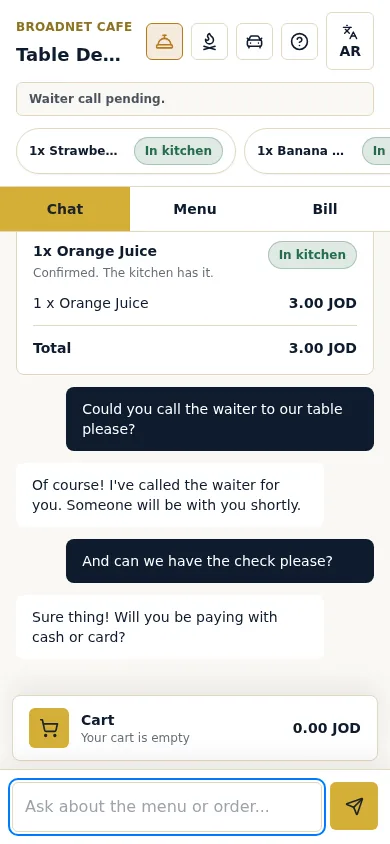
- A live bill on every phone at the table. It lists each order with its status, the subtotal, the charges you set (tax, service charge or a gratuity line) and the total. Broadnet Cafe, our own demo restaurant, set Service 5% and Tax 7.5%, which is what the screenshot at the top shows. Your charges are your choice.
- Split the bill. Guests can split it evenly or see just their own share.
- Check please. A guest taps it, or asks in the chat, and WaiterPilot asks whether they’ll pay by cash or card. The request shows on the staff floor screen within seconds, so the server walks over with the card machine already in hand.
- Payment with your staff. On the terminal you already have, at the processing rates you already pay. WaiterPilot takes no cut: it’s a flat $200 per location per month, 0% commission, no contract.
More detail is on the waiter call and bill page, and we work through split methods in splitting the bill at the table.
Can you use both together?
Short answer: in principle yes, but it depends on your POS, and we have not tested any combination.
Pay-at-table tools say they integrate with POS systems, so in most set-ups the order needs to be in the POS before a guest can pay it. Qlub says its SoftPOS is “fully integrated with your POS system”, and sunday shows logos for POS systems including NCR VOYIX, Clover, Toast, Lightspeed and Micros (vendor pages, checked 15 Oct 2026).
WaiterPilot has no POS connection. So for a pay-at-table tool to see a WaiterPilot order, a staff member has to ring it into the POS first. That works only if your team enters each order in the till as they confirm it, not at the end of the meal. We explain both ways of working in how to reconcile QR orders with your till.
| Your set-up | Ordering | Paying | Works? |
|---|---|---|---|
| WaiterPilot, card terminal | Guest’s phone (chat) | Your terminal, brought to the table | Yes |
| WaiterPilot plus a pay-at-table tool on your POS | Guest’s phone (chat) | Guest’s phone, via the other tool | Only if staff ring each order into the POS as they confirm it; untested by us |
| An order-and-pay tool on its own POS (Toast, Square) | Guest’s phone (tap menu) | Guest’s phone | Yes, if you run that POS |
| A pay-at-table tool only | Server takes the order | Guest’s phone | Yes |
What does each cost?
Short answer: published prices are rare on the payment side, and processing fees are almost never on the pricing page.
| Product | Side | Price as published (15 Oct 2026) | Not stated on the page |
|---|---|---|---|
| sunday | Pay, plus ordering | Standard $199/month, Premium $299/month; “$5 / QR code”; physical onboarding “Optional $299” | Per location or not; processing fee |
| Qlub | Pay, plus order-and-pay | Not public; “30 day free trial” | Fees |
| Square | Order and pay | QR code ordering on Plus ($49) or Premium ($149) per location per month, plus card processing | |
| Toast Mobile Order & Pay | Order and pay | No price we could read | |
| WaiterPilot | Order, live bill, check request | $200 per location per month after 30 days free, or $2,000 per location per year; 0% commission | Payment is not included: you keep your own terminal and its fees |
Which do you need? A quick decision guide
Answer in order:
- Do guests need to pay on their phone? If yes, you need a pay-at-table or order-and-pay tool. WaiterPilot alone won’t do it.
- Is the slowest part of your night the end of the meal? If yes, start with pay at table.
- Is it the start: guests waiting to order, asking about dishes, or not reading the menu’s language? If yes, start with order at table. A chat that answers in the guest’s language (WaiterPilot is tested in English, Arabic and Spanish, and answers most other languages too) helps most here.
- Are you changing POS anyway? Then look at your new POS’s own order-and-pay first, so you run one system.
- Want both and keeping your POS? Check that the pay-at-table tool supports your POS, and plan for staff to enter orders in the till as they go.
What to do next
Time the four waits at your busiest service for one week. Whichever is longest tells you which side to fix first. If it’s ordering, try a sample order to see how WaiterPilot handles it, and compare it with the payment tools on our comparison page.
Questions readers ask
What is the difference between pay at table and order at table?
Order at table lets guests send their order from a phone or device at the table, so they don't wait for a server to take it. Pay at table lets them see and settle the bill there, so they don't wait for the check and the card machine. Order-and-pay tools do both.
Does WaiterPilot let guests pay from their phone?
No. WaiterPilot shows a live bill on every phone at the table, including tax and any service charge or gratuity you set, and guests can split it evenly or see just their own share. Payment happens with your staff, on the terminal you already use.
Can I use WaiterPilot with a pay-at-table tool like Qlub or sunday?
Possibly, but we have not tested it. Pay-at-table tools say they integrate with POS systems, so in most set-ups the order needs to be in the POS first, and WaiterPilot doesn't connect to a POS, so staff would have to ring every order into the till as they confirm it. Ask the pay-at-table vendor before you count on it.
Which saves more time, ordering or paying at the table?
The research is thin, but paying stands out. In a 2016 Cornell study of one chain, guests who paid on a tabletop device turned their tables about 15% faster than those who didn't. That was observational, so guests who chose the device may differ from those who didn't.
Can guests leave a tip in WaiterPilot?
No. There is no guest tip feature. Owners can add a service charge or gratuity line to the bill; any tip is left the way it is today, on your terminal or in cash.
Sources
- Restaurant Technology Landscape Report 2024, National Restaurant Association, 2024 (checked 2026-10-15)
- The Influence of Table Top Technology in Full-service Restaurants (Cornell Hospitality Report 16(22)), Susskind and Curry, Cornell Center for Hospitality Research, 2016-10-06 (checked 2026-10-15)
- Research: tabletop technology improves sales 1% per check, reducing meal duration 10%, Restaurant Technology News (reporting Tan and Netessine, Management Science), 2019-07 (checked 2026-10-15)
- sunday pricing, sunday, 2026 (checked 2026-10-15)
- sunday home page, sunday, 2026 (checked 2026-10-15)
- qlub home page (Pay-at-Table, Order-and-Pay), Qlub, 2026 (checked 2026-10-15)
- Mobile Order and Pay Overview, Toast, 2026 (checked 2026-10-15)
- Self-serve ordering, Square, 2026 (checked 2026-10-15)
- Square for Restaurants pricing, Square, 2026 (checked 2026-10-15)