What is an AI waiter for restaurants?
An AI waiter is software, not a robot. Guests scan the QR code on their table, the menu opens in their phone's browser, and they order by chat in their own words and language. It answers menu questions from your menu, asks about the choices a dish needs and confirms the order with the guest. Then your staff take over: they check the order, cook it and serve it, and they decide anything about allergies.
Updated
Is an AI waiter a robot?
No. A robot waiter is a machine that carries plates across the dining room; an AI waiter is software the guest talks to on their own phone, at the table, after scanning a QR code.
Search for "AI waiter" and most results are robots, drive-thru voice systems and news stories. They solve different problems. A robot carries trays and needs a floor it can drive on. A voice bot answers a phone line or a drive-thru speaker. An AI waiter for dine-in sits where the order starts: at the table, on the guest's phone.
WaiterPilot is the third kind. Guests install nothing and you buy no hardware: guests use their own phones, and your staff use phones or tablets they already have.
What separates it from a digital menu is the conversation. A guest can write "something vegetarian for two of us, and a burger for my son" in one message, the way they'd say it to a server. The AI waiter turns that into an order, asks about anything missing (the burger's cooking, the side) and shows a summary the guest has to confirm.
How is an AI waiter different from a QR menu, a robot, a voice bot or POS order-and-pay?
They do different jobs: a QR menu only shows the menu, a robot carries plates, a voice bot takes spoken orders, and POS order-and-pay is a tap-and-pay cart inside one vendor's till system. An AI waiter takes the order by conversation at the table.
| QR PDF menu | Robot waiter | Phone or voice ordering bot | POS order-and-pay | AI waiter (WaiterPilot) | |
|---|---|---|---|---|---|
| What it is | A menu file or web page opened by a QR code | A machine that drives through the dining room | Software that listens and talks on a phone line, drive-thru lane or speaker | A tap-to-order cart inside a POS vendor's system | Chat software that takes the order at the table |
| What the guest does | Reads the menu, then waits for a server | Takes plates off the tray | Speaks the order | Taps dishes into a cart and usually pays on the phone | Writes in their own words, answers the chat's questions about choices and taps Confirm |
| Can the guest ask about a dish? | No, a server answers | No | Depends on the product | Usually not: the guest reads the item description | Yes, answered from your menu; when the menu doesn't say, it tells the guest to ask staff |
| Where the order goes | A server writes it down | It isn't an ordering tool | Usually into a POS or ordering system | Into that vendor's POS, kitchen printers or screens | WaiterPilot's staff board and kitchen screen; no POS or printer link |
| Payment | At the till, as now | Not involved | Depends on the product | On the guest's phone, through the vendor | None: a live bill with tax and any service charge you set, which guests can split; payment is handled by your staff |
| Hardware | QR cards | The robot, plus charging and floor space | A phone line or drive-thru speaker | The vendor's POS devices and printers | None to buy: guests' phones and your staff's existing phones or tablets |
| Guest's language | Whatever you translated | Not applicable | Depends on the product | Rarely stated by the big POS brands | Guests chat in their own language (tested in English, Arabic and Spanish); buttons are English or Arabic |
Examples as of October 2026: Toast Mobile Order & Pay and Square's self-serve ordering are POS order-and-pay tools (Toast FAQ, Square); Presto's home page sells drive-thru voice AI (presto.com). Butlaroo, Ordder and AI-Waiter.com also sell chat-based AI waiters. The longer version, with tablets and prices, is in AI waiter, QR menu, POS ordering or tablets. Vendor-by-vendor pages, with where each one is the better choice, are in compare.
What does ordering from an AI waiter look like?
The guest writes the way they'd talk to a server. The AI waiter answers from the menu, asks about the cooking and the side, sums up the order and waits for the guest to tap Confirm.
Something vegetarian for two of us, and a burger for my son.
Vegetarian dishes on the menu: mushroom risotto, vegetable tagine and halloumi salad. For the burger, how would you like it cooked, and fries or salad on the side?
Two risottos. Burger well done with fries. Does the risotto have nuts? I'm allergic.
The menu doesn't list nuts in the mushroom risotto. With an allergy, please confirm with a member of staff before you order; you can call a waiter from this screen. Shall I add "nut allergy" as a note on the order?
Yes, please.
Here's your order. Tap Confirm to send it to the staff.
2 × Mushroom risotto
1 × Burger
Cooking: well done
Side: fries
Note: nut allergy
What does it look like in the real product?
These are real screens from BroadNet.AI's own demo restaurant, a 147-dish café menu, on 15 October 2026: the guest asks, the chat answers from the menu, the guest reviews the cart and taps Confirm, and the order waits for staff.
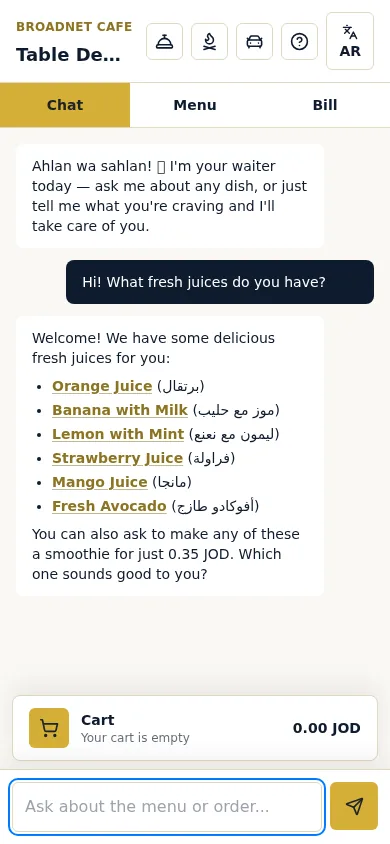
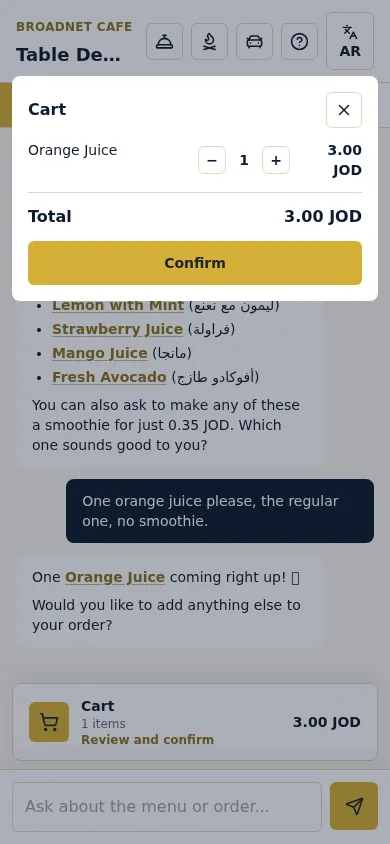
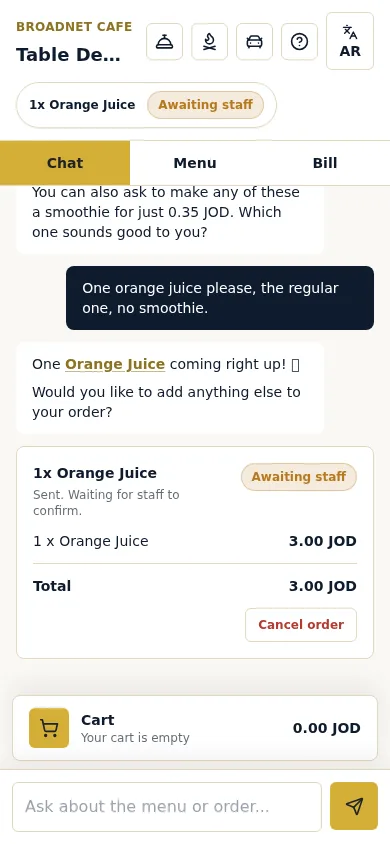
Real screenshots, 15 October 2026, at Broadnet Cafe, BroadNet.AI's demo restaurant (prices in Jordanian dinars).
And what do your staff see?
A staff board with three columns, Awaiting staff, In kitchen and Served. Staff Confirm or Reject a first order, mark a dish Out of stock if the kitchen runs out, and mark the order Served. Station tabs, such as Kitchen and Floor service, are set by the restaurant.
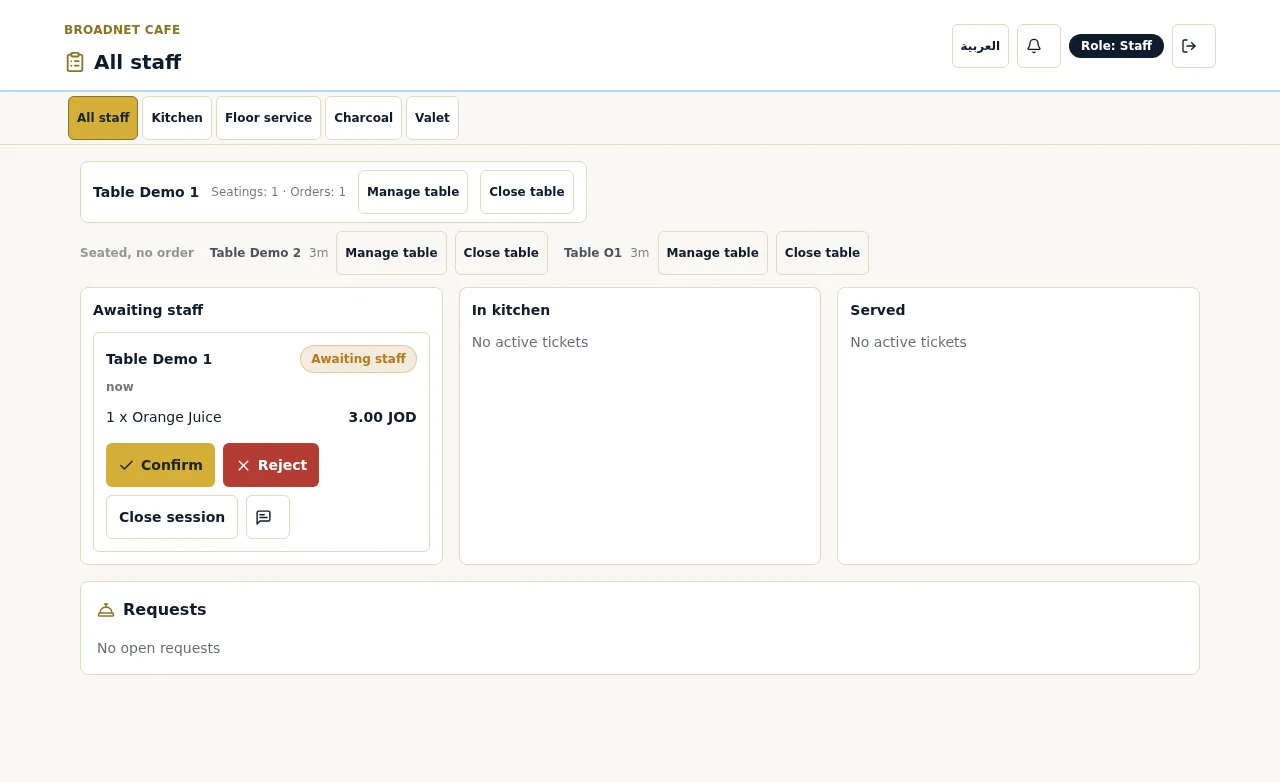
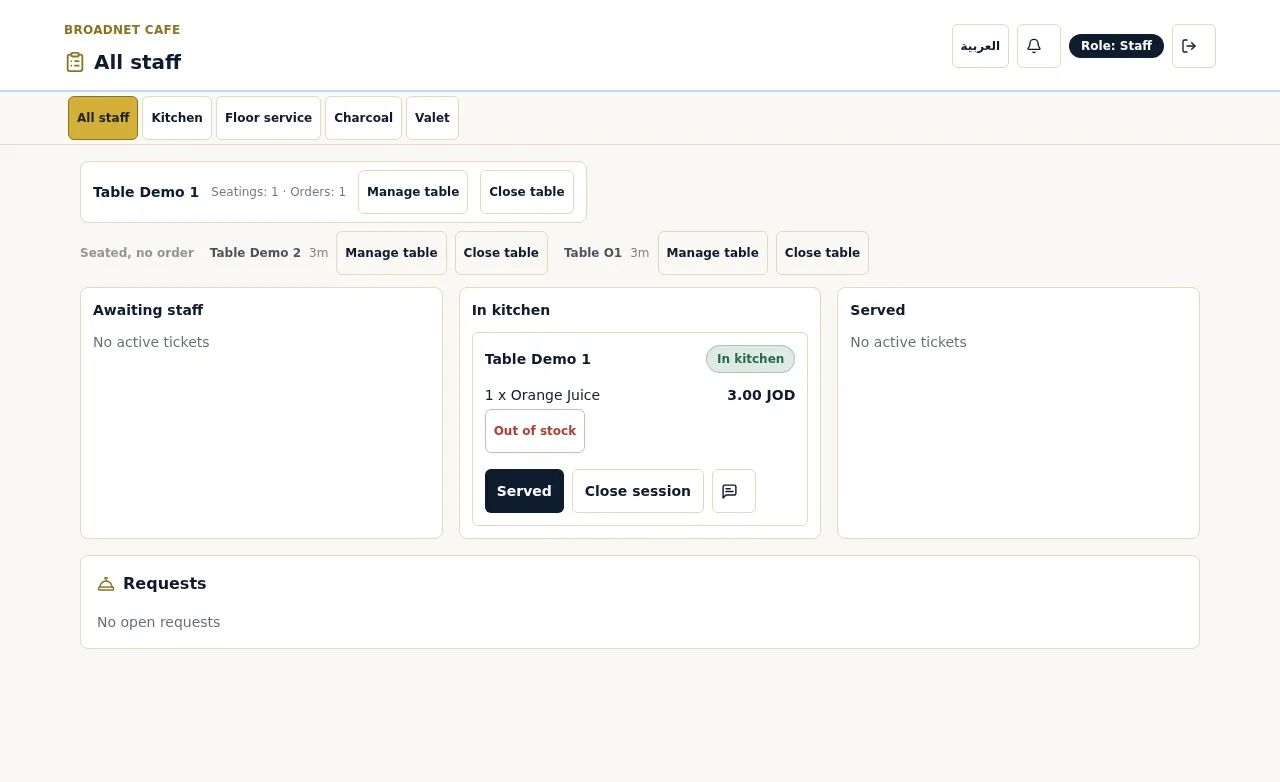
Real screenshots, 15 October 2026, at BroadNet.AI's demo restaurant.
How fast does an order reach your staff?
Within seconds. In our tests on 15 October 2026, four confirmed orders reached the staff board in 0.8 to 2.7 seconds.
We timed each order from the guest's Confirm to the ticket appearing on the staff board at BroadNet.AI's demo restaurant: 0.81, 2.74, 1.49 and 1.28 seconds. That is a small sample on one connection, not a guarantee; your Wi-Fi and mobile signal matter.
The first order at a table then waits for a person on purpose. How long that takes is up to your team, and waiting tickets change colour at 1, 5 and 10 minutes so nobody misses one. The full flow is on how it works.
What does an AI waiter do during a meal, and what stays with your staff?
It takes the order and answers the repeated questions; your staff confirm orders, cook, serve and look after guests. That is the split guests want: in the National Restaurant Association's 2024 technology report, 64% of US sit-down diners chose traditional service from employees over a restaurant that incorporates technology, and 69% of operators said technology will augment rather than replace staff.
- Answers menu questions. What's spicy, what's vegetarian, what comes with a dish: answered from your own menu, and a dish name in the reply opens its photo. When the menu doesn't say, it tells the guest to ask a member of staff.
- Takes the order in the guest's words. It asks about the choices a dish needs, such as the side or how it's cooked, and an order can't be confirmed until every required choice is picked. It adds special requests like "no onions" as notes, may ask once whether the guest would like anything with a dish, and shows a summary to confirm.
- Waits for staff on the first order. The first order at each table appears on your board as Awaiting staff until someone on your team confirms it. Later orders from that table can go straight to the kitchen.
- Speaks the guest's language. Guests chat in their own language. We have tested English, Arabic and Spanish, and it answers most other languages too; Arabic replies can use your own dialect, such as Jordanian, Lebanese, Egyptian, Gulf, Saudi or Modern Standard Arabic. Buttons on the guest screen are in English or Arabic, and notes go on the ticket as the request was taken, not translated. In our tests on 15 October 2026, a question in Spanish got its answer in Spanish, and a question in Gulf Arabic was answered in the demo restaurant's own dialect. See multilingual ordering.
- Handles waiter calls and the check. Guests can call a waiter or ask for the check from their phone. It appears on the floor screen within seconds, with whether they'll pay by cash or card, so the waiter knows to bring the card machine. See waiter call and bill.
- Keeps a live bill. The bill builds through the meal with tax and any service charge or gratuity you set, and guests can split it evenly or see just their own share. They pay your staff the way they pay today.
- Carries your name and style. Give your AI waiter a name and a house style, so it sounds like your restaurant rather than a generic assistant.
- Leaves the people work to people. Staff confirm first orders, cook, serve, decide on allergies and handle anything unusual: they can reject an order, mark a dish Out of stock, and the owner can mark a dish sold out from a phone so the chat stops offering it. WaiterPilot doesn't replace servers; it takes order-taking off their hands so they can look after guests.
Which restaurants is an AI waiter a good fit for?
Table-service restaurants where guests order at the table, servers are stretched at peak times, and guests ask a lot about the menu or don't read its language well.
- Busy dine-in service. When servers spend the rush walking to tables to take orders and answer the same questions, the chat takes that part.
- Tourist areas and mixed-language neighborhoods. Guests write in their own language and get answers in it. See multilingual ordering for exactly what is and isn't translated.
- Menus that raise questions. Spice levels, vegetarian options, sides and cooking choices are what the chat handles best.
- Restaurants keeping their POS. No POS switch and no hardware to buy; orders land on WaiterPilot's own staff screens. The trade-off is that someone rings the sale into your till.
- Hotel restaurants. It is built for any kind of restaurant, hotel restaurants included.
- Owners who want a fixed monthly cost. Setup is free and the first 30 days are free. Then it's $200 per location per month, with 0% commission and no contract.
When should you choose something else?
When you need payment at the table, orders flowing into your POS or printer automatically, voice ordering, or the lowest price. Other tools do those better today.
- You want guests to pay on their phone. WaiterPilot takes no payment. As of October 2026, POS order-and-pay tools such as Toast Mobile Order & Pay and Square's self-serve ordering, and pay-at-table tools such as sunday and Qlub, take payment at the table.
- Every order must land in your POS or print in the kitchen. WaiterPilot has no POS or printer connection. A POS-native tool, or one with a listed integration for your POS, saves the re-keying. QR ordering without a POS integration helps you weigh it.
- You want voice ordering. WaiterPilot is chat only. As of October 2026, Butlaroo's site says its AI waiter takes orders by voice or chat.
- You only want a menu guests can read. A plain QR menu does that for less. An AI waiter earns its place when guests order through it.
- Price decides it. As of October 2026, MENU TIGER and Ordder publish lower monthly prices than ours. Our case is a flat fee with setup done for you and no commission, not the lowest price. See flat fee vs commission.
- Every word on the guest screen must be in another language. Our guest buttons are English or Arabic. If you need the whole screen in, say, Turkish or Japanese, look for a tool that translates the full menu interface.
How should you evaluate an AI waiter before you buy?
Test it on your own menu with your own staff, and ask every vendor the same questions in writing. Five checks catch most problems.
- Ask something your menu doesn't say. A good AI waiter admits it doesn't know and sends the guest to staff. One that invents an answer will invent an allergen too.
- Order a dish with a required choice. The chat should ask before the order can be sent, and the kitchen should see the choice on the ticket.
- Order in a language nobody on shift reads. Then read the ticket as the kitchen will. Ask which parts the vendor translates: chat, buttons, dish names, notes.
- Follow the money. Where does the sale end up, and who takes payment? That decides how much re-keying your team does.
- Work out your busiest month. Compare a flat fee with a per-order commission on your own numbers.
Questions owners ask about AI waiters
Does an AI waiter take payment?
WaiterPilot doesn't. Guests see a live bill with tax and any service charge you set, can split it evenly or see just their own share, and pay your staff the way they pay today.
Does it work with my POS?
It works next to your POS, not inside it. WaiterPilot has no POS or printer connection, so your team enters the sale in your till as they do now.
Can it handle allergy questions?
It gives what your menu says and asks the guest to confirm with your staff. When the menu doesn't say, it tells the guest to ask a member of staff. Your team always has the final word on allergies. See allergies and dietary questions.
Which languages does it speak?
Guests chat in their own language. We have tested English, Arabic (several dialects) and Spanish, and it answers most other languages too. Buttons on the guest screen are in English or Arabic, dish names show as written on your menu, and notes are not translated for staff.
How much does it cost?
Setup, menu loading, QR cards and staff training are free, and so are the first 30 days. Then it's $200 per location per month, with 0% commission and no contract.
How fast does an order reach the kitchen?
Confirmed orders reach the staff board within seconds: 0.8 to 2.7 seconds in our four test orders on 15 October 2026. The first order at a table then waits for a staff member to confirm it; later orders from that table can go straight to the kitchen.
Will it make the average check bigger?
We don't promise that. The strongest published study of tabletop ordering (Tan and Netessine, Management Science, 2020) found about 1% more per check and about 10% shorter meals. The gain is mostly speed.
Does it replace servers?
No. It takes orders and answers questions. Staff confirm orders, cook, serve and look after guests, and a guest can call a waiter from the phone at any time.
What should you read next?
- From scan to servedOrder states, staff screens and what happens when a dish runs out.
- How QR table ordering worksThe guest's side, step by step, with no app.
- Multilingual orderingExactly what's translated and what isn't.
- Works with your POSRunning WaiterPilot next to your till.
- Waiter call and billCalls, check requests, cash or card, and the live bill.
- Allergies and dietary questionsWhat the chat says, and what stays with staff.
- Compare table ordering toolsWhere POS order-and-pay, QR menus or another AI waiter fit better.
- Buyer's checklistTwelve questions to ask any vendor.
- GlossaryPOS, KDS, order-and-pay and other terms in plain words.
- Does tabletop ordering increase check size?What the research actually found.
- Pricing$200 per location per month after 30 days free.