Choosing a system
Do restaurants need an ordering app? App vs browser QR ordering
Not for dine-in: guests can scan a QR code and order in the phone's browser. A restaurant ordering app pays off for loyalty, delivery and regular customers.

WaiterPilot Editorial
Updated , 9 min read
The short answer
Not for dine-in. Guests at a table can scan a QR code and order in the phone's browser, with nothing to download. A restaurant ordering app makes sense when the same people order again and again: loyalty rewards, delivery and pickup, saved details. Most restaurants need browser ordering at the table and, at most, an app for regulars.
Key points
- Dine-in guests can order in the phone's browser after a QR scan; an app adds a download and often an account for a single meal.
- In the National Restaurant Association's 2024 survey, 48% of US full-service diners would order with a QR code, but only 21% of baby boomers, so keep a server and a printed menu.
- An ordering app earns its keep with repeat customers: loyalty, delivery and pickup, saved details and messages to regulars.
- Big POS brands run dine-in QR ordering in the browser too; Square's self-serve ordering opens in the phone's browser, as published on 15 Oct 2026.
- WaiterPilot is browser-only, with no guest app and no sign-up, and it has no loyalty or delivery features, so pair it with another tool if you need those.
On this page
No, a restaurant doesn’t need an ordering app for dine-in. Guests already at a table can scan a QR code and order in the phone’s browser, with nothing to download and no account to create. A restaurant ordering app makes sense for a different job: bringing the same customers back, with loyalty rewards, delivery and pickup, and saved details. Most restaurants need browser ordering at the table and, at most, an app for their regulars.
The confusion comes from the words. “Restaurant ordering app” can mean an app guests download from an app store, or any ordering software the restaurant uses. This guide is about the first kind, and about when it is worth asking a guest to install something before they can order.
What is the difference between an ordering app and browser ordering?
An ordering app lives on the guest’s phone and must be downloaded first. Browser ordering is a web page that opens from a QR code or a link, and it works on any phone with a camera and a browser.
| Restaurant ordering app | Browser QR ordering | |
|---|---|---|
| What the guest does first | Finds the app in the App Store or Google Play, installs it, and often creates an account | Scans the QR code on the table; the menu opens in the phone’s browser |
| Before the first order | Download, install, sign up, then the menu | The menu, right after the scan |
| Best for | Regulars, loyalty, delivery and pickup from home | Dine-in guests, first-time visitors, tourists |
| What the restaurant learns about the guest | Usually an account: name, email or phone number, order history | Depends on the tool; WaiterPilot asks for no name, phone number or email |
| Reaching guests later | Push notifications and in-app offers | Nothing built in |
| Updates | New versions through the app stores; guests have to update | The next time the page loads |
| Phones it runs on | Separate iPhone and Android versions to build and keep current | Any phone with a camera and a browser |
The trade is simple. An app knows more about each guest and can reach them again. A browser page asks less of each guest and works the first time. At a table, the second matters more, because the guest is already in your dining room and wants to order now.
Why do dine-in guests rarely want to download an app?
Because the visit is one meal, and an install stands between the guest and their first drink. Even browser ordering doesn’t suit everyone, so an extra download narrows the group further.
The numbers on guest attitudes are mixed. In the National Restaurant Association’s 2024 technology report, 59% of US full-service diners said they would open a menu by QR code, 48% would order with one and 46% would pay with one (NRA, 2024). The split by age is large: 69% of millennials would order by QR, against 21% of baby boomers. The same survey found 63% would “place an order using a smartphone app”, but the question doesn’t separate a restaurant’s own app from a web page, so it doesn’t tell you guests want to download yours.
A William Blair survey reported by Restaurant Dive found 47% of consumers weren’t comfortable using QR codes on their phones to view menus, order and pay, rising to 65% of those over 60 (Restaurant Dive, 2023). That is a secondary report with no published sample size, but the direction matches the NRA figures: a real share of guests want a person, not a phone.
Put those together and the case against a dine-in app is plain:
- Many dine-in guests visit once, or only now and then. A tourist or a first-time guest won’t install your app for one meal, and a visitor from abroad may not even have an app store account in your country.
- Every extra step can lose someone. A scan is one step. A download, an install and a sign-up are three more, each at the moment the guest is hungry.
- Many guests prefer a server anyway. In the same NRA report, 64% of full-service diners chose traditional service from employees over a restaurant that incorporates technology. Ordering by phone should be an option at the table, not the only way in. We look at guest attitudes in more depth in do customers like QR code menus?
When does a restaurant ordering app make sense?
When the same customers order again and again, especially away from the table. An app is a tool for repeat business, not for the first order of the night.
An app is worth a look if most of these are true for you:
- You have real regulars, people who order every week, not just a few familiar faces.
- Takeaway, pickup or delivery is a large share of your sales, and those guests order from home or work.
- You run, or want to run, a loyalty program with points or rewards tied to an account.
- You want to message customers, such as a new dish or a quiet-night offer, through push notifications.
- Saved details save time: a stored address, a usual order, a saved card for pickup.
Some vendors sell exactly this. Owner.com, for example, sells a restaurant website, online ordering, a branded app and loyalty; as published on 15 Oct 2026, its plans were $249 a month plus a 5% restaurant fee per order, or $499 a month flat, and guests also pay a 5% order support fee on both plans (Owner.com pricing). Its site says “Guests who use your branded app reorder around 2x more often”. That is the vendor’s own claim, with no published method. Its pages, as we read them, don’t mention dine-in QR table ordering.
That split is the point. Apps are built for the customer who comes back. If your problem is the guest sitting at table 12 waiting to order, an app is the wrong tool. If your problem is getting last month’s takeaway customers to order again, it may be the right one. For the cost side of delivery and app commissions, see dine-in ordering vs delivery app commission.
Do POS systems use an app for table ordering?
Mostly not. The large POS brands run dine-in QR ordering in the phone’s browser, and keep apps for other jobs.
As published on 15 Oct 2026:
- Square: QR codes mapped to tables open the restaurant’s Square Online ordering page in the phone’s browser, where guests order and pay (Square).
- Lightspeed: Order Anywhere covers table QR ordering, where guests view the menu, order and pay with no app (Lightspeed).
- sunday, a pay-at-table company, advertises “Scan, split, tip, pay. 10 seconds, no app.” on its home page (sunday). The 10 seconds is the vendor’s own claim.
The market has settled on a split: browser for the table, apps and online ordering sites for customers off the premises. If a vendor asks your dine-in guests to download an app before they can order, ask why.
App, browser or both: which should you choose?
Choose by where your orders come from and how often the same people come back. Use this guide as a starting point.
| Your situation | Choose | Why |
|---|---|---|
| Mostly dine-in, many first-time or foreign guests | Browser QR ordering | Nothing to install for a single meal |
| Regulars who order takeaway or delivery every week | An ordering app or an online ordering site | Saved details and reordering matter more than speed at the table |
| A loyalty program is central to your marketing | An app, or the loyalty feature in your POS | Points need an account; check your POS before paying for an app |
| A busy dining room and a big takeaway trade | Both: browser QR at the tables, an app or site for off-premises | They don’t conflict; a guest at the table never needs the app |
| Many older regulars who like paper | A printed menu and servers first, with QR as an option | Only 21% of boomers would order by QR (NRA, 2024) |
Worked example: does Casa Olivo need an app?
Casa Olivo (an example, not a customer) has 24 tables on a street with a lot of visitors. The owner was offered a branded ordering app and wants to know if it would help in the dining room.
Assumptions, made up for the example:
- 2,400 dine-in guests a month.
- 70% are one-time visitors: tourists and people passing by.
- The other 30% are regular visits, by people who come about 4 times a month.
- Takeaway is about 10% of sales, ordered by phone.
The arithmetic:
- One-time guests: 2,400 × 70% = 1,680 guests a month who would be asked to install an app for a single meal.
- Regular visits: 2,400 × 30% = 720 visits. At about 4 visits each, that is 720 ÷ 4 = about 180 regular customers.
- So an app’s natural users are about 180 people, while 1,680 guests a month would see the download as an obstacle.
The decision. Casa Olivo puts browser QR ordering on every table, keeps its printed menu and its servers, and doesn’t build an app for the dining room. For the 180 regulars it checks whether its POS has a loyalty feature before paying for an app. It will look at an app or online ordering again if takeaway grows beyond phone orders.
On WaiterPilot’s prices, the dining-room part costs $200 a month for one location after 30 days free, or $2,000 a year, with no setup fee and 0% commission. We don’t price the app here, because quotes for custom and branded apps vary too much to give one fair figure.
What does browser ordering look like with WaiterPilot?
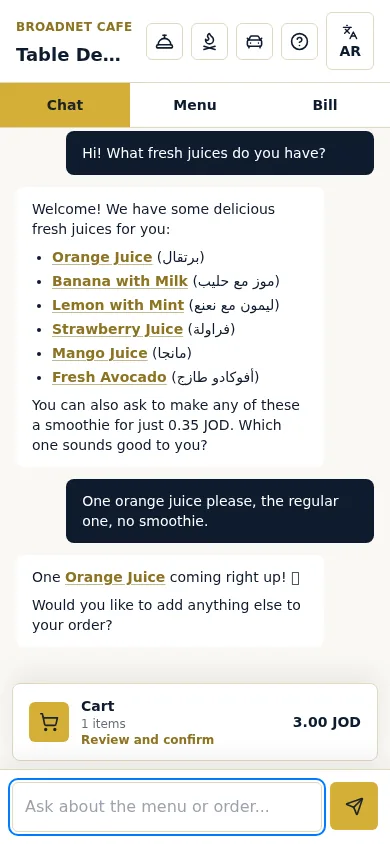
The guest scans the QR code on their table and WaiterPilot opens in the phone’s browser as a chat. There is no app to download and no sign-up, and the guest orders in their own words.
- Ask and order. Guests ask about dishes in their own words and get answers from your menu; when the menu doesn’t say, the chat tells them to ask a member of staff. The chat replies in the guest’s language: we have tested English, Arabic and Spanish, and the screen buttons are in English or Arabic. See multilingual ordering.
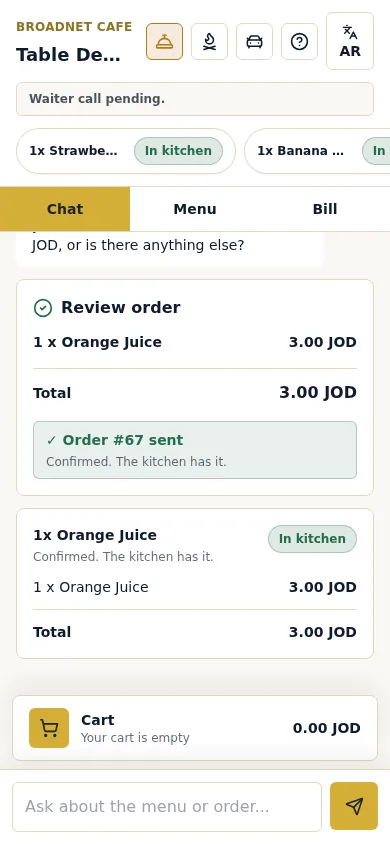
- Your staff stay in charge. Orders land on a staff board. The first order at each table waits for a person on your team to confirm it.
- The bill, without payment. Guests see a live bill and can split it evenly or see just their own share, then pay your staff as they do today. WaiterPilot takes no payments.
- Less data than an app. Guests don’t sign up or give a name, phone number or email to order. We keep each table’s orders and chat so staff can serve them, and one essential cookie keeps a phone connected to its table. More in is QR ordering private?
The limits matter as much. Because there is no app and no account, WaiterPilot has no loyalty points, no push messages and no delivery or pickup ordering. It also has no POS or printer connection, so staff ring the sale into the till. If you need those features, pair it with a tool that does them, or choose a different system. The full guest flow is on QR table ordering.
What to do next
Before you pay for an app, or for any ordering system, find out who you are actually serving.
- Count for two weeks how many of your dine-in guests are regulars and how many visit once.
- Split your sales into dine-in, takeaway and delivery.
- If dine-in leads, start with browser QR ordering at the tables, and keep your printed menu and servers.
- If takeaway or delivery from regulars leads, price an ordering app or online ordering site, and check your POS’s own loyalty features first.
- Test before you decide. Place a sample order in your browser to see what a guest sees, and read our roundup of the best QR table ordering systems for small restaurants, which says where other tools fit better.
WaiterPilot is $200 per location per month after 30 days free, or $2,000 per location per year, with free setup, 0% commission and no contract. See pricing.
Questions readers ask
Do guests need to download an app to order with WaiterPilot?
No. Guests scan the QR code on their table and the menu opens in the phone's browser. There is no app to download and no sign-up, and guests don't give a name, phone number or email to order.
Is browser ordering slower than an app?
For a first visit, browser ordering is quicker, because there is nothing to install and no account to create. An app a regular already has can open a little faster, which matters more for frequent takeaway orders than for one meal at a table.
Can I run a loyalty program without an app?
Often, yes. Many POS and loyalty tools record points against a phone number or card at the till. Ask your POS provider what it offers before you pay for an app just for points. WaiterPilot has no loyalty feature.
Does WaiterPilot have an app for staff?
No. Staff screens also run in the browser, on phones or tablets you already have. On an iPhone, lock-screen alerts need the staff board added to the Home Screen.
Does browser ordering work for tourists?
Yes, and that is where it helps most: a visitor doesn't need an app store account in your country. With WaiterPilot guests chat in their own language; we have tested English, Arabic and Spanish, and the screen buttons are in English or Arabic.
Sources
- Restaurant Technology Landscape Report 2024, National Restaurant Association, 2024 (checked 2026-10-15)
- 47% of consumers uncomfortable using QR codes in restaurants (William Blair survey), Restaurant Dive, 2023-04-19 (checked 2026-10-15)
- Self-serve ordering, Square, 2026 (checked 2026-10-15)
- Order Anywhere, Lightspeed, 2026 (checked 2026-10-15)
- Owner.com pricing, Owner.com, 2026 (checked 2026-10-15)
- sunday home page, sunday, 2026 (checked 2026-10-15)