Choosing a system
Digital menu board, QR menu or tablet? Which digital menu do you need?
"Digital menu" can mean a screen on the wall, a QR menu, QR ordering or a tablet. What each one does, what it costs as published, and which venue each suits.

WaiterPilot Operations
Updated , 8 min read
The short answer
"Digital menu" means four different things. A digital menu board is a screen on the wall that guests read in a queue. A QR menu shows the menu on the guest's phone. QR ordering also sends the guest's order to staff. A table tablet puts a device on every table. Counter service suits boards; table service suits QR or tablets.
Key points
- A digital menu board is a screen for guests standing in line; it shows the menu but takes no orders.
- A QR menu only displays the menu on the guest's phone; QR ordering also sends the order to staff, by tapping dishes or by chat.
- Table tablets work for guests without a smartphone, but you buy, charge, clean and replace one device per table.
- In a 2024 survey, 59% of full-service diners would open a menu by QR code and 48% would order with one, so keep a printed menu and a server path too.
- WaiterPilot is QR ordering by chat on the guest's phone; it is not a menu board or a tablet, and needs no hardware.
On this page
“Digital menu” means four different things, and vendors use the phrase for all of them. A digital menu board is a screen on the wall that guests read while they queue. A QR menu shows the menu on the guest’s own phone. QR ordering also lets the guest send the order to staff. A table tablet puts a device on each table that guests order from. Counter-service venues usually want a board; table-service restaurants usually want QR ordering or tablets, alongside a printed menu.
We make WaiterPilot, an AI waiter by BroadNet.AI. It is QR ordering by chat on the guest’s phone, so it sits in one of the four boxes. We don’t sell screens, menu boards or tablets, and if a board is what your venue needs, this guide says so.
What are the four kinds of digital menu?
Short answer: a wall screen, a menu on the guest’s phone, ordering from the guest’s phone, and a device on each table.
The four kinds side by side. Example prices are as published on vendors’ own pages on 15 October 2026.
| Digital menu board | QR menu (view only) | QR ordering | Table tablet | |
|---|---|---|---|---|
| Where guests see it | A screen on the wall or above the counter | Their own phone | Their own phone | A device fixed to or left on the table |
| Can guests order from it? | No | No: a server takes the order | Yes: the order goes to staff | Yes |
| Hardware you buy | Screens and players | None beyond printed codes | None beyond printed codes | One device per table, plus chargers |
| Who it suits | Guests in a queue | Seated guests who still order from a server | Seated guests who want to order when ready | Seated guests, including those without a smartphone |
| Example prices as published | We didn’t check board vendors | Menutech from €15 a month | MENU TIGER from free to $119 a month; Square QR code ordering on its $49 Plus and $149 Premium plans per location; WaiterPilot $200 per location | Not published by the vendor we checked |
Self-order kiosks are a fifth option, usually for counter service: Square lists its Kiosk at $99 a month per device. We compare kiosks, tablets and phones in detail in kiosk vs tablet vs QR ordering.
How do digital menu boards work?
Short answer: screens connected to software that you edit from a browser; they display the menu but don’t take orders.
A digital menu board is a set of screens, usually commercial displays or TVs, each driven by a small media player or a built-in app. You change prices, photos and dishes in the vendor’s software, and the screens update. Most boards let you schedule menus by time of day, so breakfast switches to lunch on its own, and some can show a dish as sold out.
Boards are built for one moment: a guest standing in line deciding what to order before they reach the till. That’s why they suit cafés with a counter, quick-service restaurants and food halls. In a dining room where guests sit down and wait to order, a board on the wall doesn’t help them order. They still need a server, a phone or a tablet.
Boards also need ordering and payment somewhere else, usually a till or a kiosk. A board is a display, not an ordering system.
What is the difference between a QR menu and QR ordering?
Short answer: a QR menu lets guests read the menu on their phone; QR ordering lets them send the order too.
With a QR menu, the guest scans a code and reads the menu, often a web page or a PDF. A server still comes to take the order. It saves printing costs and makes changes easy, but it doesn’t cut the wait to order.
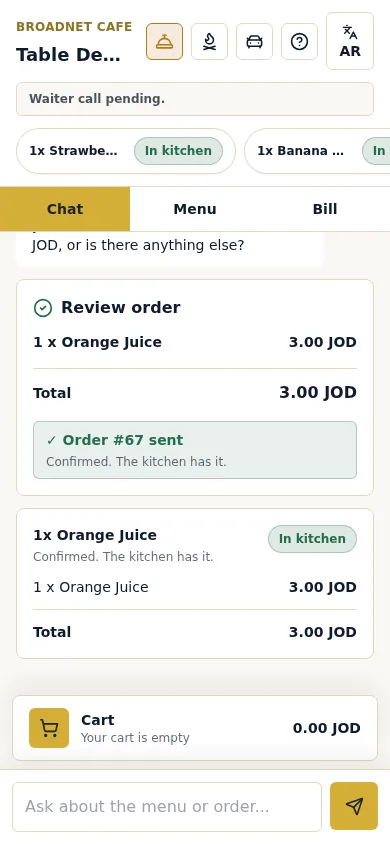
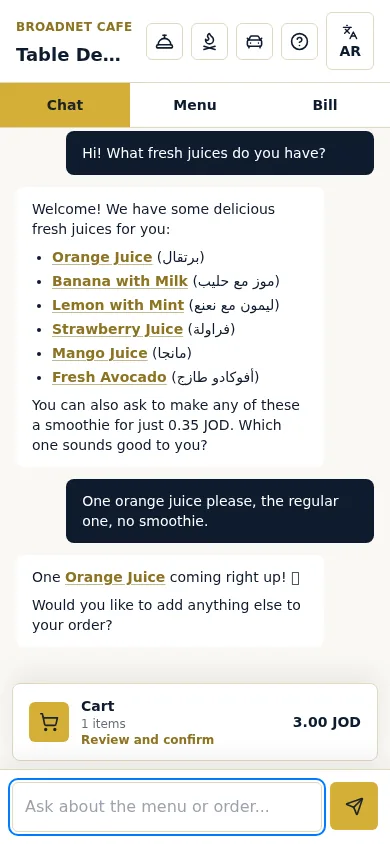
With QR ordering, the guest picks dishes and sends the order to staff from the phone. Most systems do this with a tap-to-add menu and a cart. Square’s self-serve ordering, for example, opens the restaurant’s Square Online ordering page from per-table QR codes and sends orders to the POS and kitchen printers. A few systems, including WaiterPilot, let the guest order by chat instead: they ask questions in their own words and the order is built from the conversation.
Our post on QR menu vs QR ordering vs order-and-pay shows what the guest sees in each case, with screenshots.
When does a tablet on every table make sense?
Short answer: when many of your guests don’t use smartphones at the table, and you’re ready to look after one device per table.
Tablets give every table the same screen, whether or not guests have a phone or want to use it. Guests are open to them: in a 2024 survey, 60% of full-service diners said they would place an order on a tablet at the table, and 65% would pay the check on one (NRA, 2024). In Korea, the table-tablet company T-order reported more than 320,000 installed tablets in January 2026 (Byline Network, 2026).
The costs are practical ones: buying the devices, charging them every night, cleaning them between guests, replacing broken ones and keeping them on your Wi-Fi. Where most guests carry a phone, QR ordering does the same job with no devices to manage.
What do guests prefer?
Short answer: about half of sit-down diners are happy to use their phone, and older guests far less, so no digital menu should be the only menu.
| Finding | Source |
|---|---|
| 59% of full-service diners would open a menu by QR code, 48% would order with one and 46% would pay with one | NRA, 2024 |
| Ordering by QR: millennials 69%, Gen Z 60%, Gen X 52%, boomers 21% | NRA, 2024 |
| 60% would place an order on a tablet at the table | NRA, 2024 |
| Over 45% of consumers said they weren’t comfortable using QR codes to view menus, order and pay | William Blair survey, reported by Restaurant Dive, 2023 |
| About a quarter of guests did not like using tabletop technology | Cornell Hospitality Report, 2016 (a co-author worked for the device vendor) |
Whatever you choose, keep a printed menu on hand and a server who will take an order the old way.
Which digital menu fits your venue?
Short answer: queues want boards, seated guests want something at the table, and every venue should keep a paper fallback.
Our judgment, by venue type:
| Venue | Best fit | Why |
|---|---|---|
| Counter café, quick service, food hall | Digital menu board, with a till or kiosk | Guests decide while queuing and pay at the counter |
| Café with seating and table service | QR menu or QR ordering | Guests sit first and order when ready |
| Casual dining | QR ordering, alongside a printed menu | Cuts the wait for the first order; servers stay on the floor |
| Tourist restaurant | QR ordering that works in the guest’s language | The menu and questions come in the guest’s own language |
| Family restaurant with many older guests | Printed menu and servers first; a tablet or QR as an option | Fewer older guests order by QR |
| Fine dining | Printed menu and servers | Ordering is part of the service guests pay for |
For fine dining specifically, see fine dining and AI ordering.
How do you create a digital menu?
Short answer: get the menu itself right first; the screen or QR code is the easy part.
- Write the menu cleanly. Dish names, prices, sizes, sides and the choices each dish needs. Note allergens only where your kitchen has confirmed them.
- Pick the kind from the venue table above.
- Add photos for the dishes guests ask about most.
- Place the QR codes or screens where guests can see them, and test each one with three different phones.
- Keep a printed menu for guests who don’t want a screen.
- Decide who marks dishes sold out during service, and how fast.
Our checklist for preparing your menu for digital ordering goes through each step.
What would each option cost Casa Olivo?
Short answer: from about €15 a month for a QR menu to $200 a month for chat ordering, and more for hardware.
Casa Olivo is a fictional restaurant (an example, not a customer): 14 tables, table service, one location. Prices are as published on 15 October 2026; payment processing and hardware are left out unless stated.
| Option | Monthly cost for one location | What else to budget for |
|---|---|---|
| QR menu (Menutech, which sells menu writing, translation and QR menus) | From €15 | Printed QR cards; servers take the orders |
| QR ordering, tap to add (MENU TIGER) | $17 (Regular, 500 orders a month) to $119 (Premium, unlimited) | Card processing if guests pay through it |
| QR ordering inside a POS (Square) | $49 (Plus) per location | Square as your POS, plus card processing on each payment |
| QR ordering by chat (WaiterPilot) | $200, or $2,000 a year | Nothing else from us: no setup fee, no hardware, 0% commission; staff ring sales into your till |
| Table tablets | Ask vendors | 14 devices, chargers, cases and replacements |
| Digital menu board | Ask vendors | Screens, players and installation; a separate way to order |
Where does WaiterPilot fit?
Short answer: in the QR ordering box, for seated guests, with no hardware.
Guests scan the QR code on their table and the menu opens in their phone’s browser, with no app. They ask and order by chat in their own words, and dish names in the chat open the dish photo. Answers come from your menu; when the menu doesn’t say, WaiterPilot tells the guest to ask a staff member. The chat answers in the guest’s language, tested in English, Arabic dialects and Spanish, and the guest buttons are in English or Arabic. The first order at each table waits for staff to confirm it, and owners mark a dish sold out from their phone.
Staff use screens on phones or tablets you already have. You get QR table cards to print in three sizes, and WaiterPilot works alongside your printed menu. It is not a menu board, doesn’t connect to your POS or printer, and takes no payment. It costs $200 per location per month after 30 days free, with free setup, 0% commission and no contract.
What to do next
Stand where your guests stand when they decide what to eat: in a queue or at a table. If it’s a queue, look at menu boards. If it’s a table, compare options on the QR table ordering page, check pricing and the comparison page, and try a sample order to see chat ordering from the guest’s side.
Questions readers ask
What is a digital menu for restaurants?
Any menu shown on a screen instead of paper. It can be a menu board on the wall, a QR menu on the guest's phone, a QR ordering system that also sends orders to staff, or a tablet on each table. Ask which one a vendor means before comparing prices.
How do digital menu boards work?
A screen, usually a commercial display or a TV, is connected to a small media player or has one built in. You edit the menu in the vendor's software from a browser, and the screens update. Many let you schedule breakfast and lunch menus. Boards show the menu; they don't take orders.
Is a QR menu the same as a digital menu?
A QR menu is one kind of digital menu: it opens the menu on the guest's phone. A QR menu only shows the menu, while QR ordering also lets the guest send the order to staff. Menu boards and table tablets are other kinds.
Do I need a tablet on every table?
No. Guests' own phones can do the same job with a QR code and no hardware. Tablets help guests who have no smartphone or don't want to use theirs, but you buy, charge, clean and replace one per table. Many restaurants keep a printed menu and a server for those guests instead.
How do I create a digital menu for my restaurant?
Start with an accurate menu: dish names, prices, choices and allergen notes. Then pick the kind of digital menu that fits your service, add photos, place and test the QR codes or screens, and decide who marks dishes sold out during service.
How much does a digital menu cost?
As published on 15 October 2026: Menutech's plans start at €15 a month, MENU TIGER runs from free to $119 a month, Square lists QR code ordering on its $49 and $149 plans, and WaiterPilot is $200 per location per month. Board and tablet costs depend on the hardware you buy.
Sources
- Restaurant Technology Landscape Report 2024, National Restaurant Association, 2024 (checked 2026-10-15)
- 47% of consumers uncomfortable using QR codes in restaurants (William Blair survey), Restaurant Dive, 2023-04-19 (checked 2026-10-15)
- The Influence of Table Top Technology in Full-service Restaurants (Cornell Hospitality Report 16(22)), Cornell University (Susskind and Curry), 2016-10 (checked 2026-10-15)
- MENU TIGER pricing, MENU TIGER, 2026 (checked 2026-10-15)
- Menutech home page, Menutech, 2026 (checked 2026-10-15)
- Square for Restaurants pricing, Square, 2026 (checked 2026-10-15)
- Self-serve ordering, Square, 2026 (checked 2026-10-15)
- T-order cumulative installations (in Korean), Byline Network, 2026-01-14 (checked 2026-10-15)