How do you set up WaiterPilot in your restaurant?
Most restaurants are live within two weeks of the first call. You send your menu as a PDF or photos and we load it; you check it, because the chat answers from it. Then you set your bill charges, name your tables and put a QR card on each, decide who watches which staff screen, train the team, and run a test night before guests use it. Setup, menu loading, QR cards and staff training are free, and the first 30 days are free.
Updated
Who does what during setup?
We do the loading and the training; you make the decisions only you can make: what your menu says, what goes on the bill, and who does what on the night.
| Step | Done by | What you decide or check |
|---|---|---|
| First call | You and us, about 20 minutes | Your tables, your menu, how orders reach your kitchen and till today, the languages your guests speak |
| Menu loading | Us, from your PDF or photos | Send the current menu, including prices, sides, cooking choices and any allergen information you have confirmed |
| Menu check | You | Dish names, prices, required choices, descriptions and allergens, because the chat answers only from them |
| Settings | You, with our help | Bill charges (tax, service charge), the Arabic dialect, the waiter's name and house style, whether guests see prices, optional calls |
| Tables and QR cards | Us and you | Table names that match your floor plan; where each QR card stands |
| Staff screens and roles | You | Who confirms first orders, who watches the kitchen and floor screens, who rings sales into the till |
| Staff training | Us | Who attends; a printable staff guide stays behind |
| Test night | You and your staff | A test order from every table, every exception, then go live |
What do you need to send us?
Your current menu, as a PDF or photos, and a short list of your tables. Nothing to install and no hardware to buy.
- Your menu. A PDF or clear photos of every page, with prices. We load it for you; the product itself does not read photos, a person does.
- The choices each dish needs. Sides, cooking levels, sizes, flavours. Required choices must be picked before an order can be confirmed, so tell us which ones are required.
- Allergen information you have confirmed. Only what you have checked with your kitchen. When the menu doesn't say, the chat tells the guest to ask staff, which is the safe default.
- Dish names in Arabic, if you have them. Arabic guests read Arabic names and descriptions where the menu has them, and English where it doesn't. The menu editor shows how much of your menu has Arabic text.
- Your table names. As your staff say them: T1, Terrace 4, Bar 2. Each table gets its own QR code and link.
- Photos of dishes, if you have them. A dish name in the chat opens its photo.
What should you check in the loaded menu?
Everything the chat could repeat to a guest. It answers from your menu and nothing else, so a wrong price or a missing side becomes a wrong answer.
- Every dish name and price, against your printed menu.
- Every required choice: a steak that needs a cooking level, a meal that needs a side, a drink that needs a size.
- Optional extras and their prices.
- Descriptions that answer the questions guests ask most: spicy or not, vegetarian or not, what comes with it.
- Allergens: only the ones your kitchen has confirmed. Leave the rest blank rather than guess.
- Dishes you don't serve every day, so you know which to mark sold out before service.
Which settings do you choose?
Five settings make WaiterPilot match your restaurant. All of them are in the owner's admin, and you can change them later.
- Bill charges. Tax and any service charge or gratuity, as you charge them today. They show on the guest's live bill. For example, BroadNet.AI's demo restaurant set Service 5% and Tax 7.5%; your numbers are your own. There is no guest tip feature.
- Arabic dialect. Jordanian, Lebanese, Egyptian, Gulf (UAE), Saudi or Modern Standard Arabic. It sets the Arabic the chat uses; guests who write in other languages are still answered in theirs.
- Your waiter's name and house style. Optional. They shape tone only and never change your menu, your prices or what a guest can order.
- Prices on or off. You can hide prices from guests if that suits your restaurant.
- Optional calls. Waiter call and check request come as standard. Shisha coals and valet calls can be switched on, each with its own staff screen.
How do tables and QR cards work?
Each table has its own QR code, so staff always know which table is ordering. QR cards come with the free setup, and the admin prints more whenever you need them.
- One code per table. Tables are added by name in the admin. Each one has its own QR code and link; a guest who scans it opens your menu for that table, in the phone's browser, with no app and no sign-up.
- Three print sizes. Print QR codes from the admin in three sizes, including a table-stand card, and a printable staff guide.
- Next to the printed menu. Keep printed menus on the tables or at hand. WaiterPilot works alongside them, not instead of them.
- Wi-Fi details near the code. Where mobile signal is weak, put your guest Wi-Fi name and password near the QR card.
Who watches which staff screen?
Pick a person for each screen before the first night. The screens run on phones or tablets you already have, and the stations are tabs on the same staff board.
| Screen | What it shows | Who usually watches it | What they do |
|---|---|---|---|
| All staff (main board) | Every ticket in three columns: Awaiting staff, In kitchen, Served; tables with their seatings and orders; a Requests panel | A manager, host or lead server | Confirm or Reject first orders; mark Served; move a party, add a dish for a table, close a table |
| Kitchen | Quantities, dishes, choices and notes, without prices | The pass or the head cook | Cook from the ticket; mark a dish Out of stock if it runs out after ordering |
| Floor service | Waiter calls and check requests, with cash or card | Servers on the floor | Tap Ack and go to the table |
| Charcoal, Valet (optional) | Shisha coal calls; valet calls | Whoever runs coals or the car park | Tap Ack and do the job |
What will your staff see on the first night?
These are the real screens, from BroadNet.AI's own demo restaurant on 15 October 2026.
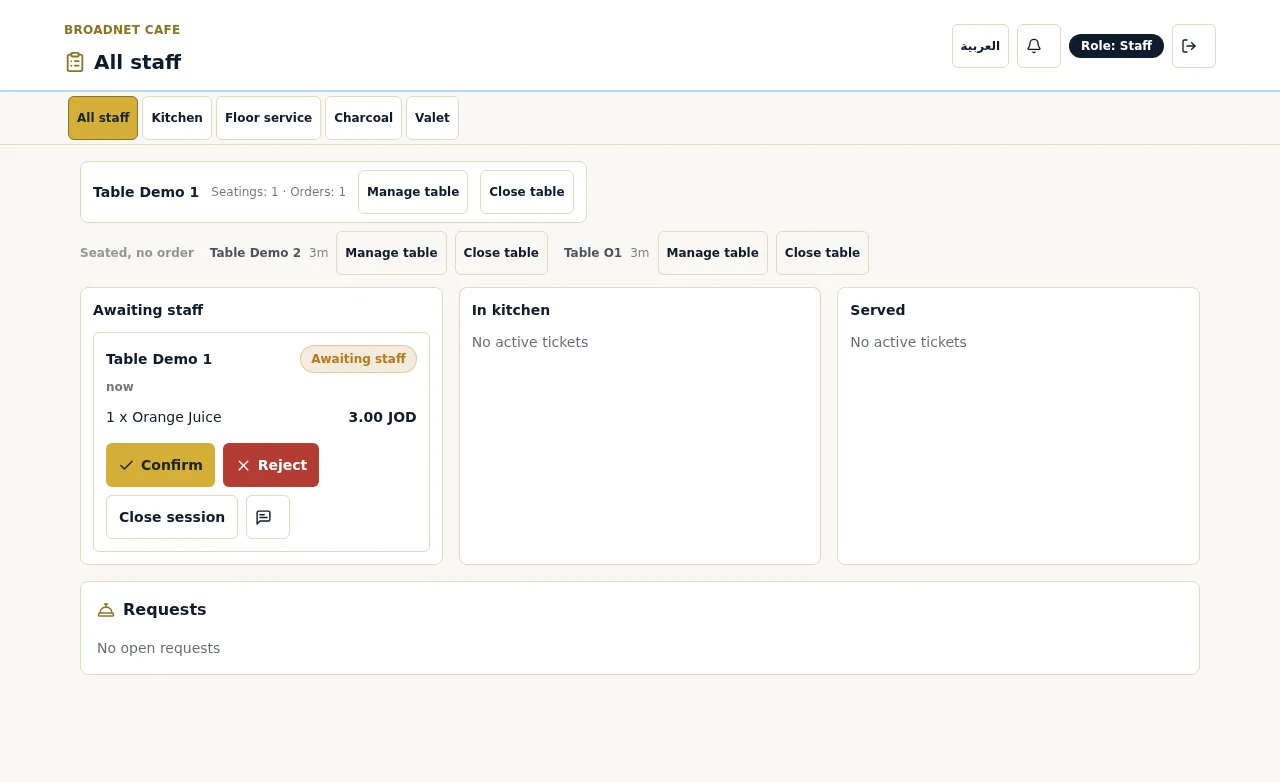
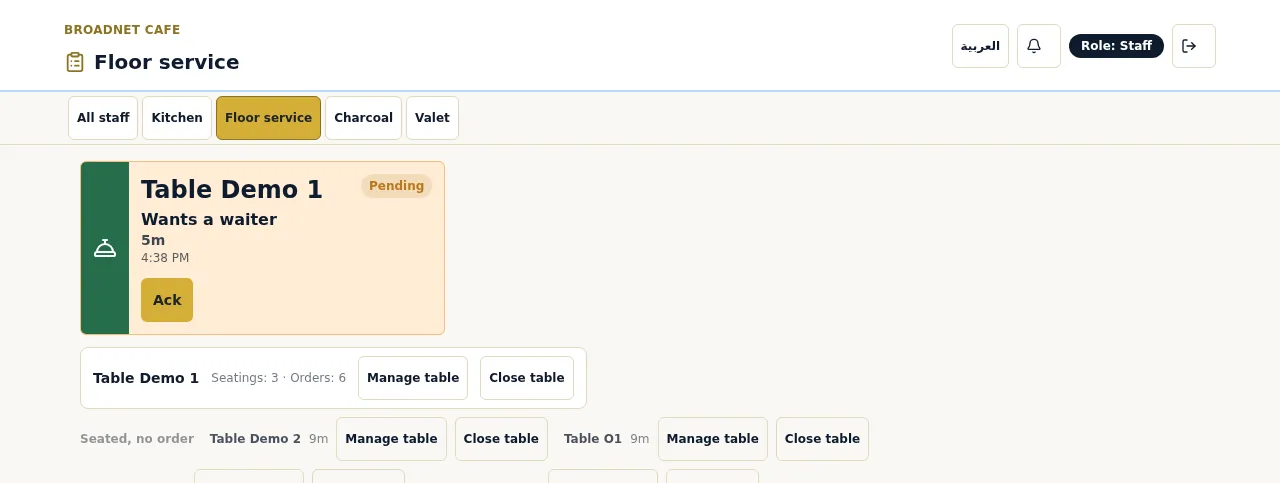
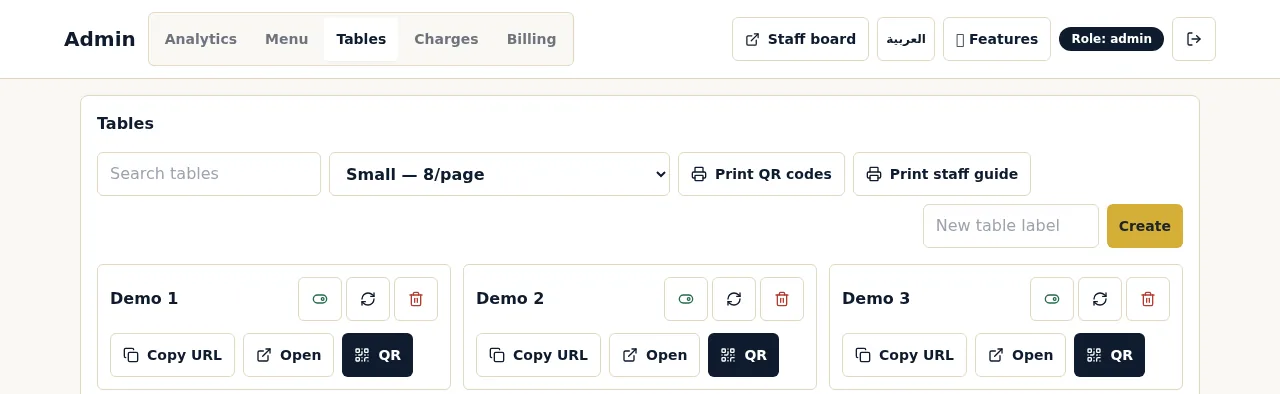
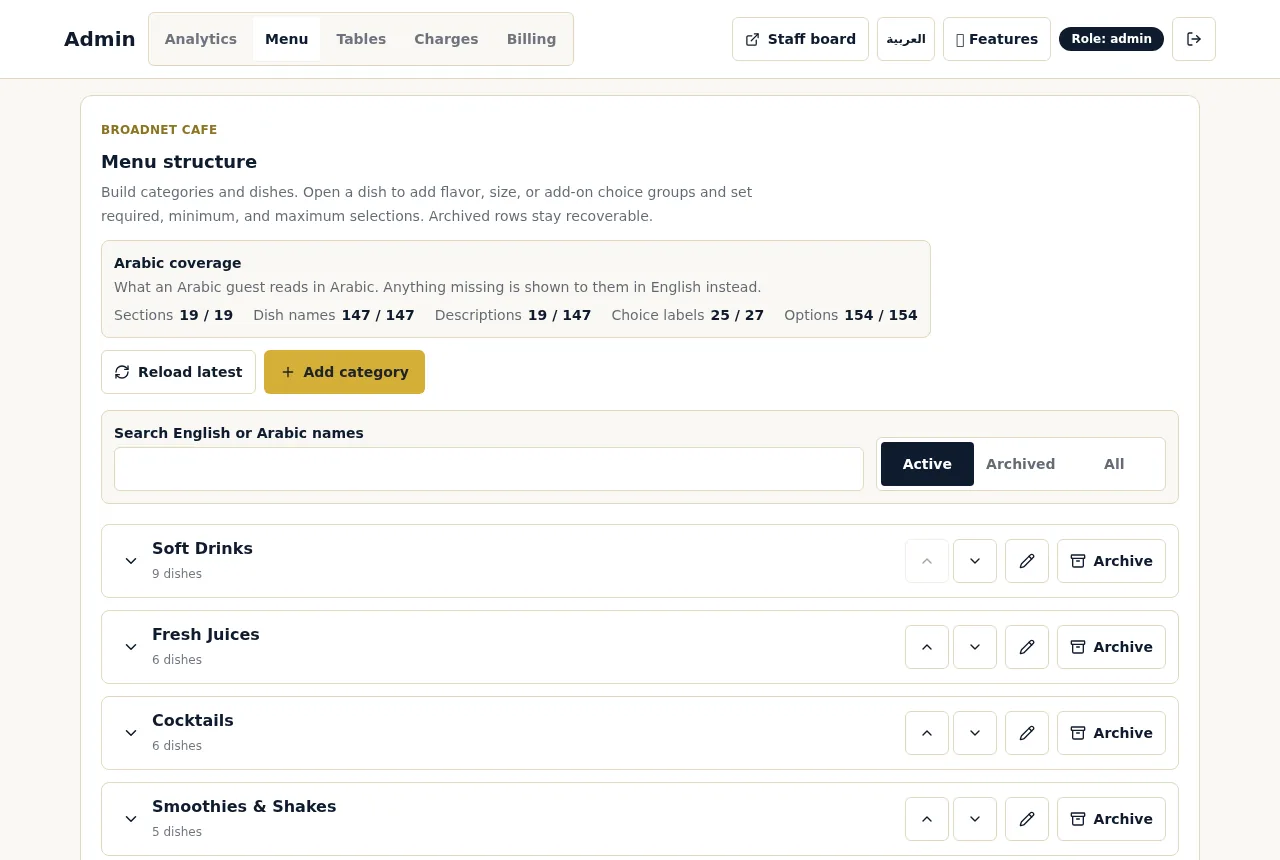
Real screenshots, 15 October 2026, at Broadnet Cafe, BroadNet.AI's demo restaurant. Prices are in Jordanian dinars there; you set your own currency and prices.
What do you test before the first night?
Run a test night with your own staff: every table, every screen, every exception. It takes an hour and catches most first-night problems.
Scan every table
Scan each QR card and check it opens the menu for that table.
Walk a test order through
Order a dish with a required choice, tap Confirm, and follow it on every screen.
Awaiting staffConfirm it and cook it
Confirm from the main board and check the kitchen screen shows the dish, the choice and the note, without prices.
In kitchenServe it
Mark it Served and check the guest's phone shows the change.
ServedTry the exceptions
Reject a first order. Cancel one from the guest phone while it is Awaiting staff. Mark a dish Out of stock in the kitchen and check it leaves the bill. Mark a dish sold out from the owner's phone and ask the chat for it.
Call a waiter and ask for the check
Check both reach the Floor service screen and that the check request shows cash or card. Open the live bill and check your tax and service charge.
Close the table
Close the table from the staff board, then compare what you rang into the till with the live bill.
What is the plan for the first night?
Agree six rules before the doors open, and brief them at the pre-shift meeting.
- Who confirms first orders. One named person, with a backup for breaks. The first order at each table waits for them; later orders from that table go straight to the kitchen.
- When sales go into the till. As staff confirm each order, or when the table asks for the check. Pick one and don't mix them. See works with your POS.
- The allergy rule. Any allergy question or note means a person goes to the table. The chat doesn't alert staff by itself, and staff have the final say. See allergies and dietary questions.
- Notes in other languages. Notes aren't translated. Decide who reads them, and put a translation app on one staff phone.
- Sold-out dishes. Mark tonight's sold-out dishes before service, from the owner's or manager's phone.
- The fallback. If the connection drops, or a guest prefers paper, take the order from the printed menu as you do today.
What should you watch in the first week?
The owner's analytics tell you what to fix: questions the chat couldn't answer, things guests asked for that aren't on your menu, and how fast your team responds.
- Questions the chat couldn't answer. Each one is a gap in your menu. Add the missing detail and the next guest gets an answer.
- What guests asked for that isn't on your menu. A list of requests you don't serve, in the guests' own words.
- Service speed. How long staff take to confirm orders, the kitchen to serve them and the floor to answer calls. Waiting tickets also change colour at 1, 5 and 10 minutes on the board.
- Who is ordering. How many guests scanned, chatted and ordered, and which languages they wrote in.
- Tonight's summary. Today against the same day last week, busy hours and top dishes, and a "Tonight at" summary you can send by text or WhatsApp from your phone.
- Your till against the live bill. Check at closing for the first few nights that every WaiterPilot order made it into the till once.
Questions about setup
How long does WaiterPilot take to set up?
Most restaurants are live within two weeks of the first call. The time goes into loading and checking your menu, QR cards and staff training.
What does setup cost?
Nothing. Menu loading, QR cards and staff training are free, and the first 30 days are free. Then it's $200 per location per month, with 0% commission and no contract.
Can you load our menu from photos?
Yes. Send a PDF or photos and we load it for you. You check it before going live.
Do we need new tablets or printers?
No. Staff use phones or tablets you already have, and guests use their own phones. On an iPhone, lock-screen alerts need the staff board added to the Home Screen.
Can we change the menu after going live?
Yes, from the owner's admin. Sold-out dishes can be marked from a phone, and WaiterPilot stops offering them right away.
Does it work in a hotel restaurant?
Yes. It works in any restaurant with tables, including hotel restaurants. It does not handle room service.
What should you read next?
- From scan to servedThe order flow your staff will learn.
- Buyer's checklistTwelve questions to ask before you choose.
- Works with your POSGetting orders into your till.
- Waiter call and billCalls, check requests and the live bill.
- Multilingual orderingWhat guests see in their language.
- PricingFree setup, 30 days free, then $200 per location per month.