
Does QR table ordering work for a family restaurant?
Yes, for families seated at a table. With WaiterPilot, people at the table scan its QR code, ask what's spicy or what's on the kids' menu, and order by chat; your staff confirm the table's first order before the kitchen cooks. The bill stays live on every phone and splits evenly or by each person's share. Allergy questions get what your menu says and go to staff, who have the final word. It takes no payment and has no POS link.
Updated

What makes a family table hard to serve?
Many people, many questions and many changes of mind, all at one table.
- Big orders take a long time to take. A server standing at a table of eight, writing down every child's choice, isn't serving anyone else.
- Lots of questions. Is it spicy? What comes with it? Is there a smaller portion? The same questions come again at the next table.
- Allergies and diets. One child can't have nuts, a grandparent eats no meat. The answers have to be right, and someone has to own them.
- Changes of mind. The order changes twice before it goes in.
- Who pays for what. Two families at one table want separate shares of one bill.
How does WaiterPilot work at a family table?
The chat takes the questions and the ordering; your staff keep the decisions.
| At the table | What WaiterPilot does | The limit |
|---|---|---|
| Phones at the table | Anyone at the table can scan its QR code; the menu opens in the phone's browser, with no app and no sign-up | Guests who'd rather not use a phone order with a server, as they do today |
| Questions | Answers come from your menu: what's spicy, what comes with a dish, what's vegetarian, what's in the kids' section if you have one. When the menu doesn't say, it tells the guest to ask staff | It knows only what your menu says |
| Choices | Required choices, such as a side, must be picked before the order can be confirmed | You set which choices are required |
| Special requests | A request such as "no onions" goes on the ticket as a short note, taken from the guest's words | Notes are not translated for staff |
| Changes of mind | Guests change quantities in the cart before they confirm, and can cancel an order while it is still awaiting staff | Once staff confirm it, ask a server |
| Allergies | The chat gives what your menu says and asks the guest to confirm with staff | Staff have the final word, and they are not alerted automatically, so train them to ask |
| Calling staff | Guests call a waiter or ask for the check from their phone; it appears on the floor screen within seconds, with cash or card | A waiter call says the table wants a waiter, not why: the high chair or the spill is explained when someone arrives |
| Moving tables | Staff can move a party to another table when a bigger one frees up | Done by staff on the board |
| The bill | A live bill on every phone at the table, with your tax and any service charge you set, split evenly or as each person's own share | No payment in WaiterPilot; guests pay at your till or terminal |
What does the shared bill look like?
Every phone at the table sees the same live bill: each order with its status, the restaurant's own charges, the total and Split the bill.
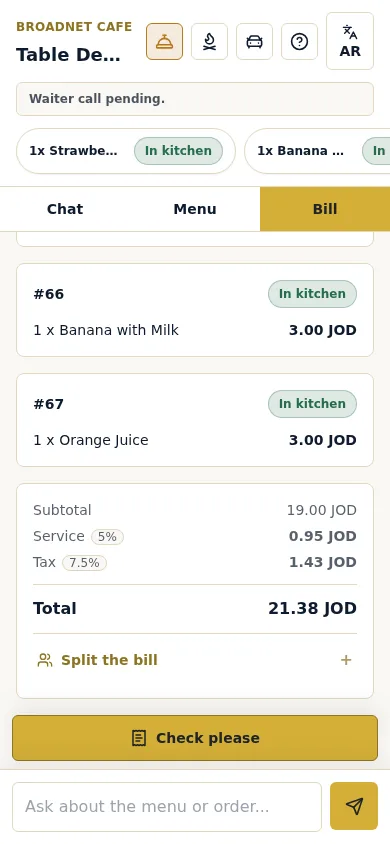
Real screenshot, Broadnet Cafe (BroadNet.AI's demo restaurant), 15 October 2026.
Why do allergy decisions stay with staff?
Because a wrong answer can hurt a child, and a menu doesn't always say enough.
In the US, 5.8% of children and 6.2% of adults have a diagnosed food allergy (CDC NCHS, 2021 data, published January 2023). In a registry of 2,827 people with food allergies, dining out was the second most common place for a reaction after home (21% against 44%), and in 53.9% of the restaurant reactions the guest had told staff about the allergy (Oriel et al., 2020).
So WaiterPilot never confirms that a dish is safe. It gives what your menu says and asks the guest to confirm with staff. Staff aren't alerted automatically, so make asking about allergies part of how a server greets a family table. See allergies and dietary questions.
How should a family restaurant set it up?
Put what families ask about into the menu, and keep a person between big tables and the kitchen.
- Write the details families ask about into the menu. Spice, what comes with each dish, smaller portions and a kids' section if you have one, and allergens. The chat answers only from what your menu says.
- Name who confirms first orders. A big table's first order is the one to read twice before it goes to the kitchen. Staff can reject a first order that looks wrong.
- Keep a server for every table. Some guests would rather order face to face. In a 2024 survey of US full-service diners, 64% said they'd choose traditional service from employees over a restaurant that uses technology, and 88% of Boomers did (NRA, 2024).
- Put the floor screen where someone sees it. Waiter calls and check requests appear there, and change colour at 1, 5 and 10 minutes.
- Put a QR card on every table. QR cards, menu loading and staff training are free with setup.
- Agree how orders reach your till. WaiterPilot has no POS connection, so decide who rings up table orders. See works with your POS.
Who should choose something else?
Family restaurants where guests order at a counter, pay first, or always want a server to take the order.
- Counter-service restaurants. If families order and pay at the counter and collect their food, a kiosk or a counter POS fits better.
- Pay-first service. WaiterPilot takes no payment. If guests pay before they eat, use a tool that takes payment.
- Every order must print or land in your POS. WaiterPilot has no POS or printer connection. A POS-native ordering tool saves the re-keying.
- Regulars who always want a server. If your guests want a person to take every order, the chat may go unused. A 30-day trial will show you.
Questions from family restaurants
Can more than one person at the table use their phone?
Yes. Anyone at the table can scan its QR code, and the bill is live on every phone. The table's first order waits for a staff confirm; after that, orders from the table go straight to the kitchen screen.
Will it tell us whether a dish is safe for my child's allergy?
No. It gives what the menu says and asks you to confirm with staff, who have the final word.
Does it know which dishes suit children?
Only what your menu says. If the menu has a kids' section or says a dish is mild, the chat answers from it; if not, it tells the guest to ask staff.
Can two families split one bill?
Yes. Guests split it evenly or see just their own share. Payment happens with your staff.
What if someone changes their mind after ordering?
Before Confirm, change the cart freely. Until staff confirm it, the guest can cancel the order. After that, ask a server.
What does it cost a family restaurant?
The same as any location: 30 days free, then $200 per location per month or $2,000 per year, with free setup, 0% commission and no contract. See pricing.
What should you read next?
- Allergies and dietary questionsWhat the chat says, and what staff decide.
- Waiter call and billCalls, the check request and the split, with real screenshots.
- Casual diningTable turns, groups and the check on a busy night.
- From scan to servedThe staff screens and the first-order check.
- Pricing30 days free, then one flat price per location.