Explainers
QR menu vs QR ordering vs order-and-pay: the differences, illustrated
A QR menu only shows the menu, QR ordering sends the guest's order to staff, and order-and-pay also takes payment on the phone. Side by side, with screenshots.

WaiterPilot Editorial
Updated , 10 min read

The short answer
A QR menu shows the menu on the guest's phone, and a server still takes the order. QR ordering lets the guest send the order from the phone to staff, by tapping dishes or by chat. Order-and-pay adds payment on the phone, usually inside a POS. They cut different waits, so choose by which wait hurts your service most.
Key points
- A QR menu is for reading; QR ordering sends the order; order-and-pay sends the order and takes payment on the phone.
- QR ordering comes in two styles: tapping dishes into a cart, or writing in your own words to a chat that asks about choices.
- Order-and-pay is usually built into a POS, so orders land in that POS and on kitchen printers.
- In the NRA's 2024 survey, 59% of full-service diners would open a menu by QR code, 48% would order and 46% would pay.
- WaiterPilot is conversational QR ordering with no payment: guests see a live bill they can split, then pay staff.
On this page
A QR menu, QR ordering and order-and-pay all start with the same scan, but they do different jobs. A QR menu shows the menu on the guest’s phone, and a server still takes the order. QR ordering lets the guest send the order from the phone to staff, by tapping dishes into a cart or by writing to a chat. Order-and-pay adds payment on the phone, and is usually built into a POS. Choose by the wait that hurts your service most: waiting for a menu, for a server to take the order, or for the check.
This post puts the kinds side by side, in a table and in real screenshots from WaiterPilot, a conversational QR ordering tool. For the full product page, with how setup works and what your restaurant needs, see QR table ordering with WaiterPilot.
What is the difference, in one table?
Short answer: what the guest can do after the scan. Read, order, or order and pay.
| QR menu | QR ordering (tap) | QR ordering (chat) | Order-and-pay | |
|---|---|---|---|---|
| What the guest sees | The menu, as a PDF or web page | A menu with dishes, options and a cart | A chat, a menu tab and a cart | A menu and cart, then a payment screen |
| What the guest does | Reads, then waits for a server | Taps dishes and options into a cart and sends it | Writes in their own words; the chat asks about choices; the guest confirms | Taps dishes into a cart and pays on the phone |
| Questions about dishes | Whatever the page says | Whatever the page says | Answered from the restaurant’s menu; the rest goes to staff | Whatever the page says |
| Where the order goes | A server’s notepad | The vendor’s dashboard, screen or printer | The vendor’s staff screens | The POS, kitchen printers and screens |
| Who takes payment | Staff, at the till | Varies by product | Varies; WaiterPilot takes none | The guest, on the phone |
| Example, as published on 15 Oct 2026 | Any QR code generator | MENU TIGER | WaiterPilot | Square self-serve ordering, Toast Mobile Order & Pay |
You will also see these called scan to order, table ordering, order at table, mobile ordering and pay at table. Pay at table on its own is a fourth thing: guests settle the bill from the phone but order from a server. Our post on pay at table vs order at table covers that pair. More terms are in the glossary.
What does a guest see with a QR menu?
Short answer: the menu, and nothing else.
The guest scans the code and the menu opens, often as a PDF, sometimes as a web page with photos. They read it, put the phone down, and wait for a server to take the order the usual way. Nothing reaches the kitchen until a person writes it down or rings it in.
A QR menu is the cheapest kind, since many QR code generators make one for free, and it saves reprinting when prices change. It does nothing about the wait for a server to arrive, the wait to order a second round, or the wait for the check. If those waits are not a problem in your restaurant, a QR menu may be all you need. Keep your printed menu on the table either way; QR codes work alongside it, not instead of it.
What does a guest see with QR ordering?
Short answer: a menu they can order from, either by tapping or by writing.
In tap-to-order systems such as MENU TIGER, the guest browses sections, taps a dish, picks options and adds it to a cart, much like an online shop. MENU TIGER, for example, describes QR code ordering and menus translated into “30+ foreign languages” on its plans (MENU TIGER, checked 15 Oct 2026).
In conversational systems such as WaiterPilot, the guest writes what they want in their own words and language. The chat answers from the restaurant’s own menu, puts dishes in the cart and asks about required choices, such as a size or a side, before the order can be confirmed.
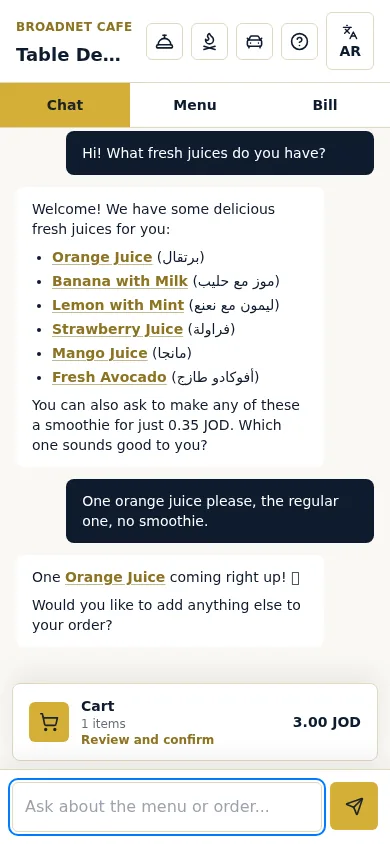
In our 15 October 2026 test at that demo restaurant, the chat answered from its real 147-dish menu and listed the juices with their saved Arabic names alongside. Nothing reaches staff until the guest reviews the cart and taps Confirm, and before that they can still change quantities.
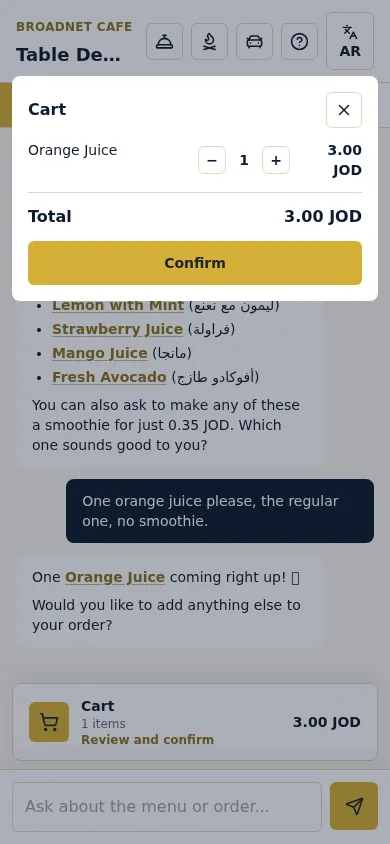
Which style suits you depends on your guests. If they know what they want and read your menu’s language, tapping is quick. If they ask a lot before ordering, or many don’t read your menu’s language, a chat that answers in their language does more of the server’s talking.
What does a guest see with order-and-pay?
Short answer: a menu and a cart, then a payment screen on the phone.
Order-and-pay is usually part of a POS. Square’s self-serve ordering page says QR codes “uniquely mapped to tables” open the restaurant’s Square Online ordering page in the phone’s browser; guests pay with Apple Pay, Google Pay or Square Pay, and orders from the same table combine into one ticket (Square, checked 15 Oct 2026).
Toast describes Mobile Order & Pay the same way: guests scan a per-table QR code to browse the menu, order and pay from their own device, and with group ordering they can join one tab and pay for their own items or the whole check. Payment is by card with Click to Pay, Apple Pay (not when tabs are on) or Toast gift cards. Toast also notes that guests cannot edit an order after they submit it (Toast support, checked 15 Oct 2026).
We have no screenshots of Square or Toast, so we don’t show them here. Their own pages have pictures.
Where does the order go in each kind?
Short answer: to a person, to the vendor’s screens, or straight into the POS.
- QR menu: nowhere. The server writes it down.
- Tap-to-order QR: to the vendor’s dashboard, kitchen screen or printer. Some sell a POS link as an add-on; MENU TIGER, for example, lists a Cloud POS add-on at $30 a month on its Regular and Advanced plans.
- Order-and-pay: into the POS. Square says orders go “to your POS and kitchen printers”. Toast tells restaurants to “designate an auto-firing device” so orders go straight to the kitchen, following the POS’s print routing.
- WaiterPilot: to its own staff board and kitchen screen, on phones or tablets you already have. It has no POS or printer connection.
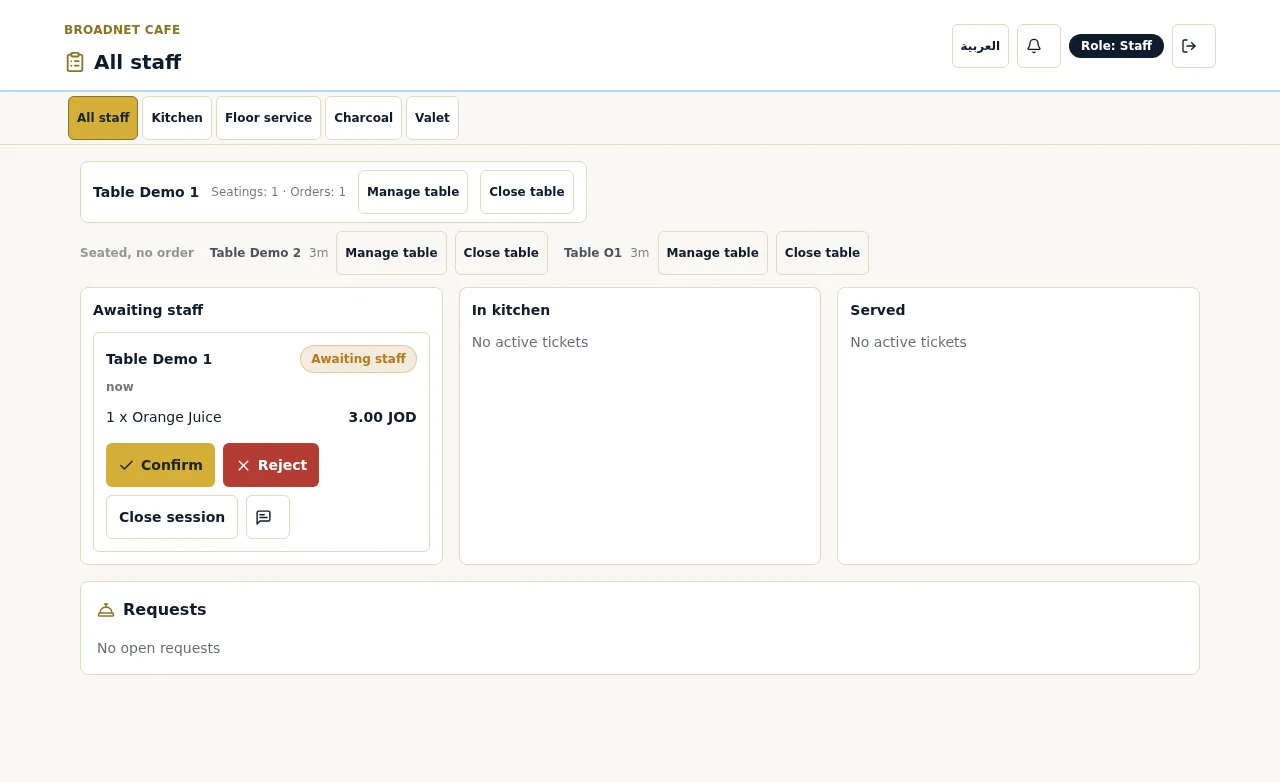
On the WaiterPilot board, the first order at each table waits as “Awaiting staff” until someone taps Confirm or Reject. The guest’s phone then shows it “In kitchen”. Later orders from that table go straight to the kitchen until staff close the table. The kitchen screen shows dishes, choices and notes, with no prices. The trade-off of having no POS link is that staff ring each sale into the till by hand; our nightly checklist for reconciling QR orders with the till works out that step.
Who takes payment?
Short answer: staff for a QR menu, the guest’s phone for order-and-pay, and it varies for QR ordering.
Order-and-pay exists to take payment on the phone. With a QR menu, payment stays with staff. QR ordering tools differ: some add a payment module, others leave payment where it is.
WaiterPilot leaves it with your staff. Guests see a live bill on every phone at the table, with each order and its status, the subtotal, and the tax and any service charge or gratuity the restaurant sets. They can split it evenly or see just their own share. When they tap Check please, they choose cash or card, so the waiter brings the card machine. Payment happens on your own terminal.
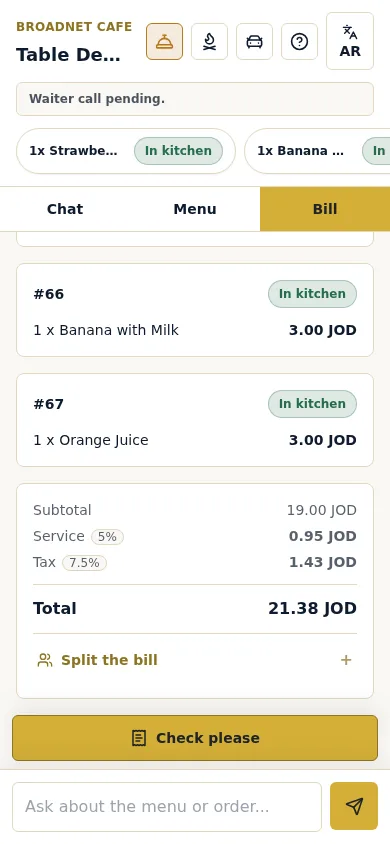
If guests paying from their phone is the main thing you want, choose order-and-pay or a pay-at-table tool. WaiterPilot is the wrong tool for that.
What does each kind cost?
Short answer: from free to a POS plan plus card fees to a flat monthly price. Compare what each includes.
Prices as published on 15 October 2026, per month:
| Product | Kind | Published price | Notes |
|---|---|---|---|
| QR code generator | QR menu | Often free | Printing costs only |
| MENU TIGER | Tap-to-order QR | Free (75 orders a month) to US$119 | Regular $17, Advanced $46, Premium $119; no commission per order |
| Ordder | POS with QR ordering | $29 to $199 | Its AI Waiter is on the $79 and $199 plans |
| Square for Restaurants (US) | Order-and-pay in a POS | Plus $49 or Premium $149 per location | QR code ordering on Plus and Premium, not Free; card processing on top, for example 2.9% + 30¢ online on Plus and Premium |
| Toast Mobile Order & Pay | Order-and-pay in a POS | No published price we could read | Needs Toast POS |
| WaiterPilot | Conversational QR ordering | $200 per location | After 30 days free; 0% commission; no contract; setup, QR cards and training free |
Sources: MENU TIGER pricing, Ordder pricing, Square restaurant pricing, WaiterPilot pricing. Vendors change prices, so check before you buy. For order-and-pay, card processing usually costs far more than the software; our cost guide works through three example restaurants.
WaiterPilot is not the cheapest option here, and we won’t pretend it is. The flat fee covers ordering by chat in the guest’s language, the staff board and kitchen screen, waiter calls, check requests and the live bill, with no hardware to buy.
Do guests want to scan at all?
Short answer: more will read by QR than order by QR, and fewer still will pay.
The National Restaurant Association’s 2024 survey of US full-service diners maps neatly onto the three kinds (NRA, 2024):
| Would use a QR code at a full-service restaurant to… | Matches | Share of diners |
|---|---|---|
| Open the menu | QR menu | 59% |
| Place an order | QR ordering | 48% |
| Pay | Order-and-pay | 46% |
Ordering by QR split sharply by age: 69% of millennials and 60% of Gen Z said they would, against 52% of Gen X and 21% of baby boomers. Whichever kind you choose, keep a server who will take an order the old way, and keep the printed menu. Our post on whether customers like QR code menus has the full survey history.
Which one should you choose?
Short answer: match the kind to the wait you want to remove.
| If this is true for you | Choose |
|---|---|
| Guests only need to read the menu; servers keep up with orders | A QR menu |
| Guests wait for a server to order, and they know what they want | Tap-to-order QR ordering |
| Guests ask lots of questions, or many don’t read your menu’s language | Conversational QR ordering, such as WaiterPilot |
| Guests must pay from their phone | Order-and-pay or pay at table |
| Every order must land in your POS or print in the kitchen | Your POS vendor’s own order-and-pay |
| You want to keep your current till and printed menu | A standalone QR ordering tool, such as WaiterPilot |
| Most guests are unlikely to scan a code | Keep server ordering; offer QR as an option, or skip it |
What to do next
Write down the one wait you most want to remove, then read the column that matches it. If it’s the wait to order, see how WaiterPilot handles it on the QR table ordering page, and try a sample order to watch an order go from a guest’s phone to the staff board. It’s a simulation in your browser, with no real order placed.
Questions readers ask
Is a QR menu the same as QR ordering?
No. A QR menu only shows the menu, often as a PDF or web page, and a server still takes the order. QR ordering lets the guest send the order from the phone to the restaurant's staff or kitchen.
What does order-and-pay mean?
Order-and-pay is QR ordering that also takes payment on the guest's phone. It is usually built into a POS, such as Square self-serve ordering or Toast Mobile Order & Pay, so orders go into that POS and guests pay by card or phone wallet.
Is WaiterPilot a QR menu, QR ordering or order-and-pay?
WaiterPilot is QR ordering by chat. Guests write what they want in their own words, the chat asks about required choices, and the confirmed order goes to the staff board. WaiterPilot takes no payment: guests see a live bill they can split, then pay staff.
Do guests need an app for any of these?
Usually not; most open in the phone's browser after the scan. With WaiterPilot there is no app, no sign-up and no account.
Which kind of QR code system costs least?
A plain QR menu can cost nothing beyond printing. QR ordering and order-and-pay range from free tiers with order limits to POS plans with card fees to flat monthly prices. WaiterPilot is $200 per location per month after 30 days free, with 0% commission.
Sources
- Restaurant Technology Landscape Report 2024, National Restaurant Association, 2024 (checked 2026-10-15)
- Self-serve ordering, Square, 2026 (checked 2026-10-15)
- Square for Restaurants pricing (US), Square, 2026 (checked 2026-10-15)
- Toast Mobile Order & Pay FAQs, Toast, 2026 (checked 2026-10-15)
- MENU TIGER pricing, MENU TIGER, 2026 (checked 2026-10-15)
- Ordder pricing, Ordder, 2026 (checked 2026-10-15)