Explainers
What happens when the AI waiter gets it wrong?
The AI can misread a request. Here is every check between a guest's words and the kitchen, who catches which mistake, and the gaps no software closes for you.

WaiterPilot Editorial
Updated , 9 min read
The short answer
The AI can misread a request, so WaiterPilot puts people in the path. The guest reviews the order and taps Confirm, and can cancel while it waits. Staff confirm or reject the first order at every table and can take an out-of-stock dish off the bill. When the menu doesn't answer a question, the guest is told to ask staff; on allergies, staff decide.
Key points
- Nothing reaches your staff until the guest has reviewed the cart and tapped Confirm, and required choices must be picked first.
- A guest can cancel an order while it is still Awaiting staff.
- The first order at every table waits for a person, who can Confirm or Reject it; later orders from that table go straight to the kitchen.
- The chat answers only from your menu; when the menu doesn't say, it tells the guest to ask staff, but it doesn't alert staff by itself.
- WaiterPilot never tells a guest a dish is safe for an allergy; staff always have the final word.
On this page
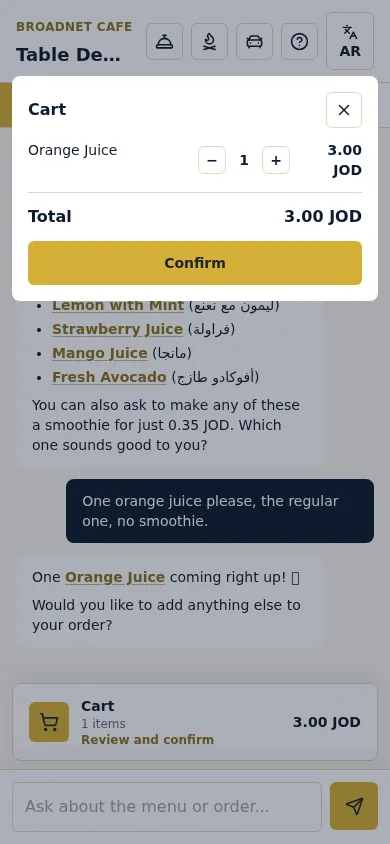
The AI can misread a request. Any system that takes orders in plain language will sometimes get a detail wrong, the same way a server sometimes mishears one. So WaiterPilot is built to put people in the path before a mistake becomes a wrong plate. The guest reviews the order and taps Confirm before anything is sent, and can cancel it while it waits. A staff member confirms the first order at every table and can reject it. Once a dish is in the kitchen, staff can mark it out of stock, which takes it off the bill. When the menu doesn’t answer a question, the guest is told to ask staff. On allergies, staff always have the final word.
This post goes through each of those checks, which mistakes each one catches, and the gaps that remain. If you’re deciding whether to trust an AI waiter at your tables, the gaps are the part to read closely.
Where can an AI waiter go wrong?
Short answer: in four places. It can misread what the guest wants, lack the answer, be asked something it shouldn’t decide, or be working from a wrong menu.
| Kind of mistake | Example | What catches it |
|---|---|---|
| Misreads the order | “No onions” lands on the wrong dish | The guest at review; staff at the first-order Confirm |
| Missing detail | A required side wasn’t chosen | WaiterPilot won’t let the order be confirmed until it is |
| Doesn’t know the answer | “Is the soup made with chicken stock?” when the menu doesn’t say | The chat says it doesn’t know and tells the guest to ask staff |
| Shouldn’t decide | “Is this safe for my nut allergy?” | The chat gives what the menu says and asks the guest to confirm with staff |
| Dish no longer available | The last portion went ten minutes ago | Sold-out marking before ordering; Out of stock after |
| Wrong menu | A price or ingredient on the menu is out of date | Only you: the chat repeats your menu |
The rest of this post takes them in the order a guest meets them.
What stops a mistake before the order is sent?
Short answer: the guest’s own review. Nothing reaches your staff until the guest taps Confirm.
The guest orders in their own words, in their own language. WaiterPilot asks about the choices a dish needs, such as the side or how a steak is cooked, and required choices have to be picked before the order can be confirmed. That closes the most common gap in a hand-written order: the side nobody asked about.
Then the guest sees the cart. They can change quantities, and they read the order back before tapping Confirm. Until then, nothing has been sent. This is the cheapest place to catch a mistake, and it’s the same moment a good server reads an order back at the table.
What if the guest spots it after tapping Confirm?
Short answer: while the order is Awaiting staff, the guest can cancel it. After that, they call a waiter.
After Confirm the guest’s phone shows the order as Awaiting staff (“Sent. Waiting for staff to confirm”) with a Cancel order button. Once staff confirm it, the phone shows In kitchen, and changes go through your staff. The guest can call a waiter from the phone at any time, and the call appears on the floor screen within seconds.
This limit isn’t special to AI ordering. Toast’s own FAQ for its Mobile Order & Pay says guests cannot edit an order after they submit it, and a manager may need to void it (Toast support, last updated 17 Sep 2026). Every ordering system needs a person for the late change.
Why does a person confirm the first order at each table?
Short answer: so someone on your team sees every new table’s order before the kitchen starts cooking.
The first order at each table sits on the staff board as Awaiting staff, with Confirm and Reject buttons. That glance is where staff catch what software shouldn’t judge alone:
- an order that doesn’t match who is sitting there, or comes from an empty table;
- a duplicate;
- a note that looks odd, or reads like an allergy;
- a note in a language nobody on shift reads, which needs a word at the table.
If something is wrong, staff tap Reject and go to the table. If it’s right, they tap Confirm and it moves to In kitchen.
What happens on later orders from the same table?
Short answer: they go straight to the kitchen. This is the main gap, and you should plan for it.
Once a table has a confirmed order, its later orders skip the staff check until staff close the table. That keeps the second round of drinks or a dessert from waiting for anyone. It also means a misread detail on a later order reaches the kitchen screen without a person reading it first.
What still catches it:
- The guest’s own review before Confirm, as above.
- The kitchen. The kitchen screen shows quantities, dishes, choices and notes, without prices. Train cooks to stop on anything unusual, and on any allergy note.
- Staff on the board. Every ticket shows on the main board. If a dish has to come off, staff mark it Out of stock, which takes it off the guest’s bill, and the guest sees a note.
- A word at the table. The same fix you use today when a server mishears.
What if the menu doesn’t have the answer?
Short answer: the chat says it doesn’t know and tells the guest to ask staff. It is built to answer only from your menu and not to guess, though like any AI it can word an answer badly.
WaiterPilot answers only from your menu. When the menu doesn’t say, the chat tells the guest it doesn’t have that information and asks them to check with a member of staff. Two honest caveats:
- It doesn’t alert staff by itself. The guest has to call a waiter or ask in person. If you want every unanswered question to reach a person, put “Questions? Call a waiter from your phone” on the table card and train staff on the floor screen.
- It’s only as right as your menu. If a price or an ingredient on the menu is out of date, the chat repeats it. The owner’s analytics list the questions the chat couldn’t answer and what guests asked for that isn’t on the menu, so you can close the gaps week by week.
The chat also stays on the menu. It steers politics, religion, medical or legal questions back to food, and guests can’t change its rules by telling it to.
What about allergies?
Short answer: WaiterPilot never decides. It gives what your menu says and asks the guest to confirm with staff. Your team has the final word.
This is the one place where a confident wrong answer would do real harm, so the chat doesn’t give one. It repeats what your menu says about the dish, asks the guest to confirm with staff, and leaves the decision to a person. It doesn’t tell a guest a dish is safe.
That alone isn’t enough, and the research shows why. In a US registry study of 2,827 people with food allergy, 53.9% of reactions in restaurants happened even though the guest had told staff about the allergy (Oriel et al., 2020). Telling someone isn’t the same as the message getting through. So pair WaiterPilot with a house rule: any allergy question, note or call means a person goes to the table before anything is cooked. Our page on allergies and dietary questions sets out that routine.
What if a note is unclear or in another language?
Short answer: notes go on the ticket as the request was taken, not translated. A person reads them.
When a guest asks for “no onions” or “sauce on the side”, the AI writes a short note on the ticket from the guest’s words. It isn’t translated for staff, and it may not be the guest’s exact wording. Two rules help:
- Whoever confirms first orders reads every note.
- Decide who on each shift reads notes in other languages, and keep a translation app on one staff phone.
The chat itself answers in the guest’s language. It has been tested in English, Arabic (several dialects) and Spanish, and it answers most other languages too. The screen buttons are in English or Arabic.
A worked example: a misread order at Casa Olivo
Casa Olivo is a fictional restaurant we use for examples (an example, not a customer). This is an illustration, not a transcript of a real chat.
Table 12, two guests, first order of the evening. One guest writes: “Two lamb shoulders, one without the yogurt sauce, and a lemonade.”
| Step | What happens | Who catches what |
|---|---|---|
| The chat asks | “Which side would you like with each lamb shoulder: rice or salad?” | Required side: can’t be skipped |
| The cart | Two lamb shoulders, both with the note “no yogurt sauce”; one lemonade | The guest doesn’t notice and taps Confirm |
| Awaiting staff | Marta sees two lamb tickets with the same note on both | Marta, reading the note before Confirm |
| At the table | Marta asks; only one guest wants it without sauce | A 30-second conversation |
| Fixed | Marta confirms the order and tells the kitchen which plate is without sauce | The kitchen hears it from a person |
| Later | The table orders two desserts; they go straight to the kitchen | No staff check, so the kitchen reads the ticket |
The mistake cost Marta one short walk to the table. Without the first-order check, it would have cost a plate of lamb remade without sauce. Notice the last row, too: the dessert order had no staff check, which is fine for desserts and is the reason the kitchen should stop on any note it doesn’t understand.
What won’t WaiterPilot catch?
Short answer: four things stay with you.
- A misread detail on a later order that the guest doesn’t notice at review, because later orders skip the staff check.
- Anything wrong on your menu. The chat repeats it.
- An allergy a guest never mentions. No system can act on what it isn’t told.
- A lost connection. WaiterPilot runs in the browser, so if the internet drops, fall back to the printed menu and a notepad.
Guests care about this. In a 2026 survey of 1,000 US adults by PAR Technology, which sells restaurant software, 47% said AI goes too far if it replaces most human interaction, and 44% when they “cannot easily reach a person” (QSR Web, 2026). WaiterPilot doesn’t replace your servers. Staff make and serve the food, confirm first orders and have the final say, and a guest can call a waiter from the phone at any moment.
What to do next
Test the mistakes yourself before you trust the system. On a test night, order with a misleading note, ask something your menu doesn’t cover, ask an allergy question, cancel an order while it waits, reject one from the board, and mark a dish Out of stock. How it works shows each of those screens, the onboarding checklist includes the test night, and what is an AI waiter? explains what the chat does and doesn’t do. You can also try a sample order now.
Questions readers ask
Can the AI waiter place an order on its own?
No. The chat builds the cart from what the guest says, but nothing is sent until the guest reviews it and taps Confirm. The first order at each table then waits for a staff member.
What if the AI misunderstands a guest's order?
The guest can fix it in the cart before tapping Confirm, or cancel while the order is Awaiting staff. Staff can reject a first order that looks wrong, and mark a dish Out of stock once it's in the kitchen, which takes it off the bill.
What if a guest asks something the menu doesn't cover?
The chat says it doesn't have that information and tells the guest to ask a member of staff. It is built not to guess, though like any AI it can word an answer badly, and it doesn't alert staff by itself, so the guest calls a waiter or asks in person.
Can the AI tell a guest a dish is safe for their allergy?
No. WaiterPilot gives what your menu says and asks the guest to confirm with staff. Your team always has the final word.
Are special requests translated for the kitchen?
No. Notes go on the ticket as the request was taken, not translated. The AI writes the note from the guest's words, so whoever confirms first orders should read every note.
Which mistakes won't WaiterPilot catch?
A wrong detail on a later order from a table that already has a confirmed order, because later orders skip the staff check. Also anything wrong on your menu itself, and an allergy a guest never mentions.
Sources
- Toast Mobile Order & Pay FAQs, Toast, 2026-09-17 (checked 2026-10-15)
- 3 in 4 diners open to restaurant AI, PAR survey finds, QSR Web (reporting PAR Technology's 2026 Industry Report), 2026-08-24 (checked 2026-10-15)
- Characteristics of Food Allergic Reactions in United States Restaurants (J Allergy Clin Immunol Pract), Oriel et al., via FARE, 2020-12 (checked 2026-10-15)