Running service
Sold out mid-service: handling 86'd dishes with digital ordering
What 86 means in a restaurant, and the exact steps when a dish runs out with QR ordering: before anyone orders it, while an order waits, and once it's cooking.

WaiterPilot Operations
Updated , 9 min read
The short answer
To 86 a dish is restaurant slang for taking it off because it has run out. With digital ordering, you stop new orders and fix orders already sent. In WaiterPilot, an owner or manager marks the dish sold out from a phone and the chat stops offering it right away. If it was already ordered, staff tap Out of stock, it leaves the bill, and a server offers something else.
Key points
- "86" means a dish is off: it has run out or been pulled for the night.
- A dish can run out at three moments: before anyone orders it, while an order waits for staff, or after it reaches the kitchen. Each needs a different button.
- In WaiterPilot, marking a dish sold out needs the owner or manager PIN, not the staff PIN, so decide before service who holds it.
- Out of stock on a ticket takes the dish off the guest's bill, and the guest sees a note; a person still goes to the table to offer something else.
- WaiterPilot doesn't count portions and isn't linked to your POS, so an 86 in your till must also be marked in WaiterPilot.
On this page
To 86 a dish is restaurant slang for taking it off because it has run out. With digital ordering, two jobs follow: stop new orders for it, and fix any order that already asked for it. In WaiterPilot, an owner or manager marks the dish sold out from a phone and the chat stops offering it right away. If a guest already ordered it, staff tap Out of stock on the ticket, the dish comes off the bill, and a server goes to the table with an alternative.
This guide walks through the three moments a dish can run out, the exact button for each, a worked Friday at Casa Olivo with the bill before and after, and a checklist for your pre-shift.
What does 86 mean in a restaurant?
Short answer: the dish is off. It has run out, or it has been pulled for the night.
“86” (eighty-six) works as a verb and an adjective: “86 the lamb”, “the lamb is 86’d”. Where the term comes from is disputed; what it means on the line is not. It is the same idea as “sold out” on a guest-facing menu, and many kitchens keep an “86 board” or list at the pass so servers know before they reach the table.
With paper and a server taking orders, the 86 list lives in people’s heads: the server hears it at pre-shift and steers guests away. With QR ordering, the guest orders without that conversation, so the menu itself has to know. That is the whole problem this post solves.
Why is a sold-out dish harder with QR ordering?
Short answer: the guest can order it before anyone tells them, and some orders reach the kitchen without a person in between.
Three things change when guests order on their phones:
- No server filters the order. A guest who wants the lamb will order the lamb unless the menu says it’s gone.
- Orders arrive quickly. A confirmed order reaches the staff board within seconds.
- Later rounds skip the check. In WaiterPilot, the first order at each table waits for a staff member to tap Confirm. After that, new orders from the same table go straight to the kitchen until staff close the table. That is good for a second round of drinks, but it means a dish that ran out five minutes ago can land in the kitchen with nobody looking.
So the system needs two controls: one that stops the dish being ordered, and one that cleanly takes it off an order that slipped through.
What are the three moments a dish can run out?
Short answer: before anyone orders it, while an order waits for staff, or after the order reaches the kitchen. Each has its own button.
| When it runs out | What you do in WaiterPilot | Who can do it | What the guest sees |
|---|---|---|---|
| Before anyone orders it | Mark it sold out in the menu editor, from a phone | Owner or manager (owner or manager PIN) | The chat stops offering it |
| An order with it is waiting as Awaiting staff | Confirm the order, then tap Out of stock on that dish; or ask the guest to cancel and reorder | Staff (Confirm, Out of stock); the guest (Cancel order) | A note that the dish was taken off, or their own cancelled order |
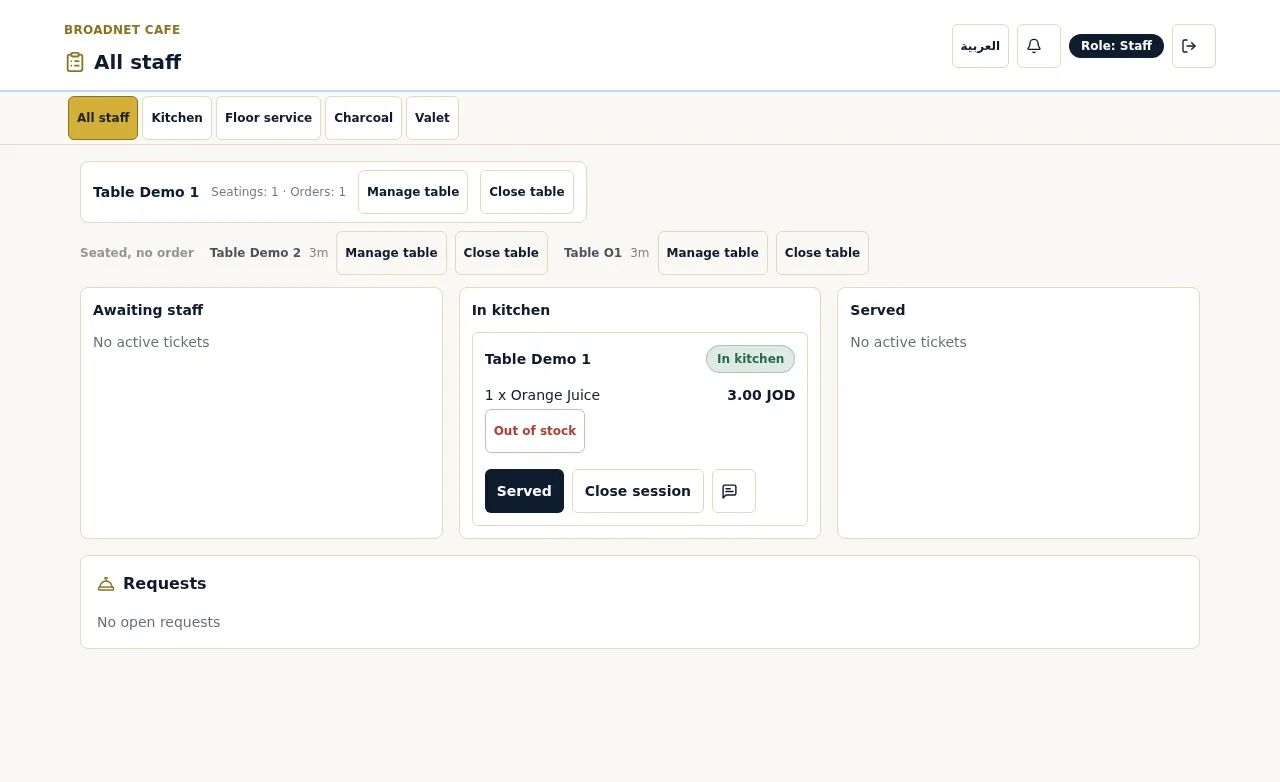
| The order is already In kitchen | Tap Out of stock on that dish | Staff | A note on their phone; the dish leaves their bill |
A few details matter here.
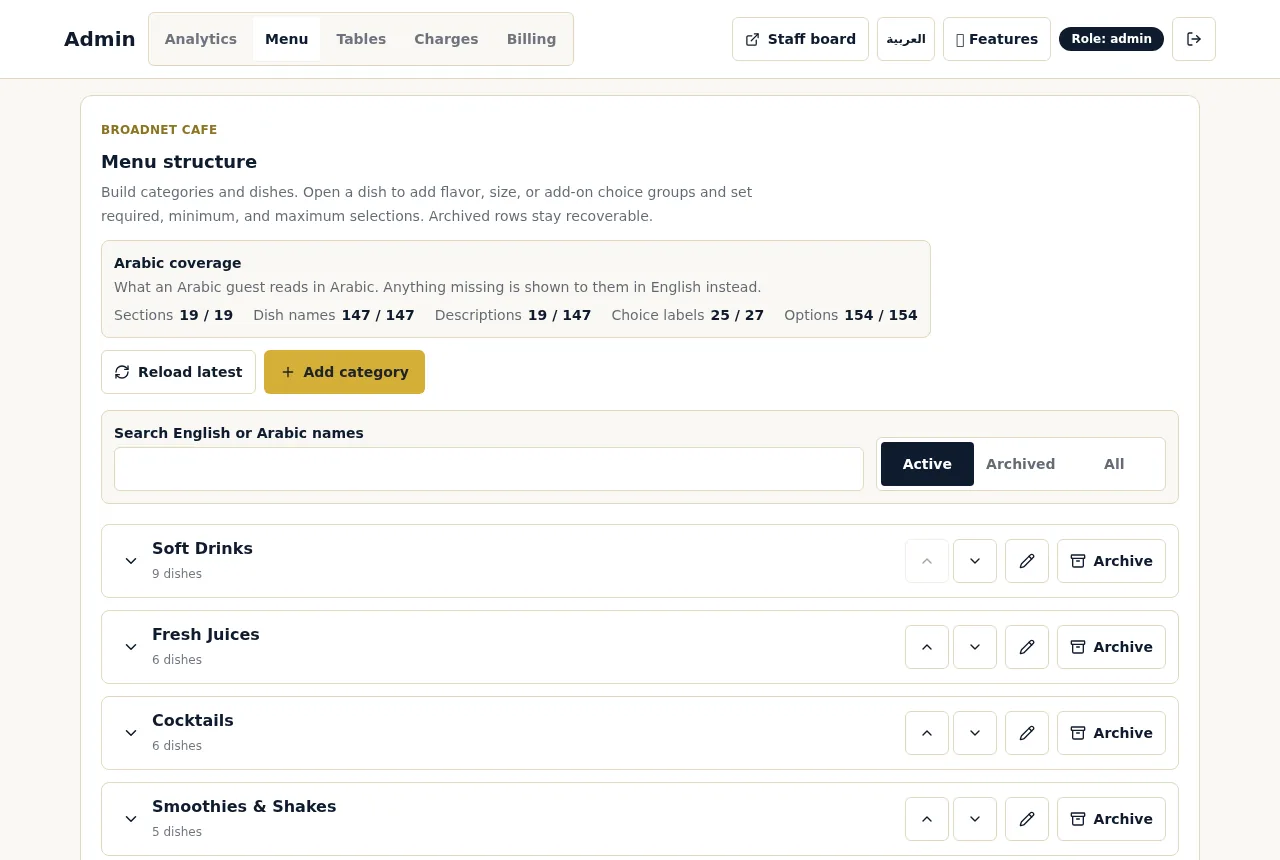
Marking a dish sold out needs the owner or manager PIN, not the shared staff PIN servers use for the board. That protects the menu from accidental edits, but it means somebody with that PIN must be reachable during service. If your manager is off on Fridays, decide in advance who holds it.
Reject is for a whole order that shouldn’t be cooked, such as a duplicate or the wrong table. It applies to a first order that is still Awaiting staff. If a first order has four dishes and only one is sold out, rejecting it throws away three good dishes. Confirm it, then take the one dish off with Out of stock, and tell the guest.
The guest can cancel while the order waits. Until a staff member confirms, the guest’s phone shows a Cancel order button. If a server reaches the table first, the guest can cancel and reorder without the missing dish.
WaiterPilot doesn’t count portions. A dish is either available or sold out. There is no “three left” warning, so keep your count where you keep it today, on the 86 board or the chef’s list, and mark the dish sold out when the count hits zero.
What does a Friday 86 look like? A worked example
Casa Olivo is a fictional restaurant we use for examples (an example, not a customer). Times and prices are illustrations. Casa Olivo’s bill lines are Service 10% and Tax 8% on the food, an 18% total on top of food.
The kitchen prepped 12 lamb shanks ($29). Here is how the last one goes.
| Time | What happens | Button | Effect |
|---|---|---|---|
| 20:02 | Chef plates the 12th lamb shank and calls “86 lamb” at the pass | — | Kitchen knows; the menu doesn’t yet |
| 20:03 | Table 12 (already has a confirmed order) adds a lamb shank and a green salad ($14) | — | Goes straight to the kitchen, as later orders do |
| 20:04 | Lucía, the floor manager, marks lamb shank sold out on her phone | Sold out (manager PIN) | The chat stops offering it to every table |
| 20:05 | The kitchen sees table 12’s lamb on the kitchen screen | Out of stock on the lamb | Lamb leaves table 12’s bill; the guest sees a note |
| 20:06 | Marta, the server, goes to table 12 and suggests the sea bass ($28) | — | A person explains, not just a note |
| 20:07 | The guest orders the sea bass by chat | — | Straight to the kitchen; the bill updates |
Table 12’s new items, before and after
| Food | Service 10% + Tax 8% | Total for these items | |
|---|---|---|---|
| As ordered at 20:03 (lamb $29 + salad $14) | $43.00 | $7.74 | $50.74 |
| After Out of stock at 20:05 (salad only) | $14.00 | $2.52 | $16.52 |
| After the sea bass at 20:07 (salad + sea bass $28) | $42.00 | $7.56 | $49.56 |
Two lessons from the timeline:
- The gap between “86” at the pass and “sold out” in the system is where orders slip through. At Casa Olivo it was two minutes, and one order landed in it. Out of stock handled it cleanly. The faster the person with the PIN hears the call, the smaller the gap.
- The note is not the apology. The guest’s phone says the kitchen ran out and they weren’t charged for it. That is useful, but a server at the table with a suggestion is what keeps the evening friendly.
What does the guest see when a dish runs out?
Short answer: either the dish is no longer offered, or a short note tells them it was taken off and not charged.
After a dish is marked sold out, the chat stops offering it and won’t add it to an order. If a guest asks for it, the chat answers from your menu as it stands, so the guest can choose something else on the spot. If the dish was already ordered and staff tap Out of stock, the guest’s phone shows a note that the kitchen ran out and they were not charged for it, and the live bill drops by that dish and its share of tax and any service charge you set.
What the guest doesn’t get automatically is a replacement. WaiterPilot doesn’t swap dishes on its own; your server offers the alternative, and the guest orders it by chat or tells the server. Guests want to know what’s happening with their food: in the National Restaurant Association’s 2024 survey, 21% of full-service diners said technology should help most with telling them when their food will arrive (NRA, 2024). A clear note plus a visit beats silence.
How does this compare with other ordering tools?
Short answer: ask every vendor how a sold-out dish is handled after the order is sent. The answers differ.
Two examples from Toast’s published FAQ, read on 15 October 2026: guests “cannot edit a Toast Mobile Order & Pay order after they submit it”, and a manager may need to void it (Toast, 2026). Because Toast’s ordering lives inside its POS, a void there is part of one system. With WaiterPilot, which has no POS connection, Out of stock takes the dish off the WaiterPilot bill, and your staff also void it in your till if they already rang it in. The works with your POS page explains where that till step sits.
Questions to ask any vendor, including us:
- Who can mark a dish sold out, from which device, and how fast does the guest menu change?
- What happens to an order with that dish that is already in the kitchen?
- Does the guest’s bill update, and what does the guest see?
- Can a guest edit or cancel an order after sending it?
- Does an 86 in the POS carry over to the QR menu, and the other way round?
How do you keep the 86 list and the menu in step?
Short answer: one person owns the sold-out switch, and the pass calls 86s to that person before the server hears them.
The order of the call matters. If the server hears “86 lamb” first, they steer the tables they’re standing at, but every guest on a phone can still order it. If the person with the PIN hears it first, the whole room stops ordering it at once.
Because WaiterPilot isn’t linked to your POS, a dish marked off in your till isn’t marked off in WaiterPilot, and the other way round. Mark it in both, or pick one as the master list and copy from it at every 86. When the dish comes back, such as tomorrow’s lunch, switch it back on the same way, from the menu editor.
What should you set up before service?
Use this list at pre-shift, every service:
- Name the PIN holder. Who marks dishes sold out tonight, and who backs them up.
- Mark known 86s before doors open. Anything you already know you won’t have tonight, mark it sold out before the first guest scans.
- Write portion counts on the 86 board for dishes likely to run out, so the call comes before the last plate, not after.
- Agree the call path. Pass calls “86” to the PIN holder first, then the floor.
- Teach Out of stock and the visit together. Tap Out of stock, then a server goes to the table within a couple of minutes with an alternative.
- Use Confirm plus Out of stock for a partly sold-out first order. Keep Reject for orders that shouldn’t be cooked at all.
- Void in the till too if the dish was already rung in.
- Switch dishes back on when they return, and check the menu at the start of the next service.
- Watch the colours. Waiting orders and calls change colour at 1, 5 and 10 minutes; a guest whose dish was taken off may call a waiter, and that call should not sit.
Over time, the owner page’s top dishes and busy hours help you prep the right counts, and its list of what guests asked for that isn’t on your menu shows what they wanted instead.
What to do next
Pick the three dishes you 86 most often and decide, today, who marks them sold out and how the call reaches that person. Then try a sample order to see the staff board, Out of stock and the guest’s phone side by side; it’s a simulation in your browser, with no real order placed. The full order flow, with what to do when other things go wrong, is on how it works. Setting up from scratch? The two-week setup checklist and training staff on a new board cover the rest. WaiterPilot is $200 per location per month after 30 days free, with 0% commission; see pricing.
Questions readers ask
What does 86 mean in a restaurant?
It is kitchen slang for a dish that is off: it has run out, or it has been taken off for the night. Staff say "86 the lamb" or "the lamb is 86'd".
How do I mark a dish sold out in WaiterPilot?
An owner or manager opens the menu editor on their phone, using the owner or manager PIN, and marks the dish sold out. WaiterPilot stops offering it right away.
What if a guest already ordered the dish that ran out?
If the order is already in the kitchen, staff tap Out of stock on that dish. It comes off the guest's bill and the guest sees a note. A server then goes to the table and offers something else.
Can a guest cancel an order with a sold-out dish?
Yes, while the order is still Awaiting staff, the guest can tap Cancel order and order again. Once staff confirm it, changes go through your staff.
Does marking a dish sold out in my POS update WaiterPilot?
No. WaiterPilot has no POS connection, so it doesn't see your till's 86 list. Mark the dish in WaiterPilot as well, and the other way round.
Can WaiterPilot warn when only a few portions are left?
No. WaiterPilot doesn't count portions: a dish is either available or sold out. Keep your portion count where you keep it today and mark the dish sold out when it runs out.
Sources
- Toast Mobile Order & Pay FAQs, Toast, 2026-09-17 (checked 2026-10-15)
- Restaurant Technology Landscape Report 2024, National Restaurant Association, 2024 (checked 2026-10-15)