Running service
Digital waiter call vs wireless call buttons: what restaurants should know
A table button works for every guest with no phone; a call from the phone tells staff what the guest wants. What each shows, needs and does when nobody answers.

WaiterPilot Operations
Updated , 8 min read
The short answer
A wireless call button is hardware on each table: one press, and a receiver, screen or wristwatch tells staff which table wants them. A digital waiter call lives on the guest's phone, so staff see the table and what it wants: a waiter, or the check by cash or card. Buttons work for guests without a phone; phone calls need no hardware, but need a scan and a connection.
Key points
- A call button needs nothing from the guest but a press; a phone call needs the guest to scan the table's QR code and have a connection.
- A phone call can say what the guest wants: a waiter, the check with cash or card, or optional calls such as shisha coals or valet.
- With WaiterPilot, a waiting call changes colour at 1, 5 and 10 minutes and stays on screen until someone taps Ack.
- Neither option walks to the table. If nobody watches the receiver or the floor screen, calls wait.
- Many restaurants are best served by both: the phone for guests who scanned, a server's eye for those who didn't.
On this page
A wireless call button is a piece of hardware on each table: the guest presses it, and a receiver, a wall display or a server’s wristwatch shows the table number. A digital waiter call lives on the guest’s phone, so staff see the table and what it wants, such as a waiter, or the check paid by cash or card. Buttons work for every guest, phone or not. Phone calls need no hardware, but they need a scan and a connection. Neither one walks to the table for you.
This guide compares the two on what matters during service: what staff see, what each needs, what happens when nobody answers, and when the button is simply the better tool.
What is a wireless waiter call system?
Short answer: a button on every table and something that alerts staff, such as a receiver display, a pager or a watch.
Owners search for these systems in many languages, and the search suggestions show the shapes they take. We looked in October 2026 (search suggestions, not volumes):
| Language | What owners search | What it usually means |
|---|---|---|
| English | waiter call system, call waiter button (+ wireless, watch) | Table buttons with a receiver or a watch for staff |
| German | Kellnerrufsystem | Usually hardware buzzers |
| Turkish | garson çağırma sistemi, butonu (+ zili, masa lambası) | Buttons, bells, table lamps |
| Arabic | جرس النادل، زر استدعاء النادل | Waiter bell, waiter-call button |
| Korean | 호출벨 | Call bell |
| Japanese | 店員呼び出しボタン | Staff-call button |
| Chinese | 服务员呼叫器 | Waiter pager |
| Portuguese (Brazil) | chamar garçom | Hardware buzzers and traveller searches, mixed |
| English (India) | waiter calling system | Search suggestions pair it with a POS brand |
The idea is the same everywhere: one press, and a server knows which table wants them. It is simple, and simplicity is its main strength.
How does a digital waiter call work?
Short answer: the call button is on the screen the guest already ordered from, and the call lands on your staff screens within seconds.
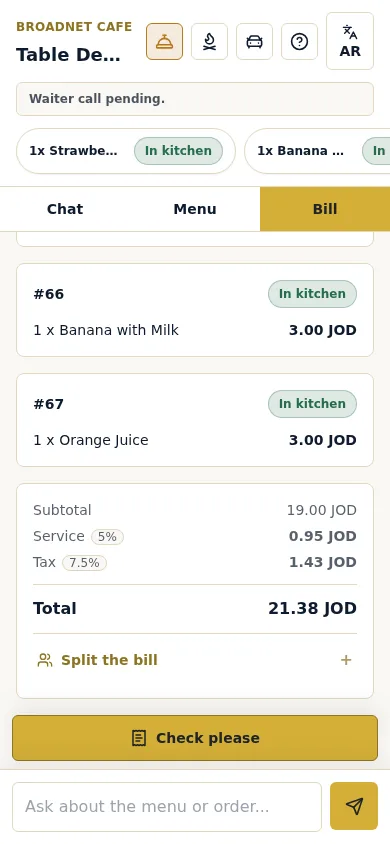
With WaiterPilot, guests scan the QR code on their table and the menu opens in the phone’s browser, with no app and no sign-up. The guest screen has header buttons to call a waiter and to get help, and Chat, Menu and Bill tabs. To call someone, the guest taps the waiter button or simply writes in the chat (“Could you call the waiter to our table please?”). The chat answers in the guest’s language.
On the guest’s side, the screen shows “Waiter call pending”. On your side, the call appears within seconds:
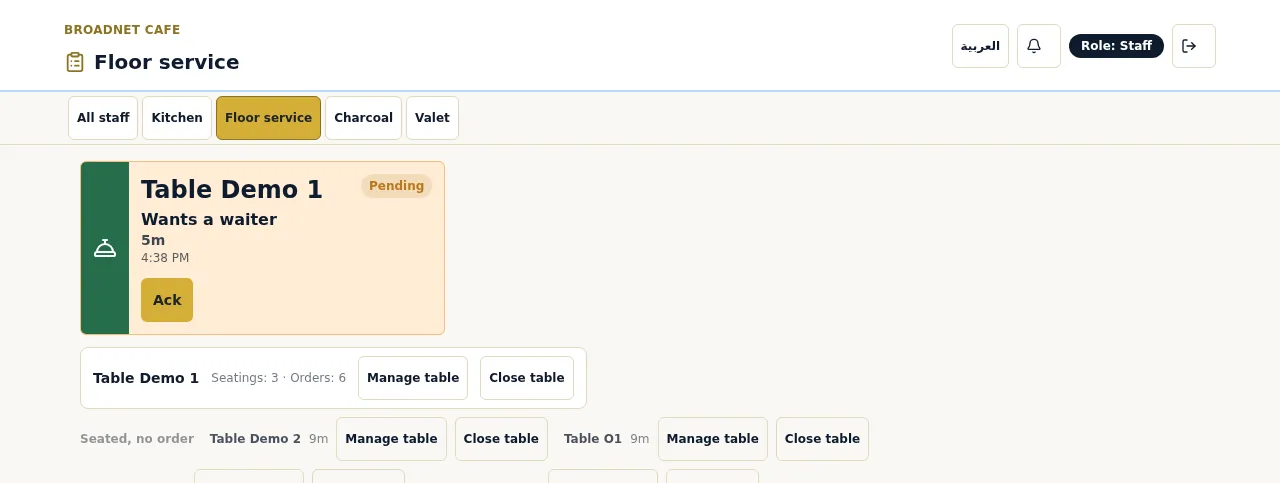
- on the Floor service screen, as a card with the table, “Wants a waiter”, the minutes waiting and an Ack button;
- on the main board, in the Requests panel next to the table’s tickets, so a manager sees calls and orders together.
A server taps Ack, which tells the rest of the team someone has it, and walks over. Calls that wait change colour at 1, 5 and 10 minutes.
The same screen carries other requests. A check request asks the guest “Will you be paying with cash or card?”, so the server arrives with the card machine already in hand. Restaurants can also turn on calls for shisha coals and valet, each with its own staff screen. Staff phones can get alerts; on an iPhone, the staff board must be added to the Home Screen first. More detail, with real screenshots, is on waiter call and bill.
How do the two compare, side by side?
Short answer: a button wins on simplicity and reach; a phone call wins on information and on needing no hardware.
| Question | Wireless call button | Digital call (WaiterPilot) |
|---|---|---|
| What does the guest need? | A finger | A phone, a scan of the table’s QR code, a connection |
| What do staff see? | The table number (some systems add a call type; ask the vendor) | Table, request type, minutes waiting, Ack status |
| Kinds of request | One, or a few fixed buttons | Waiter, check (with cash or card), plus optional coals and valet |
| Languages | None needed | Chat in the guest’s language (tested in English, Arabic and Spanish); buttons in English or Arabic |
| Hardware to buy | A unit per table, plus receivers, displays or watches | None: guests’ phones and your existing phones or tablets |
| Goes with ordering? | No, it only calls | Yes, the same screen orders, calls and shows the live bill |
| A guest without a phone | Works | Doesn’t; that guest waves or catches a server’s eye |
| When nobody answers | Depends on the system: ask whether it repeats or escalates | The call stays on screen and changes colour at 1, 5 and 10 minutes |
| Records afterwards | Depends on the system | Owner analytics include call-answer times |
Notice the two rows that cut against us. A guest without a phone can’t use a phone-based call, and a button needs no scan at all. Those are real limits, not footnotes.
What happens when nobody answers?
Short answer: the call waits. The difference is how loudly it waits, and whether you can see it afterwards.
This is the question to ask any call system, including ours. Both kinds only notify. If the person wearing the watch is in the walk-in, or nobody is looking at the floor screen, the guest waits.
What WaiterPilot does about it:
- The call stays visible. It sits on the floor screen and the main board until someone taps Ack.
- It ages in colour. At 1, 5 and 10 minutes the card changes colour, so an old call stands out from a new one.
- The guest isn’t left guessing. Their screen shows the call is pending.
- You can measure it. The owner page includes call-answer times, so you can see whether Friday’s calls waited longer than Tuesday’s.
What it doesn’t do: walk to the table, or reassign the call to someone else automatically. You still need a rule for who watches the screen.
Why it matters: in a survey by PAR Technology, which sells restaurant software, 44% of US adults said AI goes too far when “they cannot easily reach a person” (QSR Web, 2026). Whatever ordering tool you use, the way to reach a human has to work every time.
What does each one cost?
Short answer: buttons are a hardware purchase; a phone-based call comes with the ordering software. Get dated quotes before you compare.
We have not published hardware prices because we could not verify current ones; prices also vary by country and supplier. Instead, here is a worksheet with Casa Olivo’s table count. Fill in your own quotes.
Casa Olivo is a fictional restaurant we use for examples (an example, not a customer).
| Line | Wireless buttons | WaiterPilot |
|---|---|---|
| Tables | 18 | 18 |
| Units to buy | 18 table buttons + spares (your quote: ____) | None |
| Staff receivers | Displays, pagers or watches for each server on shift (your quote: ____) | Phones or tablets you already own |
| Power | Batteries or charging, per the vendor (ask) | Your staff devices’ normal charging |
| Replacement for lost or broken units | Ask the vendor | QR cards reprinted from the owner page |
| Monthly cost | Ask the vendor whether there is any | $200 per location per month after 30 days free, which also covers ordering, the staff board and the live bill |
| What you get | Calls only | Calls, check requests, ordering by chat, live bill with split |
The comparison is only fair if you need what the second column does. If all you want is a call button, $200 a month for a whole ordering system is the wrong purchase, and a set of buttons is the honest answer.
When are call buttons the better choice?
Short answer: when your guests won’t scan, when your signal is weak, or when a call is all you need.
Not every guest wants to use their phone at the table. In the National Restaurant Association’s 2024 survey, 59% of full-service diners said they would open a menu by QR code and 48% would order with one; among baby boomers, only 21% would order by QR (NRA, 2024). A 2023 William Blair survey reported that over 45% of consumers weren’t comfortable using QR codes to view menus, order and pay (Restaurant Dive, 2023).
Choose buttons if:
- most of your guests are unlikely to scan a code, for example an older lunchtime crowd;
- mobile signal and guest Wi-Fi are unreliable in your dining room;
- you only want guests to be able to call, and servers will keep taking every order;
- you want calls to keep working when your internet is down (most button systems run on their own radio link, but ask the vendor).
Choose a phone-based call if:
- you want guests to order, call and ask for the check from one screen (QR table ordering explains the ordering side);
- many guests don’t speak your language, so a chat in their own words helps;
- you want to know what the guest wants before you walk over;
- you’d rather not buy, charge and replace hardware for every table.
Can you use both?
Short answer: yes, and in many dining rooms that is the best set-up.
A button and a phone call don’t conflict. Keep your buttons for guests who don’t scan; let guests who are already ordering on their phone call from there. At Casa Olivo (our example), the lunchtime regulars on the terrace use the printed menu and the button on the table, while the evening crowd, many of them tourists, order and call from their phones. The server’s job is the same either way: see the call, acknowledge it, go to the table.
If you run both, set one rule so nothing falls between them:
- Pick one person per section who watches both the receiver and the floor screen.
- Put the floor screen where that person looks, not on a counter behind them.
- Tap Ack before you walk, so two servers don’t go to the same table.
- Agree an escalation point. For example: any call that turns orange at 5 minutes goes to the manager.
- Check call-answer times weekly on the owner page and talk about the slow nights.
- Keep the printed menu on every table. Ordering by phone works alongside it, never instead of it.
What to do next
Count how many calls your servers answered last Friday that turned out to be “can we have the check?”. Those are the ones a phone-based call with cash or card can speed up. Then try a sample order to see the waiter button, the check request and the floor screen side by side. For the full set-up on your floor, read how it works, see which jobs you can take off servers on a short-staffed night, or check pricing.
Questions readers ask
Do I need to buy waiter call buttons to use WaiterPilot?
No. The waiter button is on the guest's phone, in the same screen they order from, and staff see calls on phones or tablets you already have. You can keep buttons you already own if you like.
How does a digital waiter call reach staff?
With WaiterPilot, the call appears within seconds on the floor screen and in the main board's Requests panel, with the table, the request and the minutes waiting. Staff tap Ack so the rest of the team knows someone has it.
What happens if nobody answers a call?
In WaiterPilot the call stays on screen and changes colour at 1, 5 and 10 minutes, and the guest sees that the call is pending. But software can't walk to the table: if nobody watches the floor screen, calls wait.
Can a guest call a waiter in another language?
Yes. The guest can tap the waiter button or ask in the chat, which answers in the guest's language. The buttons themselves are in English or Arabic.
When are physical call buttons the better choice?
When many guests won't scan a QR code, when your signal is unreliable, or when you only want a call function and nothing else. A button needs no phone, no scan and no connection on the guest's side.
Sources
- 3 in 4 diners open to restaurant AI, PAR survey finds, QSR Web (reporting a PAR Technology survey), 2026-08-24 (checked 2026-10-15)
- Restaurant Technology Landscape Report 2024, National Restaurant Association, 2024 (checked 2026-10-15)
- 47% of consumers uncomfortable using QR codes in restaurants (William Blair survey), Restaurant Dive, 2023-04-19 (checked 2026-10-15)