Choosing a system
GoTab vs Toast mobile ordering: the guest's tab or the table's
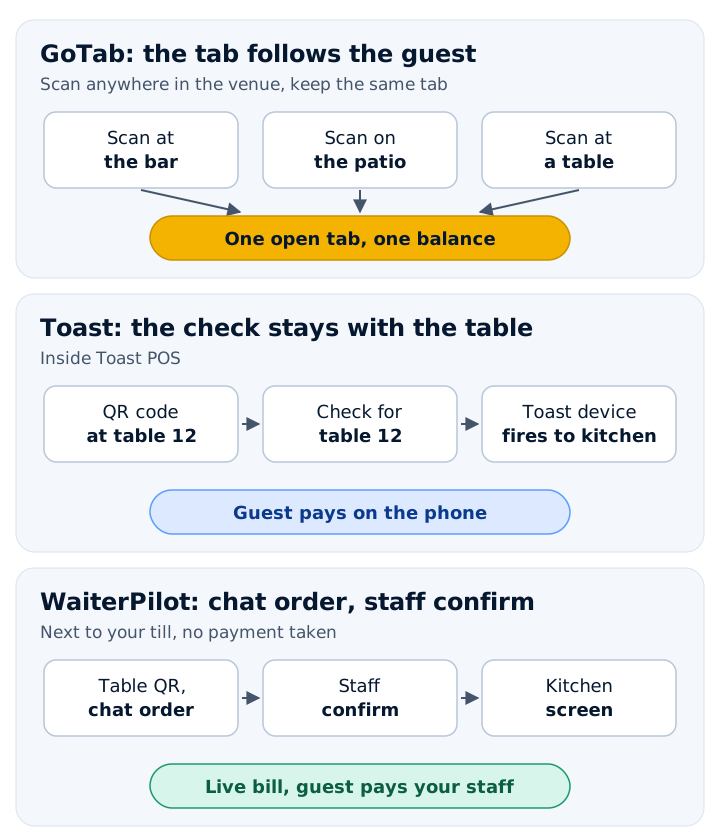
GoTab's QR tab follows the guest around the venue; Toast's is tied to the table, inside Toast POS. Prices, limits and fit, checked 18 Nov 2026.

WaiterPilot Research
Updated , 10 min read
The short answer
GoTab's QR ordering opens a tab that belongs to the guest: scan another code at the bar or on the patio and the same tab comes along. Toast Mobile Order & Pay ties the order to the table where the guest scanned, inside Toast POS. Both let guests order and pay on their own phone. GoTab publishes its prices; Toast's pricing page didn't open for us.
Key points
- GoTab says its tab "follows the guest, not the table": a new scan anywhere in the venue keeps the same tab, order history and open balance.
- Toast says guests scan the code at their table "to identify where they're sitting"; orders fire to the kitchen through a Toast device, so it works inside Toast POS.
- GoTab lists Basic $15, Pro $99 and Sync $229 per location per month, with QR and online ordering on all three; card processing starts at 2.40% + $0.15 for qualifying locations.
- Toast's pricing page returned HTTP 403 to our checker on 18 November 2026, so we give no Toast price. Ask for a written quote.
- GoTab's pricing page says no long-term software contract, while its comparison page says 2-year standard terms: ask which applies to your quote.
On this page
GoTab’s QR ordering opens a tab that belongs to the guest: if they scan another code at the bar or on the patio, the same tab and balance come with them. Toast Mobile Order & Pay ties each order to the table where the guest scanned, inside Toast POS. With both, guests order and pay on their own phone. Pick GoTab if guests move around your venue; if you already run Toast POS and seat guests at fixed tables, Toast’s own module is the shorter path.
We checked every vendor fact below on GoTab’s and Toast’s own public pages on 18 November 2026 (sources at the end). We make WaiterPilot, a different kind of tool, so read this as a vendor’s comparison.
How do GoTab and Toast mobile ordering compare?
Short answer: they differ most on where the tab lives, what each publishes about price, and what happens when the internet drops.
| GoTab | Toast Mobile Order & Pay | WaiterPilot, for reference | |
|---|---|---|---|
| Where the tab lives | With the guest: a new scan anywhere in the venue keeps the same tab, order history and balance | With the table: guests scan the code at their table “to identify where they’re sitting” | With the table: each table has its own QR code |
| Opening a tab | A scan or a text link; friends join the tab from a text link | A standard tab with the guest’s name, or a pre-authorized card (US only) | No name, phone number or email |
| Staff and guests on one check | Guests can start with a server and add a round from their phone | A server can start the check on the POS or Toast Go, and guests add to it by scanning | Staff confirm the first order at each table; later orders go straight to the kitchen |
| Paying | On the phone with Easy Tab, including the tip | On the phone: card, Click to Pay, Apple Pay (not when tabs are on), Toast gift cards | No payment: a live bill on every phone, paid to your staff |
| Splitting | By item, by seat or by percentage | Evenly, per Toast’s FAQ | Evenly, or each guest’s own share |
| Changing a sent order | Not stated on the pages we read | Guests cannot edit it; a manager may need to void it | Guests can cancel while it is still awaiting staff |
| Guest languages | Not described on the pages we read | Not described on the Mobile Order & Pay pages; staff devices offer English, Spanish, French and Simplified Chinese, and menu names and items are not translated | Chat answers in the guest’s language (tested in English, Arabic and Spanish); buttons in English or Arabic |
| Internet outage | Sync plan adds an on-premises server for enhanced offline running | Ordering and payment through Mobile Order & Pay “not supported” | Runs in the phone’s browser; ask us what staff do if the connection drops |
| Software price | Basic $15, Pro $99, Sync $229 per location per month | Pricing page returned HTTP 403 to our checker | $200 per location per month, or $2,000 per year |
| Card processing | From 2.40% + $0.15 for qualifying locations | Not on the pages we could read | None taken; 0% commission |
| Hardware | Windows, iOS and Android devices; leasing and 0% financing for qualified operators | Not on the pages we could read | Nothing to buy: guests’ phones, your staff’s phones or tablets |
| Contract | Two answers on GoTab’s own pages (see below) | Not on the pages we could read | No contract |
| Your POS | GoTab is a POS | Part of Toast POS | No POS or printer connection |
“Not stated” means we didn’t find it on the pages we read, not that the feature is missing. Ask.
Where does the tab live in each one?
Short answer: GoTab follows the guest; Toast stays with the table.
On its QR ordering page, GoTab says a scan or a text link opens the menu in the guest’s own browser, with no app. The tab is tied to the guest rather than the seat: a guest can scan a new code at a different table, on the patio or at the bar, and “the same tab, the same order history, and the same open balance follow them there.” A friend can join the tab from a text link and order on their own, and the group splits by item, by seat or by percentage. Easy Tab puts the check on the guest’s phone to review, add a tip and pay. GoTab also says mobile ordering is part of its base platform, not a paid add-on.
Toast’s Mobile Order & Pay FAQ describes the other model. “Guests simply scan a QR code at their table to identify where they’re sitting, browse your menu, place their order, and pay for their meal, all from their own device.” Each table has its own code. Guests dining together can start a group tab that combines their orders on one ticket, and a server can start the check on the POS and let guests add to it. A standard tab starts with the guest’s name; a restaurant can instead require a pre-authorized card, which Toast says is available in the US only. Guests who want to reorder can tap Order Again on items from the current tab.
For a restaurant where every party sits at one table for the whole meal, the difference is small. For a brewery, a food hall or a bar with a patio, where guests move, it is the main difference.
What does each one cost?
Short answer: GoTab publishes a price list; Toast’s pricing page didn’t open for us.
GoTab’s pricing page, read on 18 November 2026, lists three plans per location per month:
- Basic, $15: QR and online ordering, pre-authorized tabs, one POS. Easy Tab is a $25 a month add-on, and a kitchen display (KDS) is $25 a month.
- Pro, $99: POS and handhelds, Easy Tab, kiosk, QR ordering and payment, online ordering. A KDS is $35 a month.
- Sync, $229: everything in Pro, plus an on-premises server for enhanced offline running.
Card processing starts at 2.40% + $0.15 for locations processing under $5 million a year on Mastercard, Visa and Discover; other card types may cost more. GoTab says setup costs depend on the size of your operation, and an account executive quotes them.
For Toast, we have no price to give. Toast’s pricing page returned an HTTP 403 error to our checker on 18 November 2026, as it did in October, and its help articles on Mobile Order & Pay give no figure. Other companies’ pages quote Toast prices, but we only use a vendor’s own published numbers, so we don’t repeat them. Ask Toast for a written quote that covers software, hardware, card processing and Mobile Order & Pay.
What should you ask before you sign?
Short answer: the questions the public pages answer twice, or not at all.
- Contract length (GoTab). GoTab’s pricing FAQ says: “GoTab does not require a long-term software contract or proprietary hardware lock-in.” Its Toast comparison page lists “2-year standard terms, transparent, with flexible options available”. Its hardware financing runs on 24 or 36 month contracts. Ask which terms apply to your quote.
- Price (Toast). Ask for the full monthly cost per location, the card rate for orders paid by phone, and any agreement length.
- Internet outages. Toast’s FAQ says that during an outage, “order and payment processing through Toast Mobile Order & Pay® is not supported”, and servers should take orders instead. GoTab sells offline running on its Sync plan. Ask both what guests see when the connection drops.
- Changing an order. Toast says guests cannot edit a Mobile Order & Pay order after they submit it. Ask GoTab the same question.
- Languages. Neither describes ordering in the guest’s own language on the pages we read. Toast’s device language article says staff devices switch between English, Spanish, French and Simplified Chinese, and that menu names and items are not translated. If many of your guests read another language, ask both.
Our contract questions guide and the restaurant QR buyer’s checklist have the rest of the list.
Which one fits your venue?
Short answer: GoTab where guests move around; Toast where you already run Toast and guests stay at one table.
- GoTab, in its own words, fits breweries and taprooms, food halls and multi-vendor venues, entertainment venues with several zones, high-volume bars where the tab moves from bar to patio to table, and hotels and multi-concept venues.
- Toast’s own module fits a restaurant already on Toast POS. Toast’s help center says orders fire to the kitchen through a designated auto-firing Toast device, tables and QR signs are set up in Toast Web, and you need at least one Dine In dining option. If you already have those, it is the least extra work.
- If you are replacing your POS anyway, compare whole systems, not QR modules, and get both quotes for the same setup. Our Toast vs Square comparison uses the same method.
- If your till works and you only want table ordering, you may not need to switch at all. Our guide to Toast Mobile Order & Pay alternatives covers the tools that run next to an existing POS.
A third option, if guests don’t need to pay on their phone
Short answer: WaiterPilot does a smaller job than either, and it is the wrong choice if guests must pay on their phone.
GoTab and Toast are both POS systems that take payment. WaiterPilot is an AI waiter that runs next to the till you already have:
- Ordering by conversation. Guests scan the QR code on their table and the menu opens in their phone’s browser, with no app and no sign-up. They ask about dishes and order by chat in their own words; answers come from your menu, and when the menu doesn’t say, it tells the guest to ask a staff member. For allergies, staff always have the final word.
- Languages. The chat answers in the language the guest writes in. It has been tested in English, Arabic and Spanish; the screen buttons are in English or Arabic.
- Staff stay in charge. The first order at each table waits for staff to confirm it; after that, orders from that table go straight to the kitchen. A guest can cancel an order while it is still awaiting staff.
- The bill, not the payment. Guests see a live bill with tax and any service charge or gratuity you set, and split it evenly or see their own share. They pay your staff on your terminal.
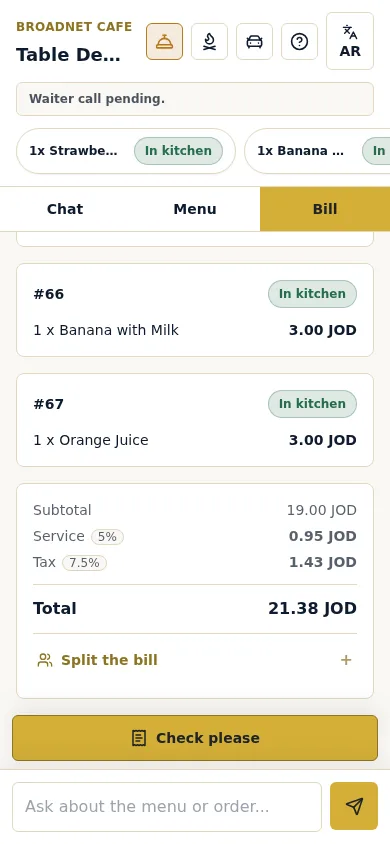
What it doesn’t do, compared with GoTab and Toast: no payment, and no POS or printer connection. Staff enter each sale in your till by hand; our guide on reconciling QR orders with your till shows what that takes, and works with your POS explains how it runs next to Toast or any other system. If guests paying at the table is the point, read pay at table vs order at table first.
It costs $200 per location per month after 30 days free, or $2,000 per location per year, with 0% commission, no contract and no hardware to buy. Setup is free: we load your menu, print your QR cards and train your staff, and most restaurants are live within two weeks of the first call. See pricing and the Toast comparison.
What to do next
Write down how your guests move. If they roam between a bar, a patio and tables, put GoTab on your list and ask which contract terms apply. If you already run Toast and seat guests at tables, price Toast’s own module first. If your problem is guests waiting to order, asking questions or not reading your menu’s language, you can try a sample order to see the chat from the guest’s side.
When you’re ready, start 30 days free or book a demo to see the staff screens and ask your questions.
Questions readers ask
What is the main difference between GoTab and Toast mobile ordering?
Where the tab lives. GoTab ties the tab to the guest, so it follows them if they scan another code at the bar or on the patio. Toast Mobile Order & Pay ties the order to the table where the guest scanned, and it runs inside Toast POS.
How much does GoTab cost?
GoTab lists Basic at $15, Pro at $99 and Sync at $229 per location per month, as read on 18 November 2026. QR and online ordering are included on all three. Card processing starts at 2.40% + $0.15 for qualifying locations processing under $5 million a year on Mastercard, Visa and Discover.
How much does Toast Mobile Order & Pay cost?
We couldn't read a price on Toast's own site: its pricing page returned HTTP 403 to our checker on 18 November 2026, and its help articles give no price. We don't repeat figures from other companies' pages. Ask Toast for a written quote.
Does GoTab require a contract?
GoTab's pages give two answers. Its pricing FAQ says it doesn't require a long-term software contract; its Toast comparison page lists 2-year standard terms. Its financing runs on 24 or 36 month contracts. Ask which terms apply to your quote, in writing.
Can Toast Mobile Order & Pay work during an internet outage?
Not for ordering and payment. Toast's FAQ says that during an internet outage, order and payment processing through Mobile Order & Pay is not supported, and servers should take orders instead.
Is there an option that doesn't replace my POS?
Yes. GoTab and Toast are both POS systems. WaiterPilot runs next to the till you have: guests order by chat in their own language, and staff enter each sale in the POS. It takes no payment, so it fits only if guests can pay your staff.
Sources
- QR Ordering & Payment, GoTab, 2026 (checked 2026-11-18)
- Pricing, GoTab, 2026 (checked 2026-11-18)
- GoTab vs. Toast, GoTab, 2026 (checked 2026-11-18)
- Toast Mobile Order & Pay FAQs, Toast, 2026-09-17 (checked 2026-11-18)
- Toast Mobile Order & Pay Overview, Toast, 2026-09-17 (checked 2026-11-18)
- Update the Language Setting on Your Toast Device, Toast, 2026-11-05 (checked 2026-11-18)
- Toast POS pricing (returned HTTP 403 to our checker), Toast, 2026 (checked 2026-11-18)